[Eco Bounty] Error message not user fiendly was displayed
Wallet Address [ioPay] : 0x385ba56abf3c15bad59887946acaf525cc7b44ad
Device & Enviroment :
OS : Windows 11
Browser : Microsoft Edge Version 138.0.3351.109
Device model : Laptop Dell
Steps to Reproduce:
Go to: https://hub.iotex.io
Connect Wallet
Click Stake in the sidebar
In the Delegate List, click button Stake of any Delegate to open popup
Click icon wallet in Amount field
Click button CONFIRM
Actual Result:
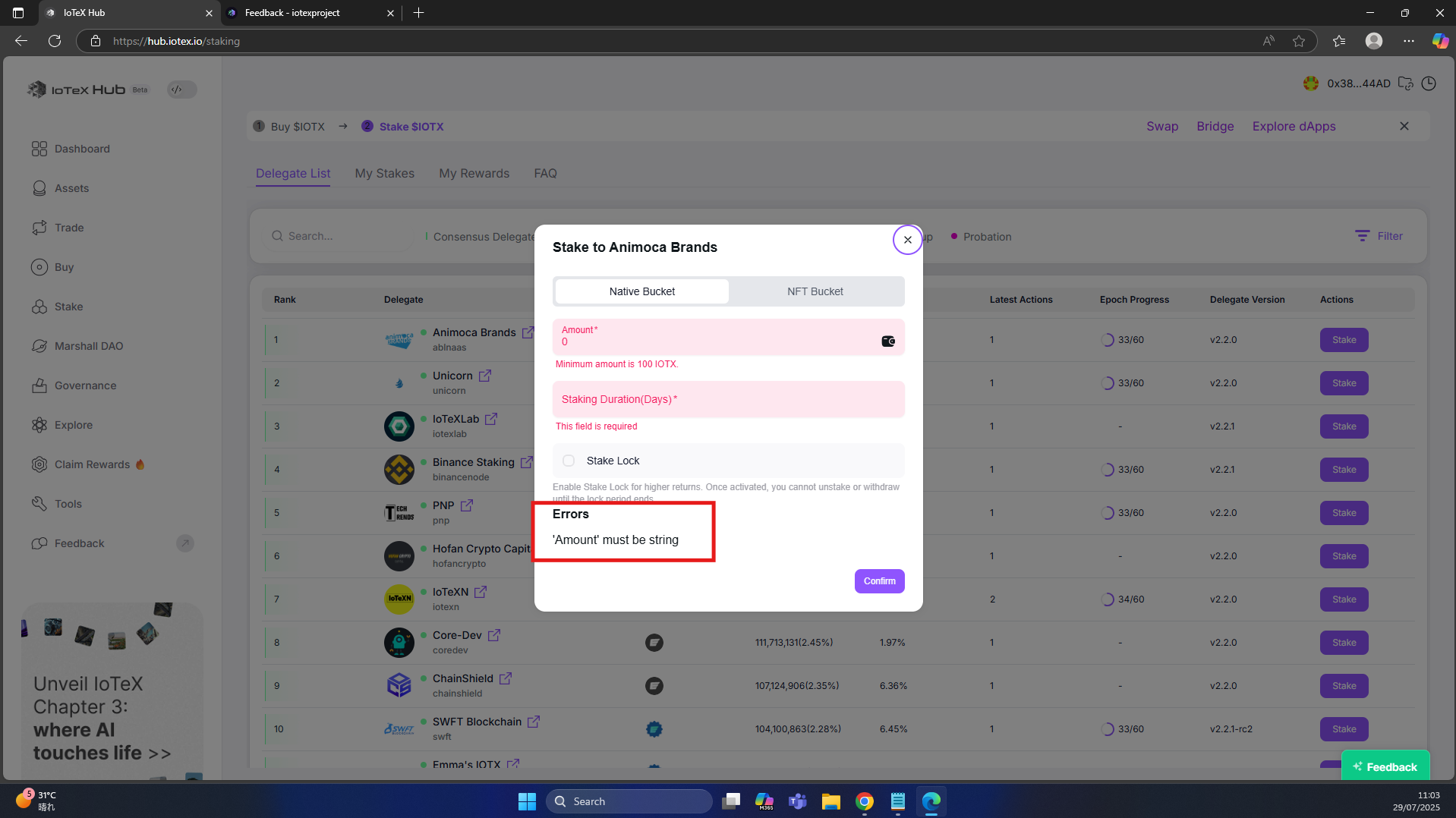
After clicking icon wallet, message check input of Amount field was shown, then when clicking confirm button, message check required of all field was displayed, but the error ['Amount' must be string] also displayed in the bottom of the popup (not user-friendly)
Expected Result: The error ['Amount' must be string] should not display because already have error message under Amount field
Log in to comment and vote
Comments1
Terry Xu
Aug 2, 2025
Thanks for your feedback! This message is meant to be a strong reminder, so we won’t change it for now. We'd love to hear any other suggestions you might have!