App: ioPay
Version: v5.2.0 (3970)
Feature: BinoAI (Built-in AI Assistant)
Severity: Medium (Functional / Misinformation)
Device: Android
📝 Description
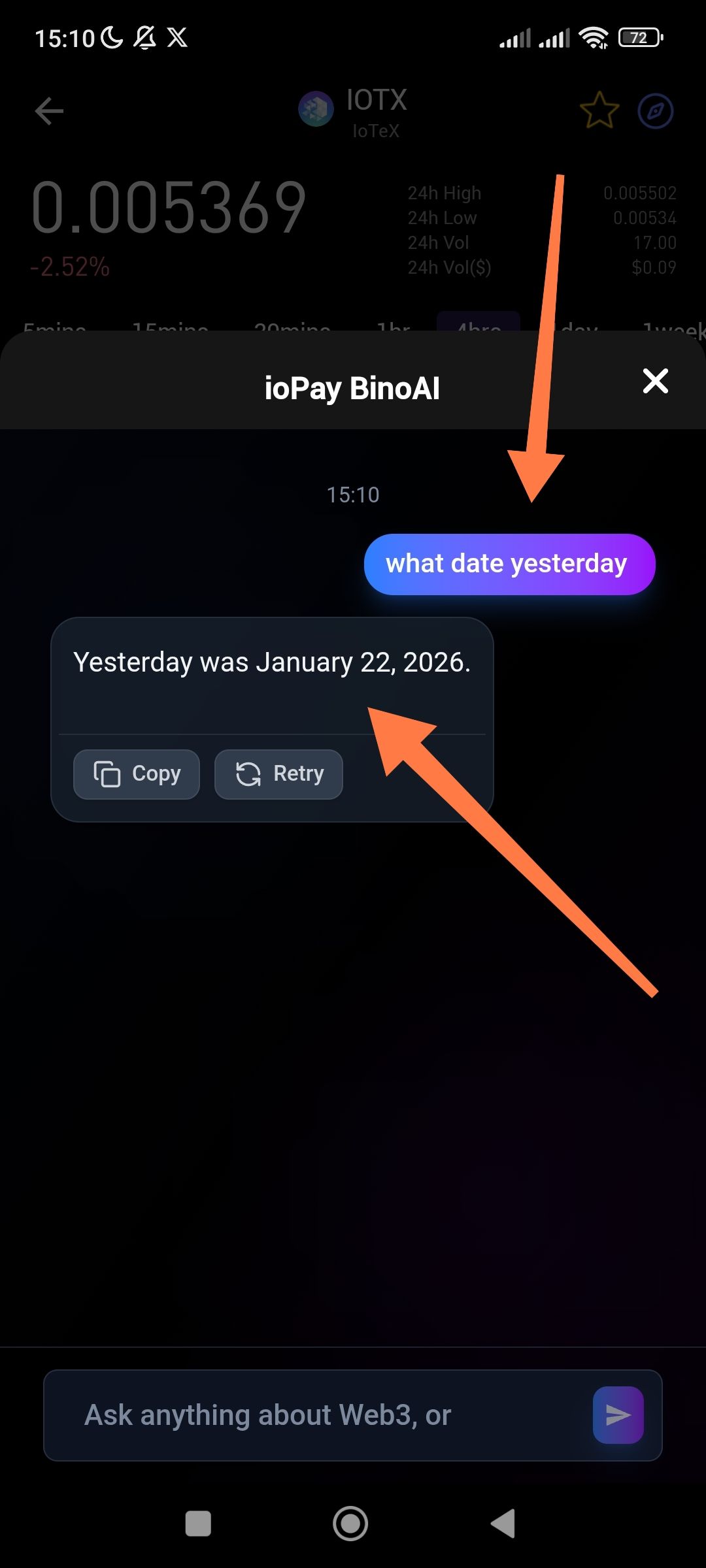
When asked for current or past date information (e.g., "what date yesterday"), BinoAI provides an incorrect response that does not match the actual current date or the device's system time.
🔁 Steps to Reproduce
Open ioPay and launch the BinoAI chat.
Check the user's current system time (captured in screenshot as 15:10 on what appears to be a current date in March 2026).
Ask BinoAI: "what date yesterday".
Observe the response.
✅ Expected Result
The AI should provide the correct date based on real-time data or the device's system clock. For example, if today is March 7, 2026, the AI should reply that yesterday was March 6, 2026.
❌ Actual Result
BinoAI responded: "Yesterday was January 22, 2026." This is mathematically and chronologically incorrect based on the current timestamp.
💡 Suggested Fix
Synchronize the AI model's "system prompt" or context with the current server-side or device-side UTC time.
Ensure the model has access to a real-time clock tool to prevent "hallucinations" regarding dates and times.
Wallet Address: io1tkw393kejmxwnd454twc6020sxcyvh5dxqmren
Device & Environment:
-Operating system: Android 13
-Device model: Redmi Note 10 Pro
