[ECO Bounty] iopay
Wallet Address Reporter: io1tkw393kejmxwnd454twc6020sxcyvh5dxqmren
App Version: ioPay v5.3.1 (3973)
Device: Redmi Note 10 Pro (Android 13)
Description
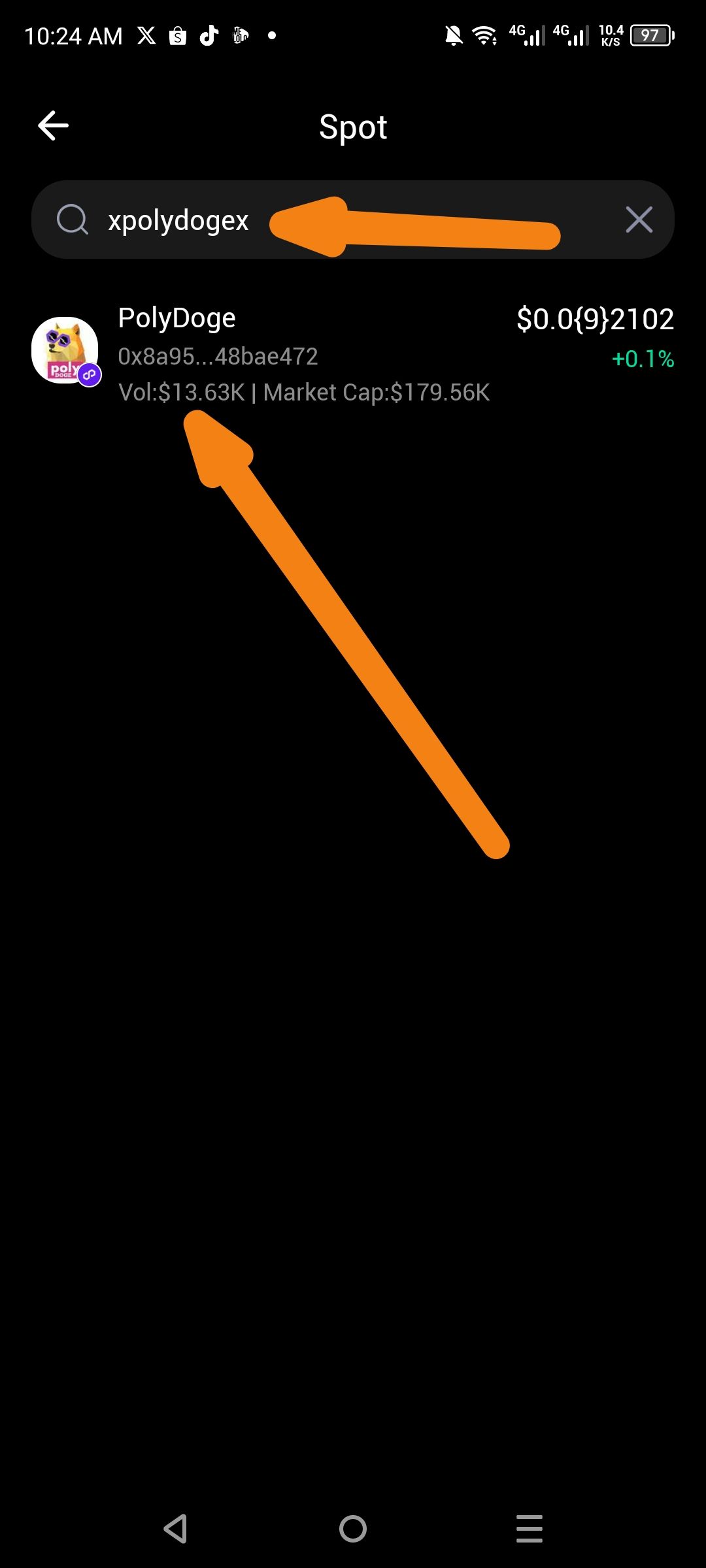
The search bar within the Markets (Spot) tab exhibits inconsistent behavior when querying for specific tokens. For example, when searching for the token "PolyDoge," the search algorithm only successfully identifies and displays the asset when the query is entered with redundant leading and trailing characters (e.g., "xpolydogex"). Searching for the exact name or ticker does not consistently populate the result, suggesting a failure in the direct string matching or indexing of the token database.
Steps to Reproduce
Open the ioPay app and navigate to the Markets tab.
Ensure the Spot sub-tab is selected.
Enter the exact name "PolyDoge" into the search bar and observe the results.
Clear the search and enter "xpolydogex".
Observe that the token PolyDoge (Address:
0x8a95...48bae472) only appears during the modified query.
Actual Result
The search bar fails to find the asset with a standard query but successfully retrieves it when the query is "padded" with extra characters.
Expected Result
The search engine should utilize fuzzy matching and direct ticker/name indexing so that entering "Poly" or "PolyDoge" immediately surface the relevant asset.
Log in to comment and vote
No comments yet
Be the first to share your thoughts.