Wallet Address Reporter: io1tkw393kejmxwnd454twc6020sxcyvh5dxqmren
App Version: ioPay v5.3.1 (3973)
Device: Redmi Note 10 Pro (Android 13)
1. Description
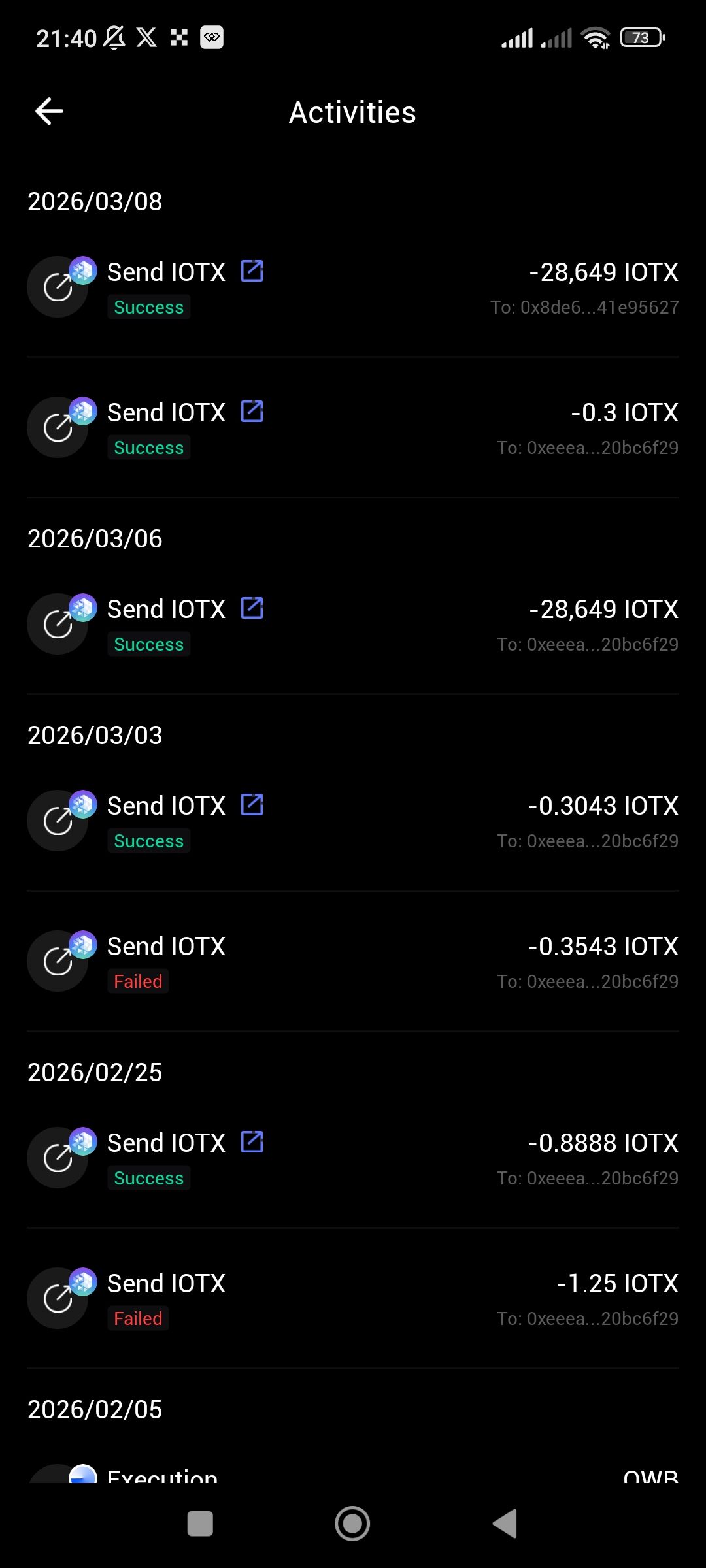
The Activities interface lacks essential data management and filtering tools. While the screen provides a chronological list of transactions, it does not allow users to sort or filter the history to view specific types of data, such as exclusively successful transactions.
2. Steps to Reproduce
Open the ioPay app.
Navigate to the Activities screen.
Observe the chronological list which mixes "Success" and "Failed" transactions.
Attempt to find a sorting or filtering button to isolate successful transactions.
3. Actual Result
Transactions are displayed in a single, unorganized list with no option to filter by status. Users must manually scroll through all entries, including failed attempts (e.g., the failed transactions on 2026/03/03 and 2026/02/25), to find successful transfers.
4. Expected Result
The interface should provide clear sorting and filtering options. A user should be able to:
Filter by Status (Success, Failed, Pending).
Sort by Date (Newest to Oldest or vice-versa).
Filter by Transaction Type (Send, Receive, Execution).
Suggested Fixes
Filter Bar: Implement a row of "Filter Chips" (e.g., All, Success, Failed) at the top of the Activities list for one-tap organization.
Search Integration: Enhance the search function to recognize status keywords so users can type "Success" to instantly hide failed transactions.
Visual Grouping: Use color-coded headers or collapsible sections to group transactions by their status.
