Wallet Address: io1tkw393kejmxwnd454twc6020sxcyvh5dxqmren
App Version: ioPay v5.2.0 (1)
Device: iPhone XR
OS: iOS 18.7.3
Issue Summary
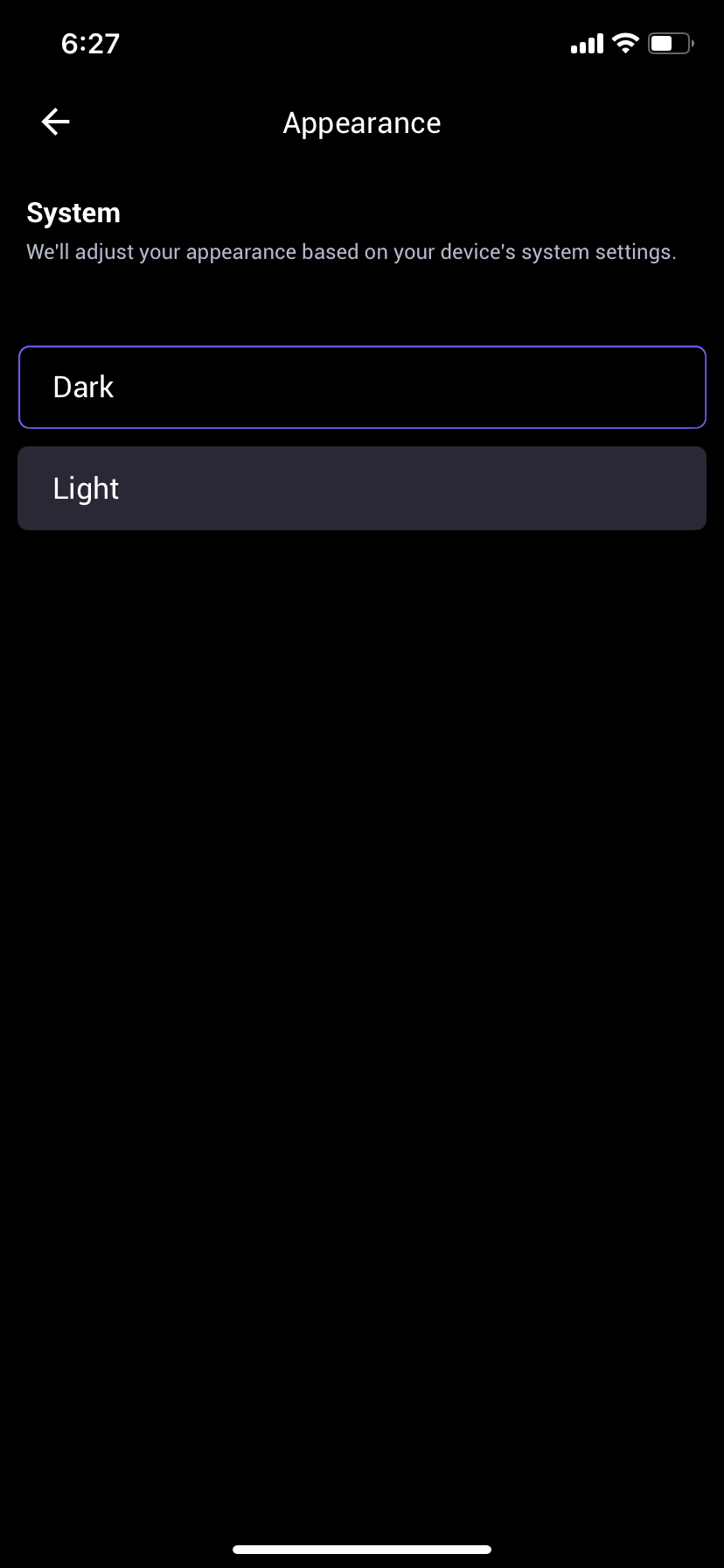
The "Appearance" settings menu in ioPay provides poor user feedback. When selecting between "Light" and "Dark" themes, the active selection is only indicated by a subtle purple outline on the button, which is insufficient, especially for accessibility. It also lacks clear icons or images.
Detailed Description
Location: Settings -> Appearance
Observation: As shown in IMG_0083.png, selecting a theme only places a thin purple border around the option (in this case, "Dark"). There is no permanent success icon (like a checkmark) to confirm the setting has been saved or is actively running.
Impact (UX/Accessibility): The visual feedback is too subtle. A thin line can easily be missed by many users, especially those with vision impairments. It does not provide the robust "Confirmation State" required for a good user experience. Furthermore, the lack of an illustrative icon or theme-appropriate image makes the menu unpolished and visually generic.
Steps to Reproduce:
Launch ioPay v5.2.0 (1) on iPhone XR (iOS 18.7.3).
Navigate to Settings > Appearance.
Tap on "Light". Observe the thin purple border.
Tap on "Dark". Observe the thin purple border.
Result: No robust visual confirmation (like a checkmark) appears, and there are no illustrative icons (like a sun or moon).
Expected Result:
The interface should provide clear, definitive feedback for the active selection.
Selection Feedback: When an option is active, a permanent checkmark (or similar success icon) should appear within the selection block to clearly mark the state.
Illustrative Icons: Icons (e.g., a sun and moon, or corresponding UI samples) should be included to visually demonstrate the themes.
