App: ioPay
Version: v5.2.0 (3970)
Feature: BinoAI
Severity: Low (UI/UX - Accessibility)
Device: Android
📝 Description
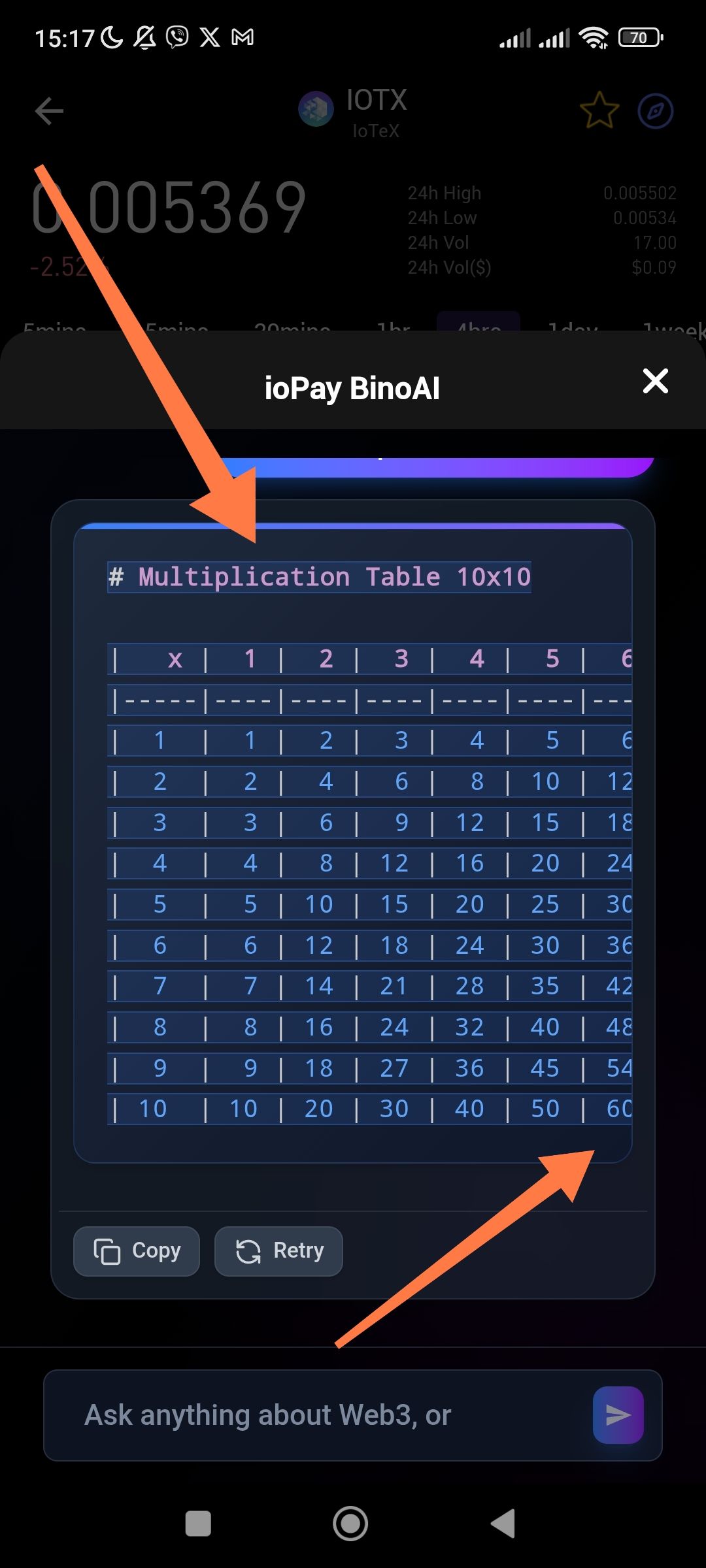
When BinoAI generates wide content, such as a Markdown table (e.g., a 10x10 multiplication table), the content does not fit within the chat bubble or the mobile screen width. The right side of the table is cut off, and there is no way for the user to scroll horizontally to see the remaining data.
🔁 Steps to Reproduce
Open ioPay and launch the BinoAI chat.
Request a wide output, such as: "Create a multiplication table 10x10".
Observe the generated table.
Try to view the columns for "7, 8, 9, and 10".
✅ Expected Result
The UI should either:
Allow horizontal scrolling within the code block/chat bubble.
Scale down the text size for large tables to fit the screen.
Provide a "Full Screen" or "Zoom" option for code/table blocks.
❌ Actual Result
The table is cropped at the right edge of the container. In the screenshot, the table cuts off after column "6", making the columns for 7 through 10 invisible and inaccessible to the user.
💡 Suggested Fix
Implement a horizontal scroll property for Markdown code blocks and tables within the BinoAI chat component. This ensures that users can swipe left/right to view wide data sets without breaking the app's layout.
Wallet Address: io1tkw393kejmxwnd454twc6020sxcyvh5dxqmren
Device & Environment:
-Operating system: Android 13
-Device model: Redmi Note 10 Pro
