Wallet Address Reporter: io1tkw393kejmxwnd454twc6020sxcyvh5dxqmren App Version: ioPay v5.3.1 (3973) Device: Redmi Note 10 Pro (Android 13)
1. Description
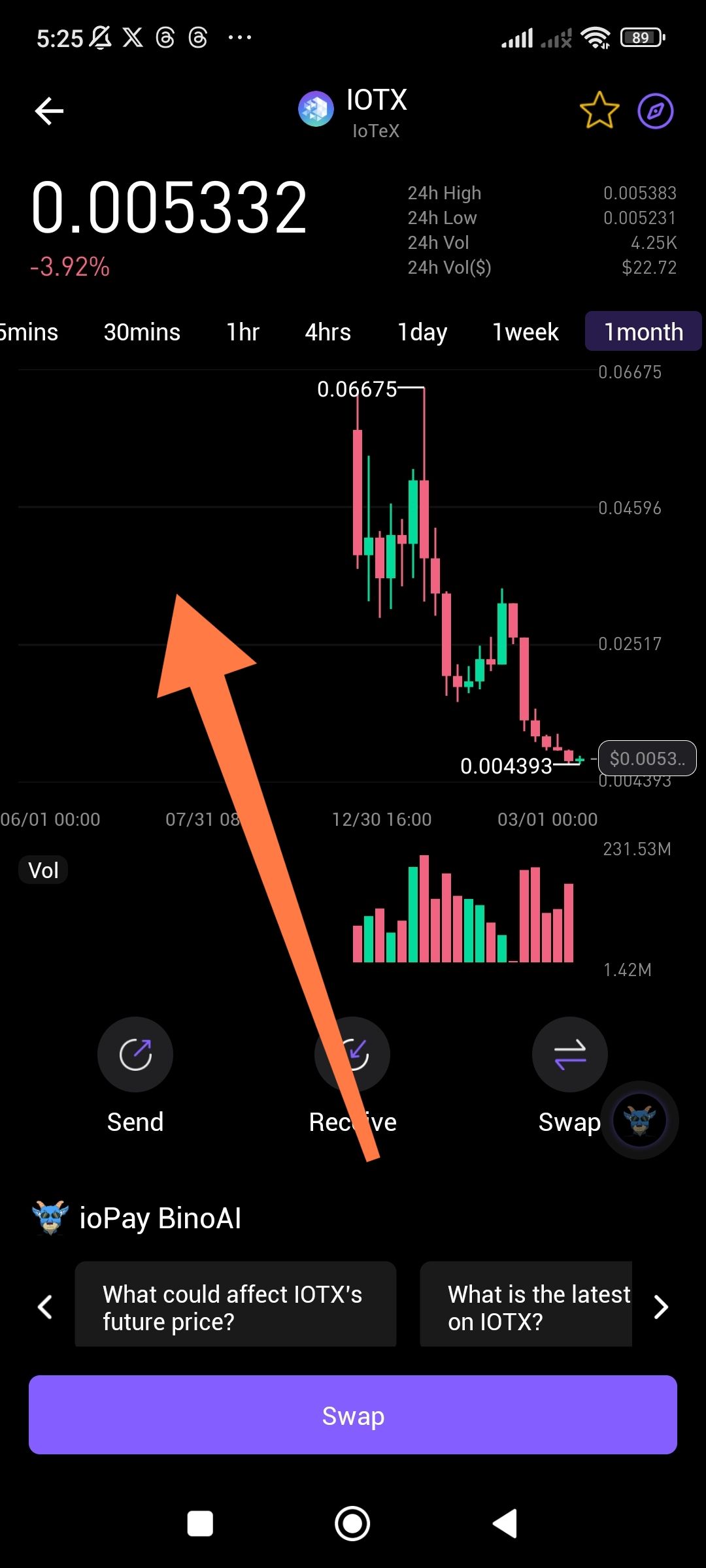
The 1 month chart interval for assets (specifically IOTX) is failing to render historical data correctly. Large sections of the chart appear empty or "blank" for previous months, even though the asset has a well-documented price history. This prevents traders from performing long-term technical analysis.
2. Steps to Reproduce
Open the ioPay app and select the IOTX asset.
Navigate to the price chart.
Select the "1month" timeframe from the sorting bar.
Observe the rendering of the candlesticks and volume bars.
3. Actual Result
The chart shows a significant "data gap" or empty space on the left side of the screen, with candlesticks only appearing for the most recent periods. The historical price action for earlier months (e.g., mid-to-late 2025) is completely missing from the view.
4. Expected Result
The chart should provide a continuous and accurate historical price feed for the entire available duration of the asset when the "1month" interval is selected.
Suggested Fixes
Data Resynchronization: Force a refresh of the chart's data provider API to ensure historical OHLC (Open, High, Low, Close) data is fully indexed for long-term intervals.
Loading State: Implement a loading spinner or "Fetching Historical Data" message so users know the app is attempting to retrieve older data rather than displaying a blank screen.
Cache Management: Clear local chart caches to prevent corrupted or incomplete data from persisting in the "1month" view.
