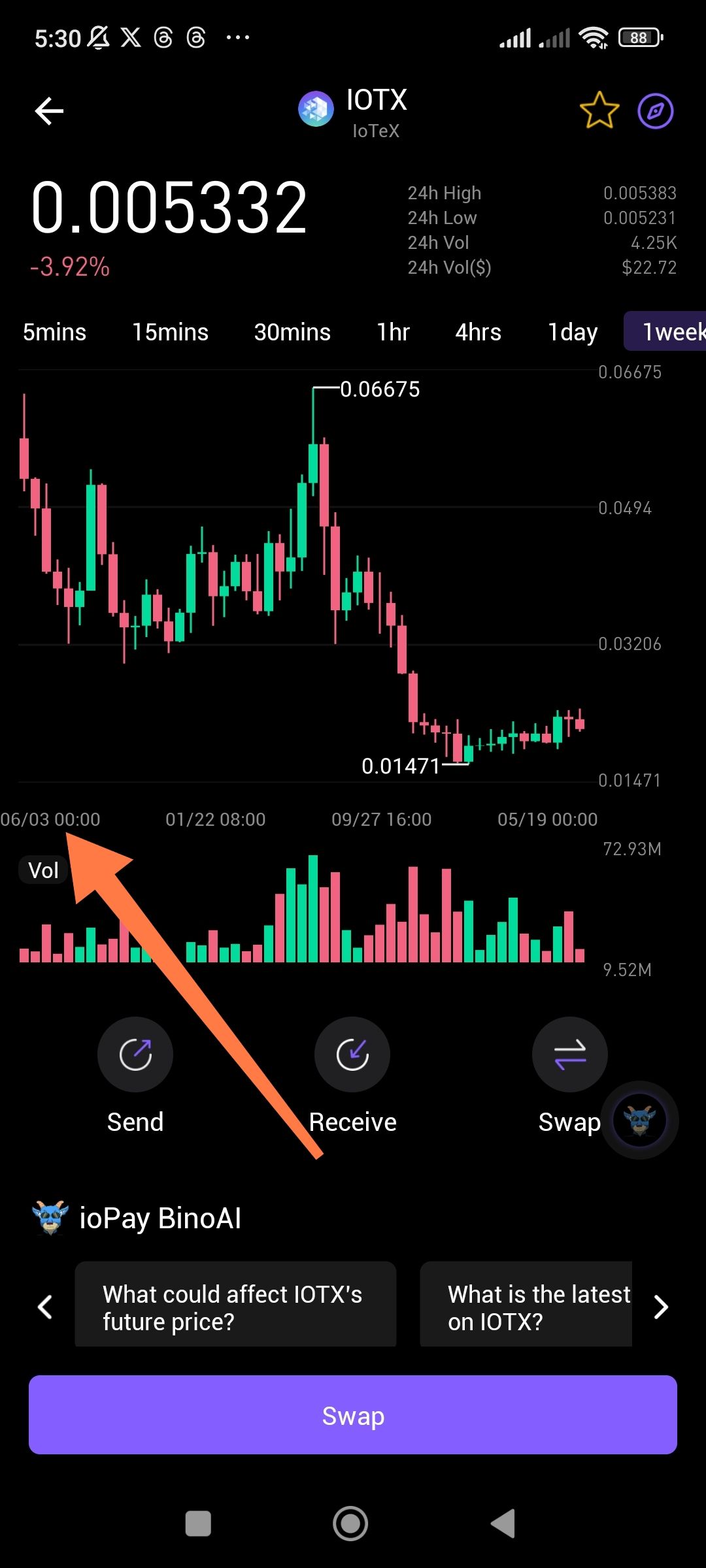
Wallet Address Reporter: io1tkw393kejmxwnd454twc6020sxcyvh5dxqmren
App Version: ioPay v5.3.1 (3973)
Device: Redmi Note 10 Pro (Android 13)
1. Description
The 1 week (1week) chart interval for assets (e.g., IOTX) is displaying an incorrect or illogical timeline on the X-axis. While the current date is in March 2026, the chart's timeline shows historical dates in a non-sequential or confusing order (e.g., displaying "06/03", "01/22", and "09/27" in reverse or mixed progression). This makes it impossible for traders to accurately track price action over time.
2. Steps to Reproduce
Open the ioPay app and select the IOTX asset.
Navigate to the price chart view.
Select the "1week" timeframe from the interval bar.
Observe the date labels on the timeline below the volume bars.
3. Actual Result
The dates on the X-axis do not follow a standard chronological order. The timeline labels appear disconnected from the actual current date, showing months like June (06), January (01), and September (09) in a sequence that does not represent a standard weekly progression.
4. Expected Result
The X-axis should display a clear, sequential chronological timeline. For a "1week" view, the labels should represent the specific days or weeks leading up to the current date in March 2026.
Suggested Fixes
X-Axis Logic Update: Review the charting engine's timestamp-to-date conversion logic specifically for the "1week" and "1month" intervals to ensure chronological consistency.
Timezone Synchronization: Ensure the chart timeline is syncing correctly with the device's system time to prevent date displacement.
Dynamic Labeling: Implement dynamic date labeling that adjusts based on the selected interval to show "Day/Month" for short terms and "Month/Year" for long terms accurately.
