[ECO Bounty] ioPay – "Earn" Feature Enabled and Accessible in Watch Mode
Description
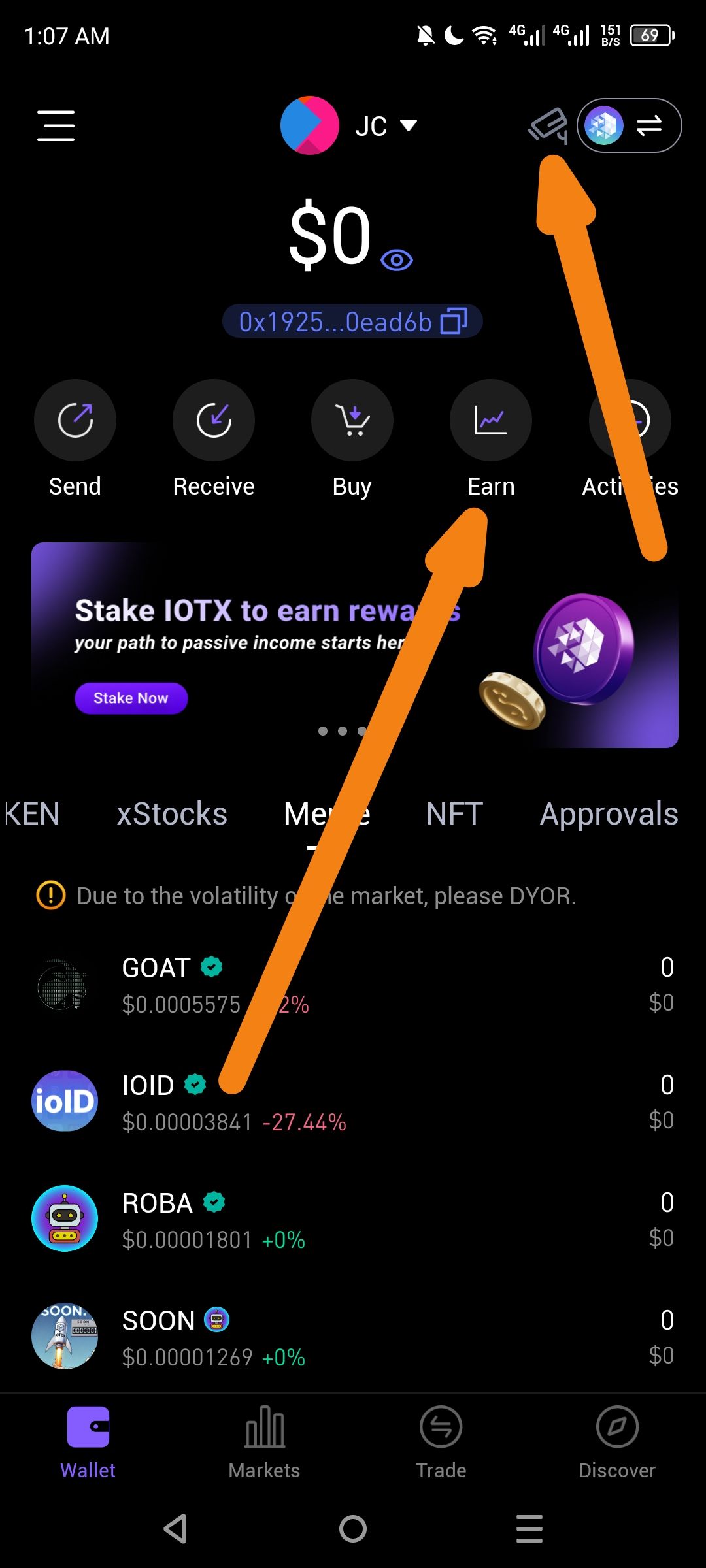
In the ioPay app, when a user is in Watch Mode (view-only mode for an address they do not own the private keys for), the "Earn" button remains enabled and visually active. Since Watch Mode is restricted to viewing data, interactive financial features like "Earn" (staking/rewards) should typically be disabled or hidden to prevent user confusion, as any attempt to stake would ultimately fail due to the lack of signing authority.
Steps to Reproduce
Open the ioPay app on Android.
Enter Watch Mode by importing a public address (confirmed by the security camera icon in the top right, indicated by the orange arrow).
Observe the main dashboard/wallet navigation.
Locate the "Earn" button (next to Buy and Activities).
Observe that the button is fully colored/enabled rather than grayed out.
Expected Behavior:
Actionable buttons like "Earn", "Send", and "Buy" should be disabled, grayed out, or accompanied by a "View Only" warning when in Watch Mode.
Tapping "Earn" should ideally trigger a message stating: "This wallet is in Watch Mode. You cannot stake or earn rewards without importing the recovery phrase/private key."
Actual Behavior:
The "Earn" button is fully active and appears available for use despite the wallet being in a view-only Watch Mode state.
Wallet Address: io1tkw393kejmxwnd454twc6020sxcyvh5dxqmren
Device & Environment:
-Operating system: Android 13
-Device model: Redmi Note 10 Pro
Log in to comment and vote
No comments yet
Be the first to share your thoughts.