[ECO Bounty] ioPay – Hardware Wallet Import Option Missing in "Add Wallet" Menu
Description
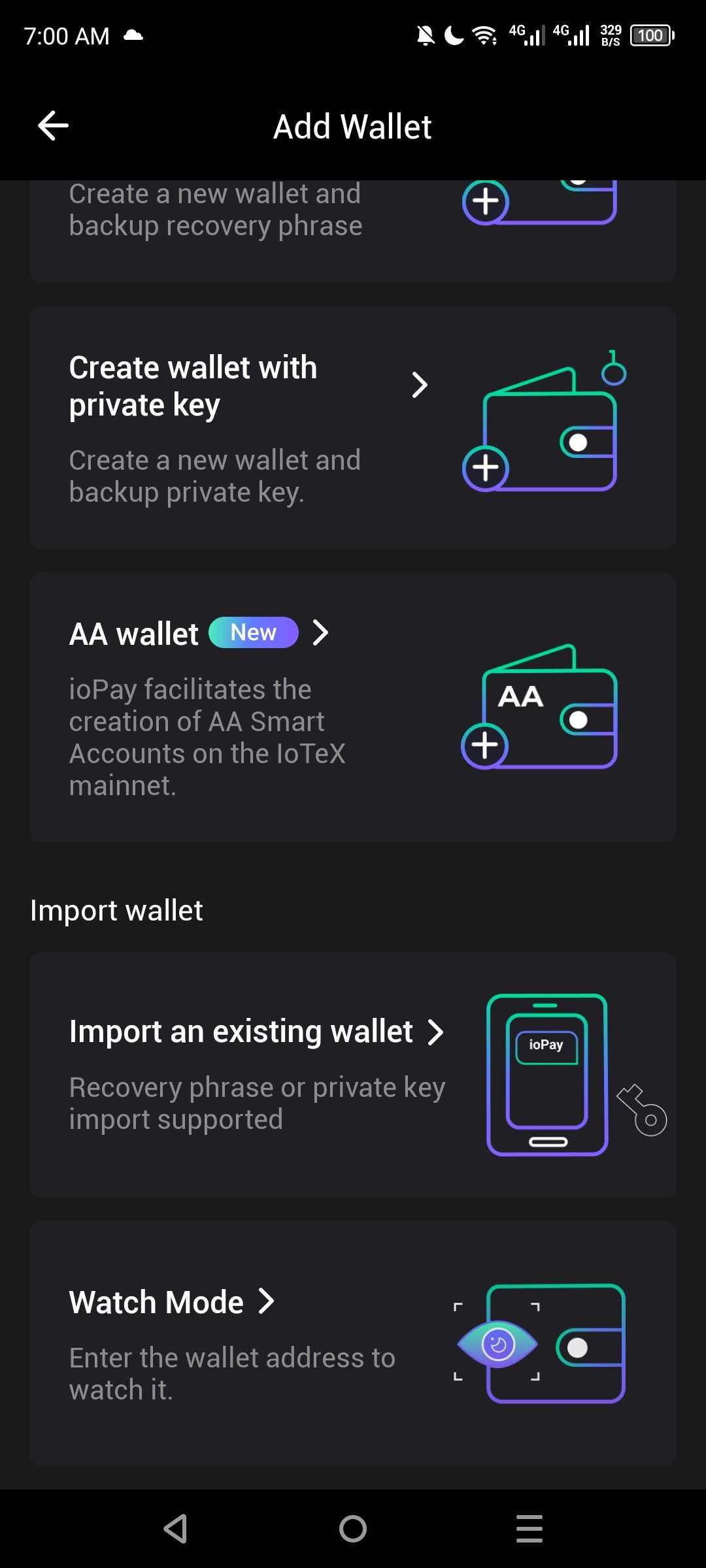
In the ioPay Android application, the option to Import or Connect a Hardware Wallet (such as Ledger) is missing from the "Add Wallet" screen. The current menu only displays options for creating new wallets, importing via recovery phrase/private key, AA (Account Abstraction) wallets, and Watch Mode. This prevents users from securely integrating their cold storage devices with the app.
Steps to Reproduce
Open the ioPay app.
Navigate to the "Add Wallet" or "Import Wallet" section.
Scroll through the available options under "Create wallet" and "Import wallet."
Observe the lack of a "Hardware Wallet" or "Connect Ledger" option.
Expected Behavior:
The "Import wallet" section should include a dedicated option to "Connect Hardware Wallet" (Bluetooth or USB).
This is a standard feature for non-custodial wallets to allow users to sign transactions using external hardware.
Actual Behavior:
Only "Import an existing wallet" (Software-based) and "Watch Mode" are available under the Import section. No hardware-specific entry point is visible.
Wallet Address: io1tkw393kejmxwnd454twc6020sxcyvh5dxqmren
Device & Environment:
-Operating system: Android 13
-Device model: Redmi Note 10 Pro
Log in to comment and vote
No comments yet
Be the first to share your thoughts.