[ECO Bounty] iopay "Home" Tab Appearing in Browser Navigation Bar
📍 Description
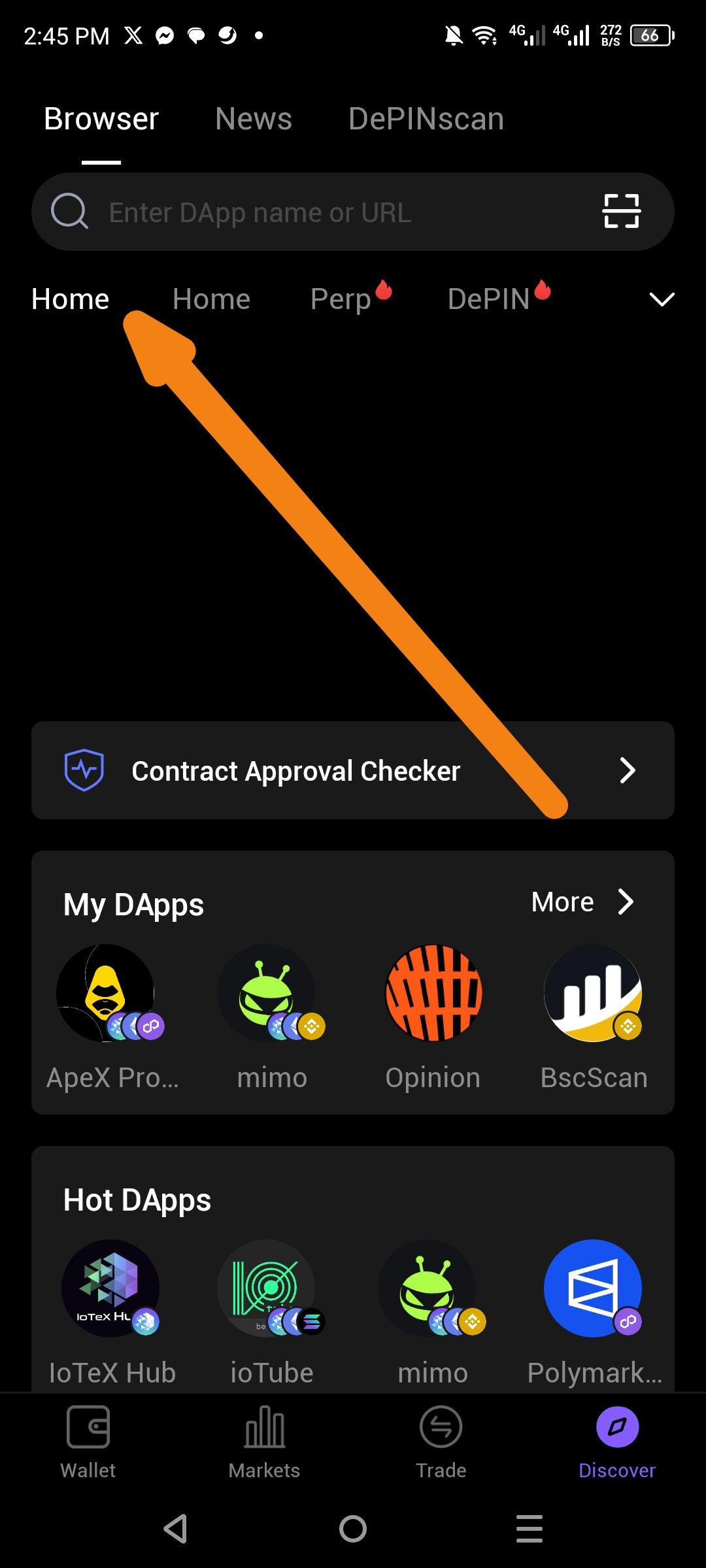
Within the Discover → Browser section of the ioPay app, the horizontal tab navigation bar displays two identical "Home" tabs side by side. The orange arrow in the screenshot clearly highlights this duplication. The tab bar currently reads:
Home|Home|Perp 🔥|DePIN 🔥|∨
There should only be one "Home" tab present. The duplicate tab appears to be a UI rendering error or a data/configuration issue where the same tab entry is being injected twice.
🔁 Steps to Reproduce
Open the ioPay mobile app on Android.
Navigate to the Discover tab (bottom navigation bar).
Tap on the "Browser" tab at the top.
Observe the horizontal category/navigation tab bar below the DApp search bar.
Result: Two "Home" tabs appear consecutively.
✅ Expected Behavior
The tab navigation bar should display unique, non-duplicate tabs, such as:
Home|Perp 🔥|DePIN 🔥|∨
Only one "Home" tab should exist as the default/landing tab.
❌ Actual Behavior
The tab bar renders two "Home" tabs next to each other:
Home|Home|Perp 🔥|DePIN 🔥|
💡 Suggested Fix
✅ Deduplication Check: Add a uniqueness filter when rendering the tab list to prevent duplicate labels from appearing.
✅ Config Audit: Review the local/remote tab configuration JSON for duplicate "Home" entries and remove any redundancy.
✅ API Validation: Add server-side validation to ensure tab entries are unique before delivering the response to the client.
✅ Unit Test: Add a UI test case that asserts no duplicate tab labels exist in the Browser navigation bar.
Wallet Address: io1tkw393kejmxwnd454twc6020sxcyvh5dxqmren
Device & Environment:
-Operating system: Android 13
-Device model: Redmi Note 10 Pro
Log in to comment and vote
No comments yet
Be the first to share your thoughts.