[Eco Bounty] ioPay Inability to Change Display Currency to PHP
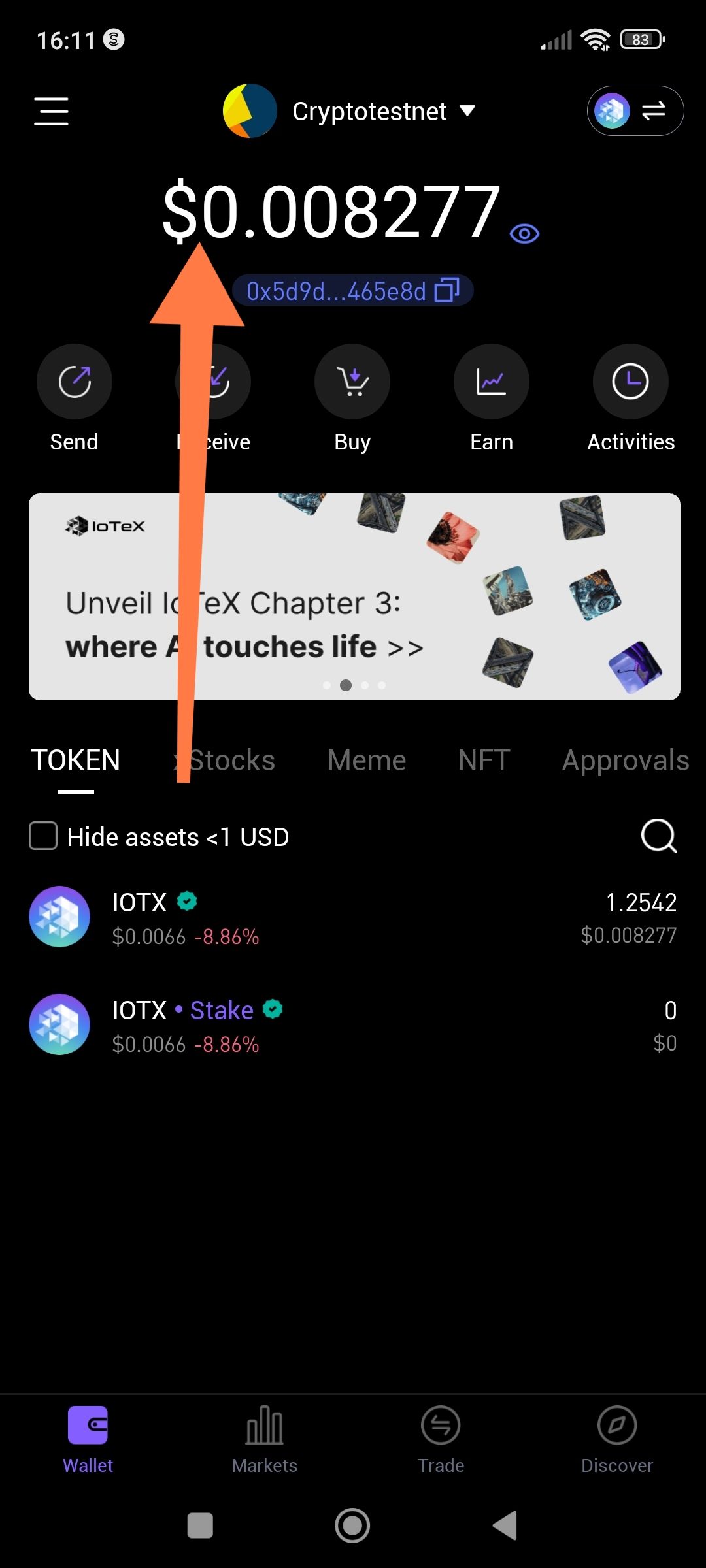
Summary
The app currently lacks an option in the settings to change the default fiat display from USD ($) to Philippine Pesos (₱). Users in the Philippines are unable to view their real-time portfolio value in their local currency, which is a standard feature in many global crypto wallets.
Steps to Reproduce / Limitations
Open the ioPay app.
Navigate to Settings (or the Profile menu).
Search for a "Currency" or "Display Fiat" setting.
Note that there is no option to select PHP (₱).
Expected Result
The app should provide a list of major global fiat currencies, including PHP, so that the main balance (e.g., $0.008277 as seen in the screenshots) can be toggled to show the equivalent in Pesos.
Actual Result
The app defaults to USD ($) with no apparent way to customize the currency symbol or conversion rate for local regions.
Wallet Address: io1tkw393kejmxwnd454twc6020sxcyvh5dxqmren
Device & Environment:
-Operating system: Android 13
-Device model: Redmi Note 10 Pro
Log in to comment and vote
No comments yet
Be the first to share your thoughts.