[ECO Bounty] iopay Inadequate Visual State Feedback for Asset Tabs
Wallet Address Reporter: io1tkw393kejmxwnd454twc6020sxcyvh5dxqmren
App Version: ioPay v5.3.1 (3973)
Device: Redmi Note 10 Pro (Android 13)
Description
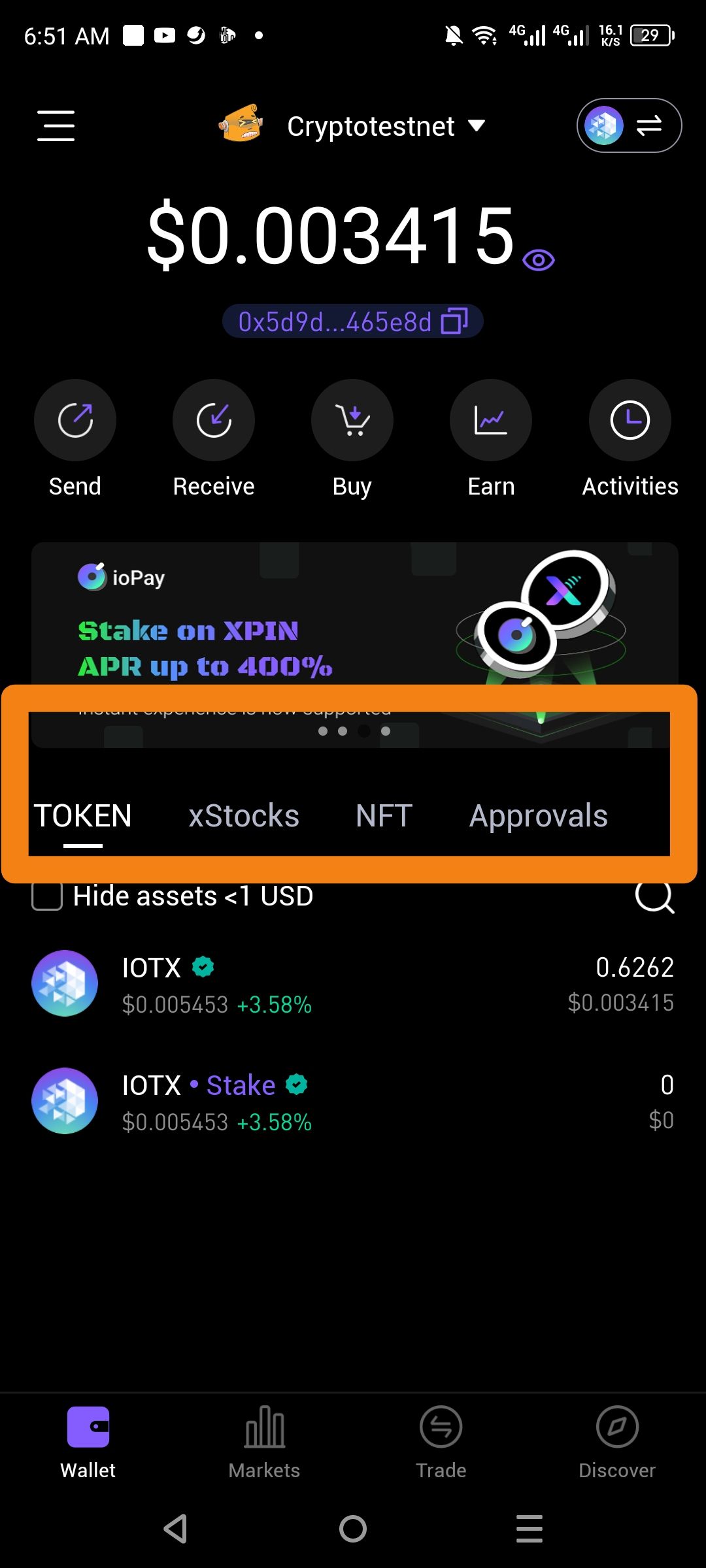
The navigation menu for asset categories (TOKEN, xStocks, NFT, and Approvals) lacks sufficient visual feedback to clearly communicate the active state and fails to utilize icons to assist with quick identification. While the "TOKEN" tab is underlined, the overall design relies on low-contrast text that makes inactive tabs difficult to read against the dark background.
Steps to Reproduce
Open the ioPay application to the Wallet home screen.
Locate the asset navigation bar beneath the promotional banner.
Observe the visual presentation of the TOKEN, xStocks, NFT, and Approvals labels.
Actual Result
Lack of Icons: Categories are represented solely by text, which is less intuitive for a mobile interface than a combination of text and icons.
Low Contrast: Inactive tabs (xStocks, NFT, Approvals) use a dim gray font that blends into the black background, potentially appearing disabled to the user.
Minimal Active Indicator: Only a thin white line denotes the active selection, which may be overlooked on high-brightness or small-format screens.
Expected Result
Iconic Representation: Each category should feature a distinct icon (e.g., a stock chart for xStocks, an image frame for NFT) to aid in navigation.
Enhanced Contrast: Text for all tabs should meet accessibility standards for readability against dark themes.
Clear State Changes: The active tab should be more prominently highlighted (e.g., via a color change or a bolder indicator) to provide immediate user feedback.
Log in to comment and vote
No comments yet
Be the first to share your thoughts.