[ECO Bounty] iopay Incorrect DApp Icon/Image Displayed for PancakeSwap Entry
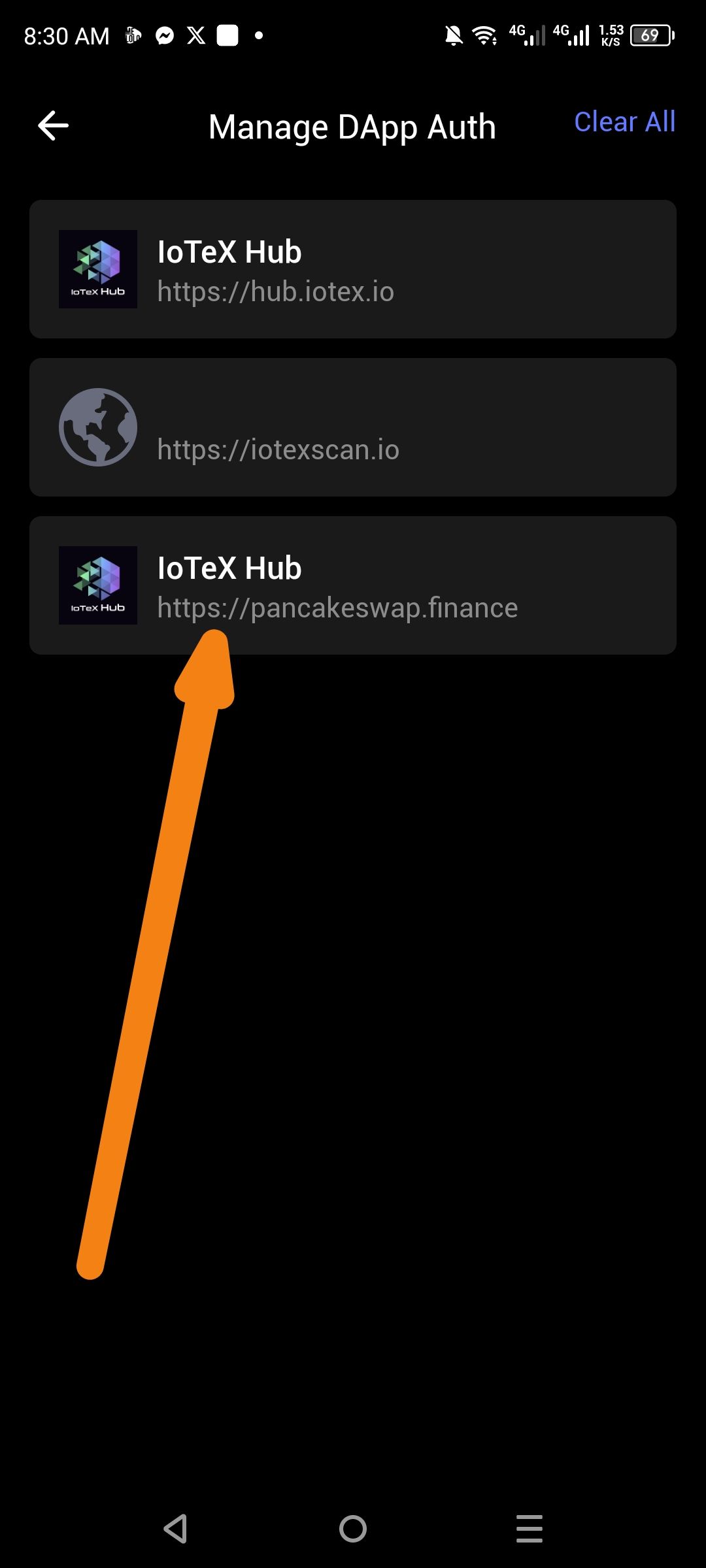
Description: In the Manage DApp Auth page, the entry for https://pancakeswap.finance is incorrectly displaying the IoTeX Hub logo and name instead of the correct PancakeSwap branding. This is a metadata mismatch where the wrong DApp identity has been applied to the PancakeSwap authorization entry.
Steps to Reproduce:
Open the ioPay mobile application.
Navigate to Settings > Manage DApp Auth.
Observe the list of authorized DApps.
Locate the entry with the URL https://pancakeswap.finance.
Expected Result: The PancakeSwap entry should display:
✅ Icon: PancakeSwap bunny/pancake logo
✅ Name: PancakeSwap
✅ URL: https://pancakeswap.finance
Actual Result: The PancakeSwap entry incorrectly displays:
❌ Icon: IoTeX Hub logo
❌ Name: IoTeX Hub
✅ URL: https://pancakeswap.finance (URL is correct)
Impact:
High — This is a misleading display that could confuse users about which DApp they have authorized. Users may not be able to identify or properly revoke permissions for PancakeSwap if it appears under a different DApp's identity.
Suggested Fix: Review the DApp metadata resolution logic. The app appears to be pulling the name and icon from a cached or incorrect source. The fix should ensure that:
DApp metadata (name, icon) is fetched directly from the authorized DApp's URL (via its manifest or favicon).
Fallback metadata does not incorrectly map to another DApp's identity.
Wallet Address: io1tkw393kejmxwnd454twc6020sxcyvh5dxqmren
Device & Environment:
-Operating system: Android 13
-Device model: Redmi Note 10 Pro
Log in to comment and vote
No comments yet
Be the first to share your thoughts.