[Eco Bounty] ioPay Incorrect "Staked" Status Displayed in Earn Section Without Active Stakes
Description
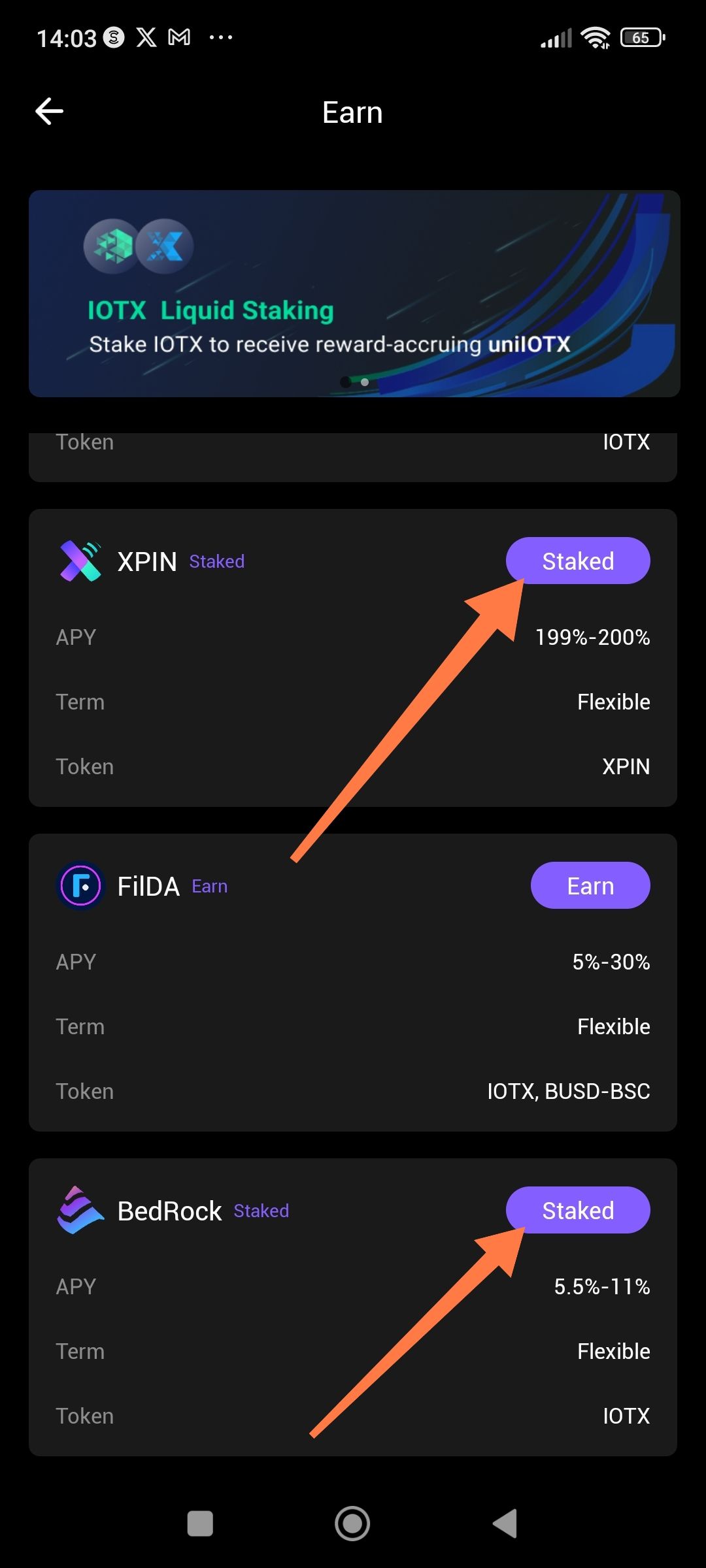
In the ioPay "Earn" section, multiple staking options (specifically XPIN and BedRock) display a "Staked" status badge despite the user having no active staking positions or deposits in these protocols. This creates confusion about the actual wallet state and may prevent users from accessing the "Earn" interface for legitimate first-time staking.
Steps to Reproduce
Open ioPay mobile app.
Navigate to the Earn tab from the bottom navigation.
Scroll through the list of available staking options.
Observe the status badges on XPIN and BedRock cards.
Expected Behavior
If the user has not deposited funds into a specific staking pool, the button/badge should display "Earn" (as shown correctly for FiLDA) to indicate availability for staking.
Actual Behavior
XPIN card shows: "Staked" (purple badge)
BedRock card shows: "Staked" (purple badge)
FiLDA card shows: "Earn" (correct status)
User Confirmation: The user has verified they have not completed any staking transactions for XPIN or BedRock in the current wallet session.
Suggested Fix
Implement a validation check that confirms actual contract balance > 0 before displaying "Staked" status, or add a refresh mechanism that clears the Earn section cache upon wallet switch.
Wallet Address: io1tkw393kejmxwnd454twc6020sxcyvh5dxqmren
Device & Environment:
-Operating system: Android 13
-Device model: Redmi Note 10 Pro
Log in to comment and vote
No comments yet
Be the first to share your thoughts.