[ECO Bounty] iopay Incorrect UI Highlighting on Wallet Address Copy
Description:
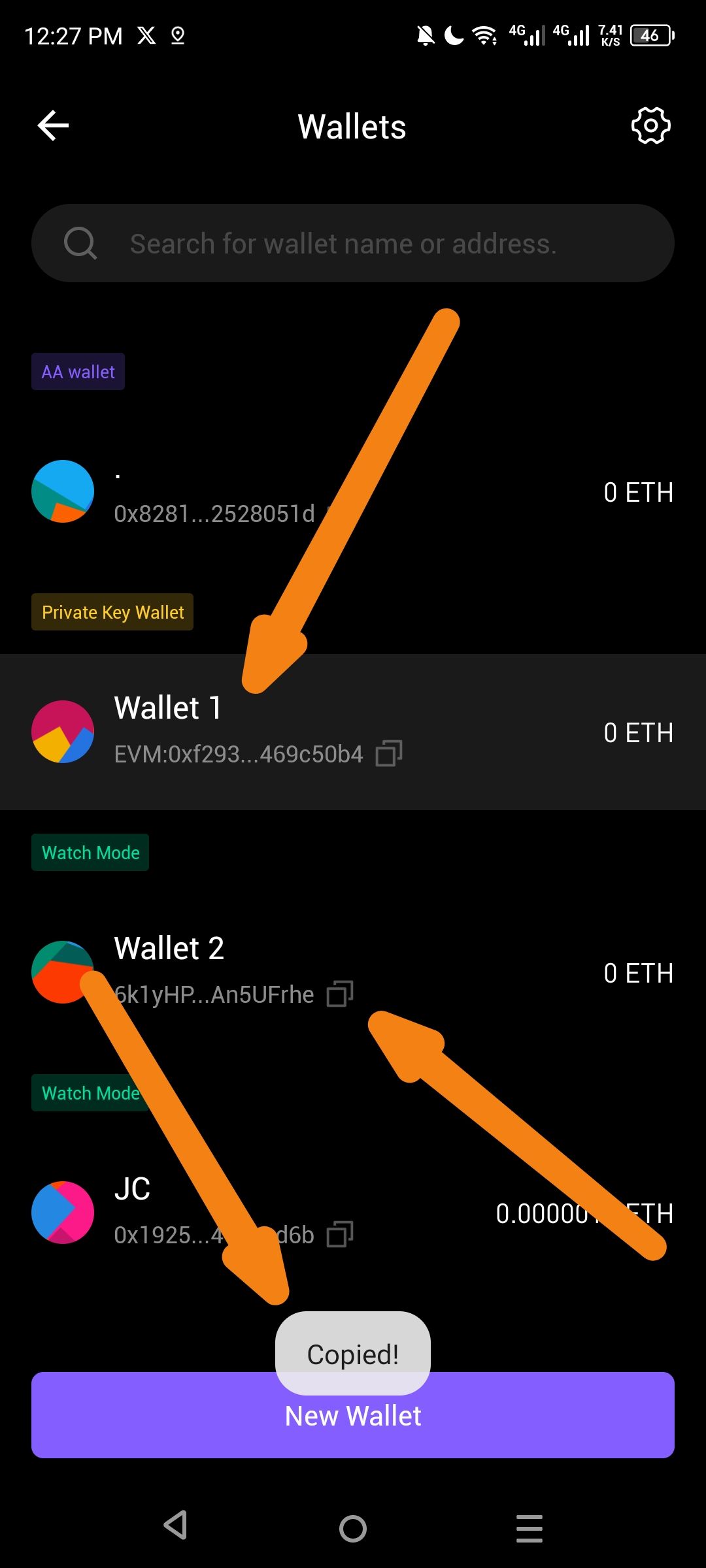
When navigating the "Wallets" list, if a user attempts to copy the address of a secondary wallet (e.g., "Wallet 2"), the "Copied!" confirmation toast appears correctly, but the UI highlight (darker background/focus state) remains stuck on a different wallet (e.g., "Wallet 1"). This creates visual confusion as to which address was actually copied to the clipboard.
Steps to Reproduce:
Open the ioPay app and navigate to the Wallets management screen.
Observe that Wallet 1 is highlighted/selected by default.
Tap the Copy icon next to the address for Wallet 2.
Observe that the "Copied!" toast appears, but the grey highlight/selection background stays on Wallet 1 instead of moving to Wallet 2.
Expected Result:
The UI highlight should move to the wallet whose address was just copied, or the highlighting should correctly reflect the active selection to avoid user confusion.
Actual Result:
The highlight remains static on the first wallet regardless of which wallet's copy button is pressed.
Wallet Address: io1tkw393kejmxwnd454twc6020sxcyvh5dxqmren
Device & Environment:
-Operating system: Android 13
-Device model: Redmi Note 10 Pro
Log in to comment and vote
No comments yet
Be the first to share your thoughts.