[ECO Bounty] iopay Insufficient Visual Feedback for Invalid E-mail
Wallet Address Reporter: io1tkw393kejmxwnd454twc6020sxcyvh5dxqmren
App Version: ioPay v5.3.1 (3973)
Device: Redmi Note 10 Pro (Android 13)
Description
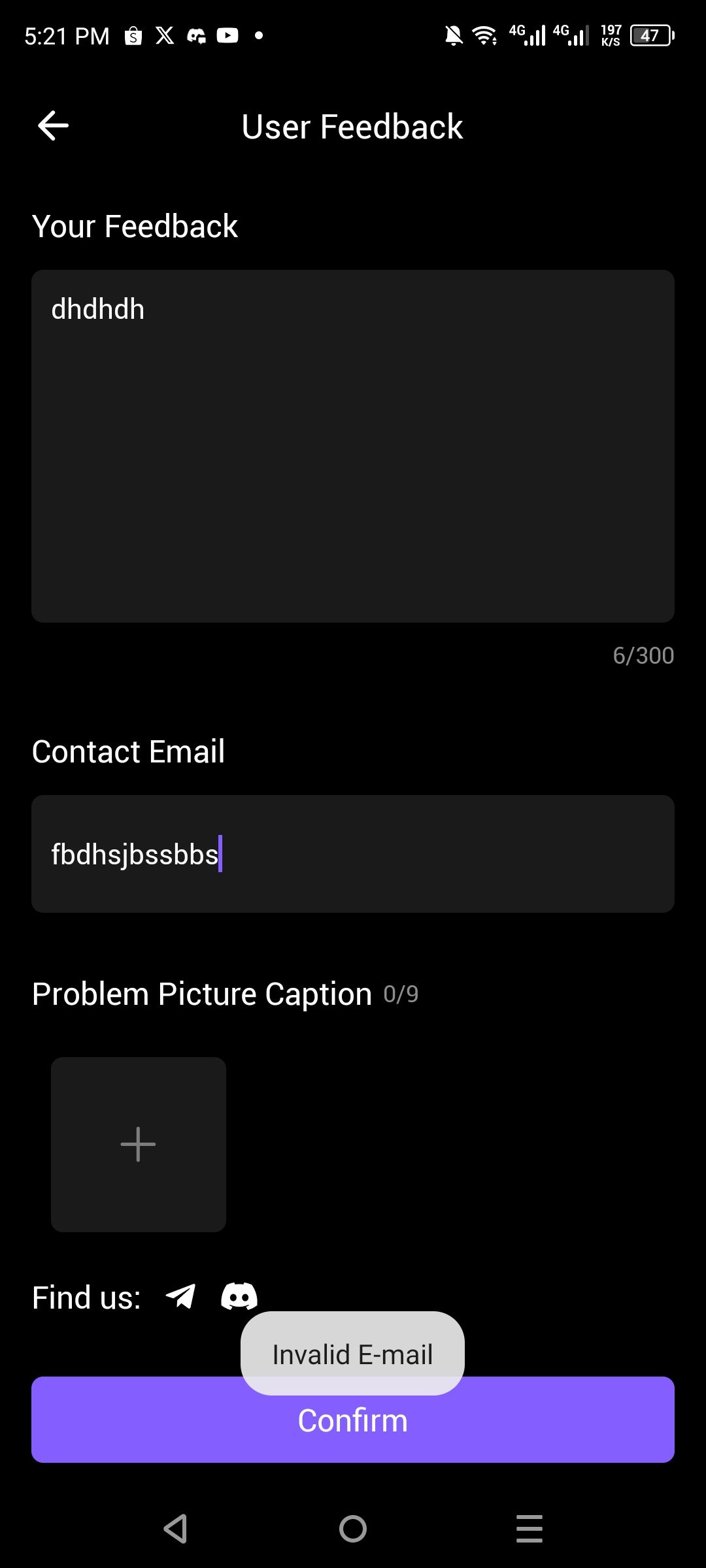
In the User Feedback interface, when a user enters an improperly formatted email address (e.g., "fbdhsjbssbbs"), the application provides a temporary floating toast notification stating "Invalid E-mail". However, the interface fails to provide persistent visual cues, such as changing the input field border to red or displaying a static error message below the text box. This lack of permanent feedback can lead to user confusion if the transient toast disappears before the user can identify the specific cause of the submission failure.
Steps to Reproduce
Open the ioPay app and navigate to About ioPay.
Select the Feedback option to open the User Feedback screen.
Enter any text in the Your Feedback box.
Enter an invalid string (e.g., without "@" or ".") in the Contact Email field.
Tap the Confirm button.
Actual Result
A transient "Invalid E-mail" toast appears briefly at the bottom of the screen, but the Contact Email input field remains visually unchanged.
Expected Result
The Contact Email input field should display a persistent error state (e.g., red highlight) and a clear, static validation message to guide the user until a valid format is entered.
Log in to comment and vote
No comments yet
Be the first to share your thoughts.