[ECO Bounty] iopay IoTeXScan Link Missing in "All Networks" View
Wallet Address Reporter: io1tkw393kejmxwnd454twc6020sxcyvh5dxqmren
App Version: ioPay v5.4.0 (3974)
Device: Redmi Note 10 Pro (Android 13)
Description
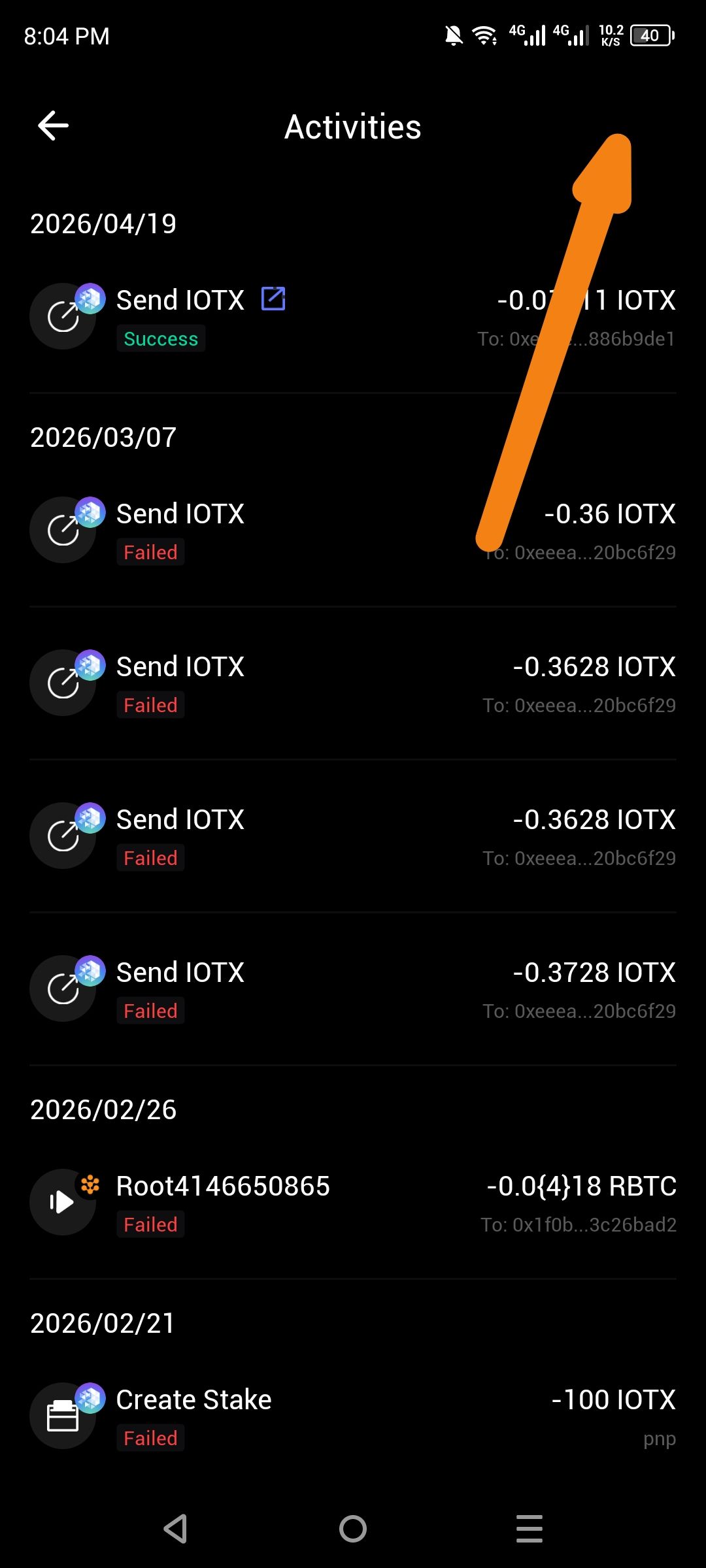
In the Activities tab, the application provides a direct link to IoTeXScan (the native block explorer) when the IoTeX network is specifically selected. however, when the user switches the filter to "All networks"—intended to show a unified history of IoTeX, Ethereum, BSC, and Polygon—the IoTeXScan icon and link completely disappear from the header.
While the "All networks" view aggregates transactions, it effectively strips away the network-specific utility of the explorer link, forcing users to manually switch back to the "IoTeX" filter just to access their detailed on-chain history.
Steps to Reproduce
Open ioPay and navigate to the Activities tab.
Set the network filter (top left) to IoTeX.
Observe the IoTeXScan (magnifying glass/link) icon in the top right corner.
Change the network filter to "All networks".
Observe that the IoTeXScan link is no longer visible.
Actual Result
The IoTeXScan shortcut is removed when the multi-chain view is active, despite IoTeX transactions being present in the list.
Expected Result
The explorer link should remain visible or dynamic. When in "All networks," the icon could either default to IoTeXScan (as the native primary network) or offer a Multi-Explorer dropdown to view transactions on Etherscan, BSCScan, etc..
Log in to comment and vote
No comments yet
Be the first to share your thoughts.