[ECO Bounty] iopay Lack of "Clear History" and Status Filtering in Activities
Wallet Address Reporter: io1tkw393kejmxwnd454twc6020sxcyvh5dxqmren
App Version: ioPay v5.3.1 (3973)
Device: Redmi Note 10 Pro (Android 13)
Description
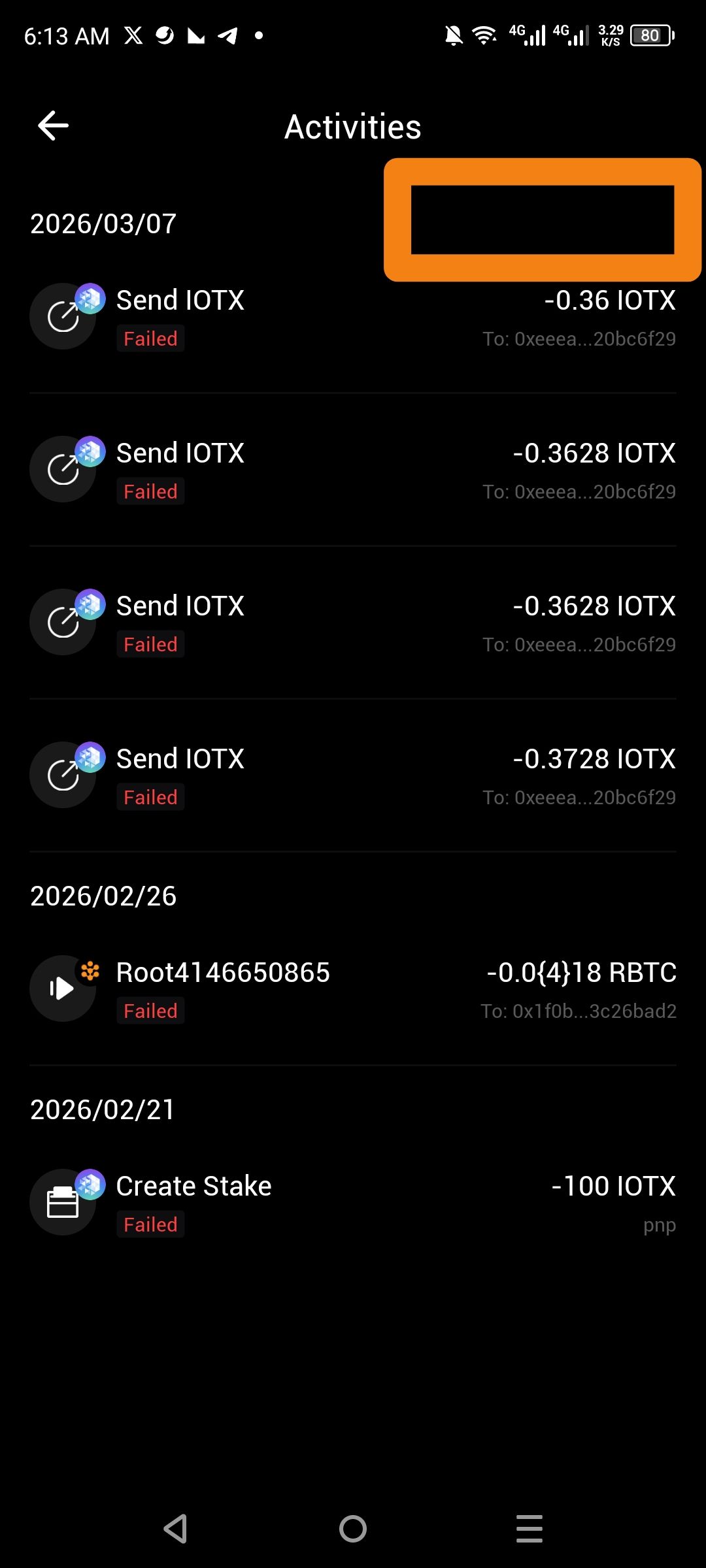
The Activities log currently lacks a function to clear, archive, or hide transaction history. Additionally, the list is cluttered with failed transactions (e.g., "Send IOTX" and "Create Stake") that provide no immediate value but cannot be filtered out. This lack of organizational tools makes it difficult for users to track successful, relevant transactions in a busy wallet.
Steps to Reproduce
Open the ioPay application.
Navigate to the Activities tab (accessible from the Wallet home screen).
Scroll through the history to view failed and successful transactions.
Look for a "Clear," "Delete," or "Filter" icon in the header or within individual transaction details.
Actual Result
The top-right header section is empty, providing no options to manage or clean the list. Failed transactions remain permanently visible and interspersed with successful ones without a way to separate them.
Expected Result
Clear/Archive History: A button in the top-right corner to clear local history or archive specific entries.
Status Filtering: A toggle or dropdown menu to filter transactions by status (e.g., Show Only Failed, Show Only Successful).
Log in to comment and vote
No comments yet
Be the first to share your thoughts.