[Eco Bounty] ioPay Lack of Contextual Feedback in "Edit Address" Interface
Wallet Address Reporter: io1tkw393kejmxwnd454twc6020sxcyvh5dxqmren
App Version: ioPay v5.4.0 (3974)
Device: Redmi Note 10 Pro (Android 13)
1. Description
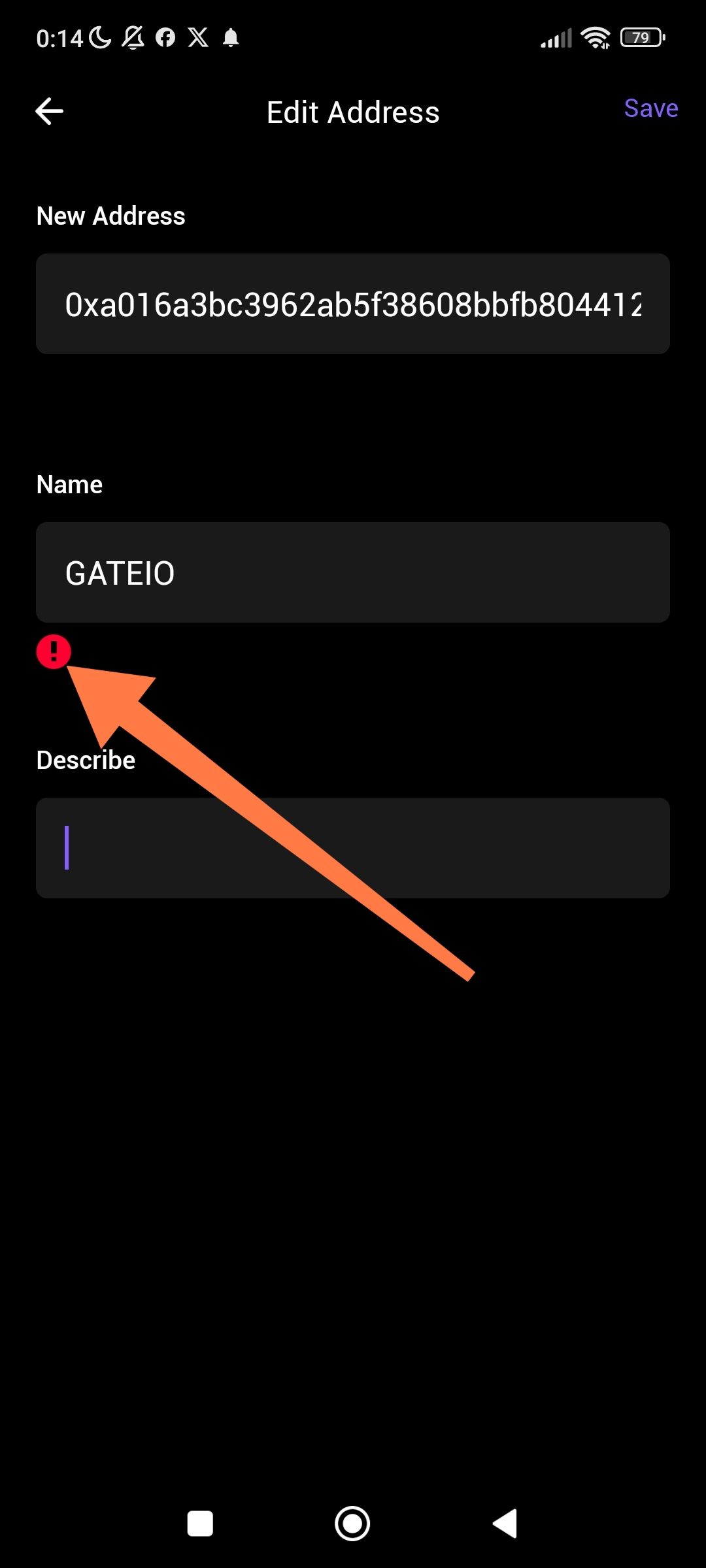
The "Edit Address" interface contains a generic error or warning icon (red exclamation mark) that lacks supporting text or explanation. When a validation issue occurs—such as an invalid address format or a naming conflict—the app displays the red icon without a descriptive message, leaving the user unable to determine how to fix the error.
2. Steps to Reproduce
Open the ioPay app and navigate to the Address Book.
Select an existing address (e.g., "GATEIO") and tap Edit.
Modify the address or name field to trigger a validation error.
Observe the red exclamation icon that appears above the "Describe" field.
3. Actual Result
A red exclamation icon (!) appears, but there is no accompanying text to explain the nature of the error. The user is left to guess whether the issue is with the wallet address, the character limit, or a network-related validation failure.
4. Expected Result
The application should provide clear, actionable feedback:
Error Labels: Display specific text next to the icon (e.g., "Invalid Address Format" or "Name already exists").
Field Highlighting: Highlight the specific input field that caused the error in red.
Validation Tooltips: Allow users to tap the icon to see a detailed explanation of the requirement.
Log in to comment and vote
No comments yet
Be the first to share your thoughts.