[ECO Bounty] iopay Lack of Distinct Visual Feedback Icons for Transaction Status
Wallet Address Reporter: io1tkw393kejmxwnd454twc6020sxcyvh5dxqmren
App Version: ioPay v5.3.1 (3973)
Device: Redmi Note 10 Pro (Android 13)
Description
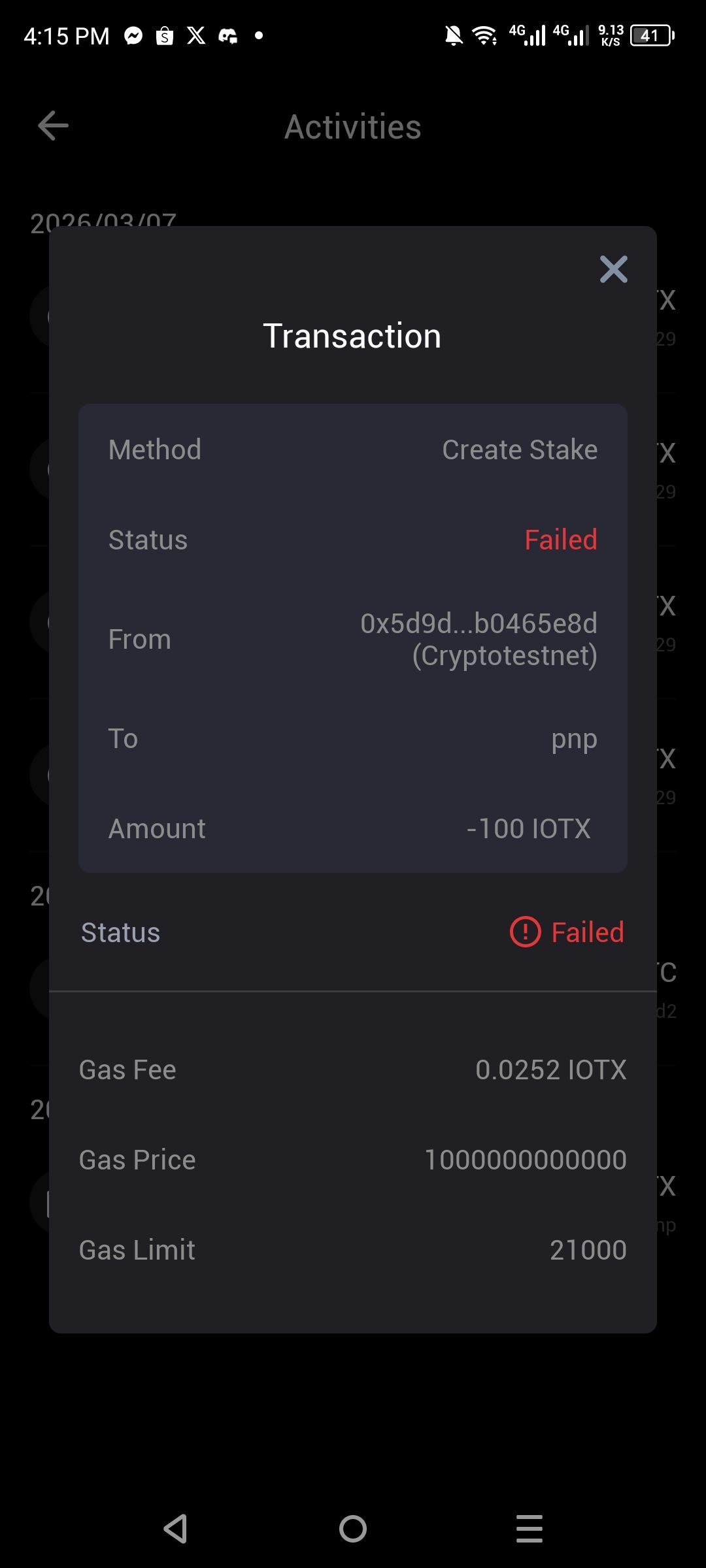
The current transaction detail view in ioPay lacks prominent, state-specific visual icons to immediately convey the finality of a transaction. While a text-based "Failed" label is present in red, there is no high-visibility status icon (such as a large red "X" or a warning shield) within the main transaction header or body to provide quick visual confirmation.
Steps to Reproduce
Open the ioPay app.
Navigate to the Activities tab.
Select a specific transaction (e.g., a "Create Stake" transaction) that has Failed.
Observe the Transaction Detail pop-up.
Actual Result
The transaction status is indicated solely by red text labels ("Failed") located in the top-right and middle-left of the detail view. There is a small circular exclamation icon next to the bottom "Failed" label, but it is undersized and lacks the visual weight required for a critical status update.
Expected Result
The UI should utilize distinct, large-scale icons to provide immediate feedback:
Failure State: A prominent red "X" or warning icon should be centered or placed near the transaction method name.
Success State: A prominent green checkmark should be displayed for successful transactions.
Consistency: This should align with modern wallet standards where color and shape are used to communicate status for accessibility.
Log in to comment and vote
No comments yet
Be the first to share your thoughts.