[ECO Bounty] iopay Lack of Minimum Value Constraint for Slippage (Set slip point)
Wallet Address Reporter: io1tkw393kejmxwnd454twc6020sxcyvh5dxqmren
App Version: ioPay v5.3.1 (3973)
Device: Redmi Note 10 Pro (Android 13)
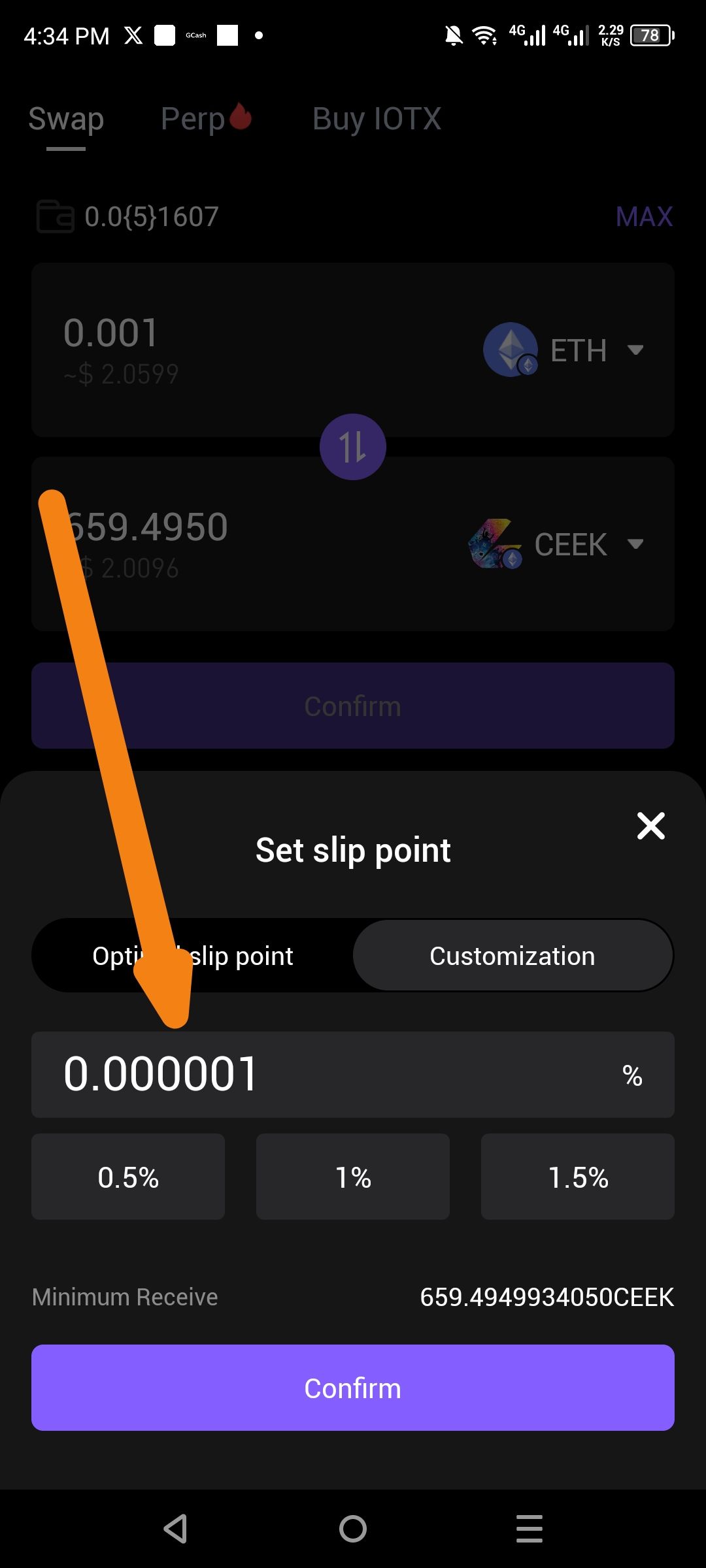
Description
In the Swap customization settings, the "Set slip point" (Slippage) field lacks a defined minimum threshold or "No Minimum" protection. A user can input an extremely low value, such as 0.000001%, without receiving a warning or error message. In decentralized trading, such a low slippage tolerance almost guarantees transaction failure due to standard price fluctuations, leading to wasted gas fees for the user.
Steps to Reproduce
Open the ioPay app and navigate to the Trade (Swap) tab.
Select a pair (e.g., ETH to CEEK) and click the Settings icon to adjust slippage.
Select the Customization tab under Set slip point.
Manually enter a value significantly below the 0.5% standard (e.g., 0.000001).
Observe that the "Confirm" button remains active and no warning is displayed.
Actual Result
The interface accepts near-zero slippage values without validating if the value is realistic for a successful transaction on the blockchain.
Expected Result
Validation Warning: The app should display a "Slippage too low" warning for values below a safe threshold (e.g., 0.01% or 0.1%).
No Minimum Guardrail: If the user intends for zero slippage, a toggle or specific "No Minimum" indicator should be used, accompanied by a risk disclaimer.
Log in to comment and vote
No comments yet
Be the first to share your thoughts.