Wallet Address:
io1tkw393kejmxwnd454twc6020sxcyvh5dxqmrenApp Version: ioPay v5.2.0 (1)
Device: iPhone XR
OS: iOS 18.7.3
Issue Summary
The application fails to provide adequate or consistent visual confirmation when a user performs a "Copy" action (e.g., copying wallet addresses).
Detailed Description
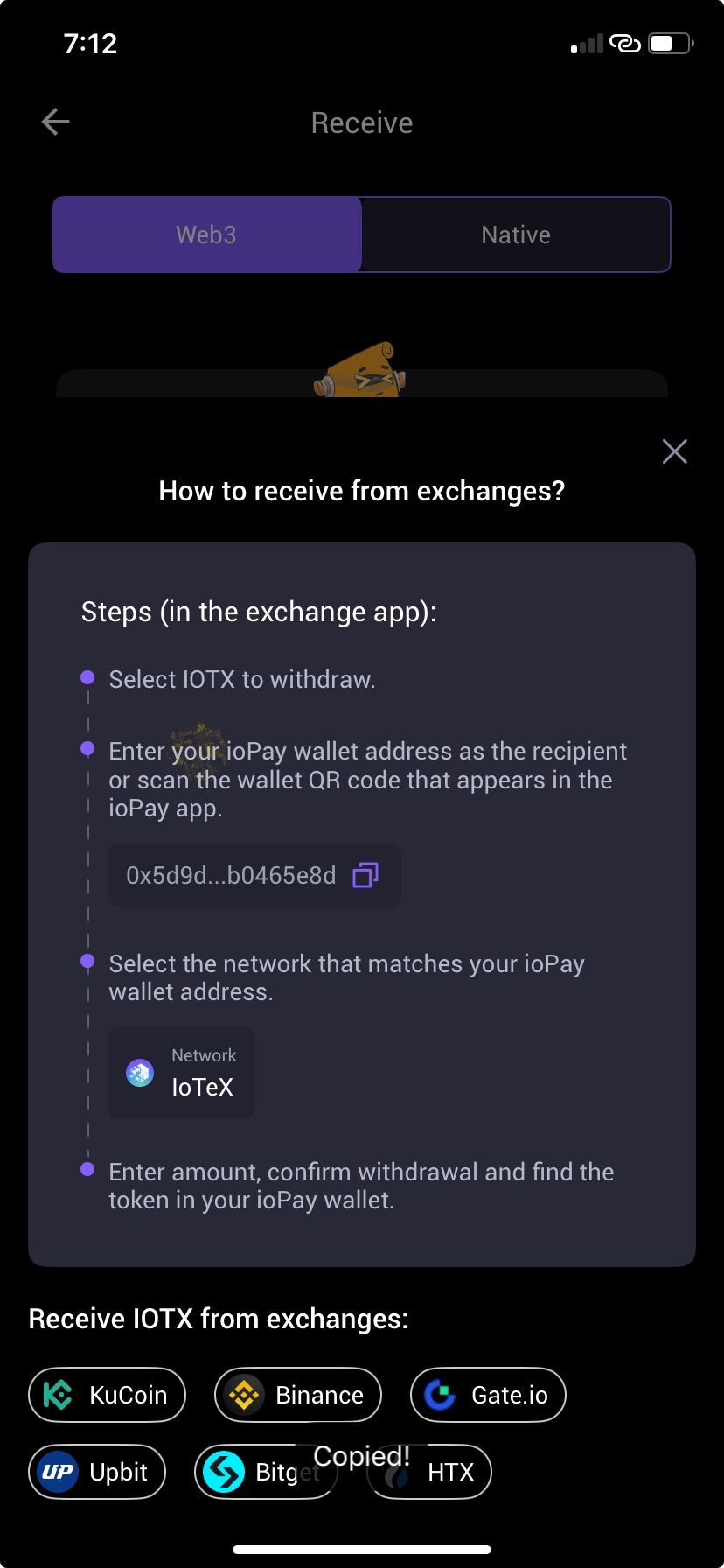
When tapping the "Copy" icon (specifically on the Receive screen, as shown in IMG_0045.jpg), the app does not trigger a clear visual confirmation.
Current Behavior: The UI remains static. While a small "Copied!" toast message may appear briefly (as seen in the screenshot), it is easily missed, lacks animation, and does not provide tactile or persistent confirmation.
Impact: Users are often left uncertain if the copy action succeeded, leading to redundant clicks and potential errors when pasting the data into external exchanges.
Steps to Reproduce:
Navigate to the Receive screen.
Tap the copy icon next to the wallet address (e.g.,
0x5d9d...b0465e8d).Observe: The lack of a distinct, accessible visual state change (such as the icon changing to a checkmark or a clear success animation).
Expected Result:
The UI should provide immediate, unambiguous feedback, such as:
Icon Change: The copy icon should briefly animate or change to a "Checkmark" icon to confirm the action.
Persistent Toast: A more visible success notification that persists long enough to be easily noticed by the user.
