[ECO Bounty] iopay Lack of Visual Feedback and Icons for Market Navigation Tabs
Wallet Address Reporter: io1tkw393kejmxwnd454twc6020sxcyvh5dxqmren
App Version: ioPay v5.3.1 (3973)
Device: Redmi Note 10 Pro (Android 13)
Description
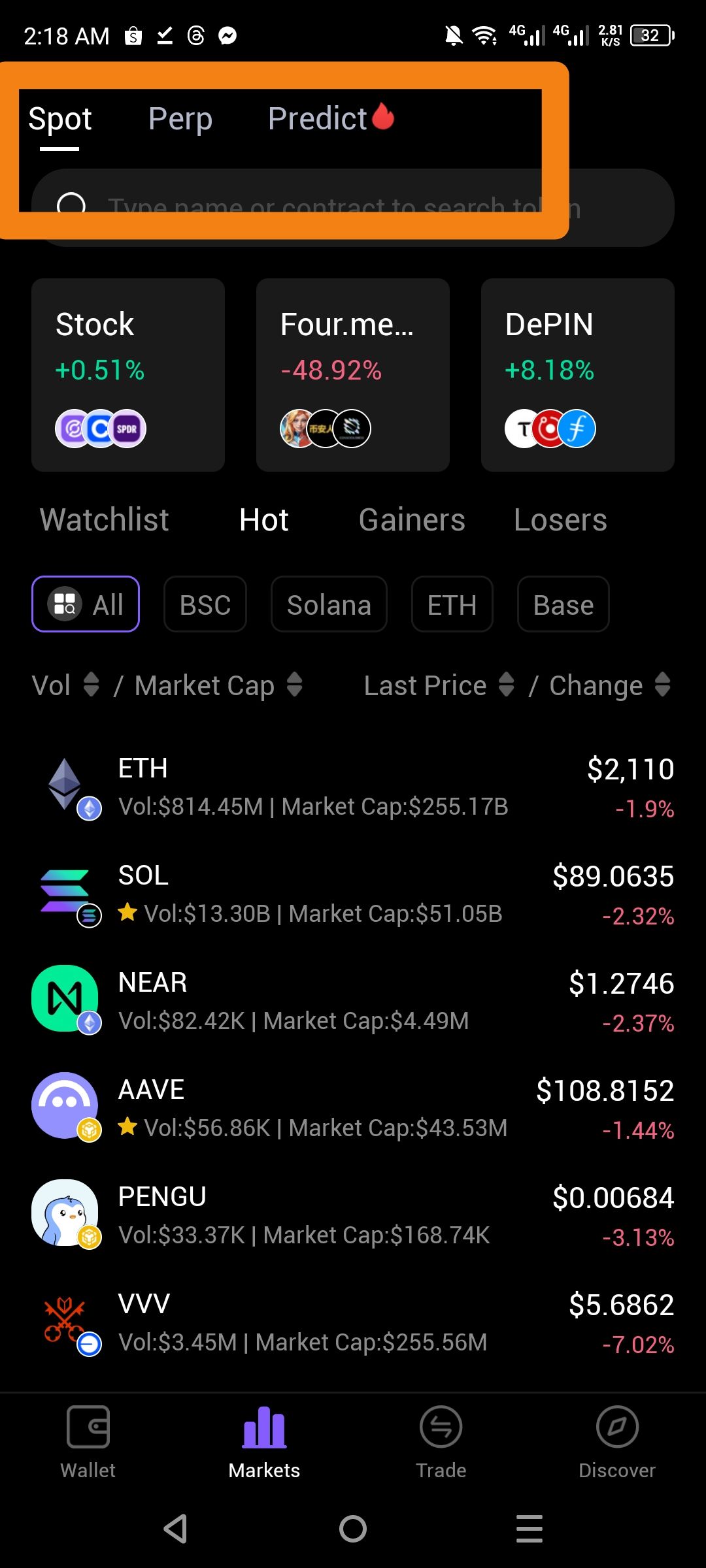
The navigation menu for market categories (Spot, Perp, and Predict) lacks descriptive icons and sufficient visual state feedback. While the "Spot" tab is currently active (indicated by a white underline), the inactive "Perp" and "Predict" tabs are rendered in a low-contrast gray font that makes them difficult to read against the black background. Furthermore, the reliance on text-only labels without accompanying icons reduces the intuitive "at-a-glance" navigation expected in a mobile financial application.
Steps to Reproduce
Open the ioPay application and navigate to the Markets tab at the bottom.
Locate the top navigation bar containing Spot, Perp, and Predict.
Observe the visual distinction between the active and inactive tabs.
Actual Result
No Icons: The tabs use text only, missing an opportunity for faster visual recognition.
Low Contrast: Inactive tab text ("Perp", "Predict") has poor visibility against the dark theme.
Expected Result
Iconic Support: Each market category should feature a relevant icon (e.g., a simple chart icon for Spot, a gear or recurring icon for Perp).
Enhanced Contrast: Text for all tabs should be bright enough to ensure accessibility and clear legibility.
Improved Active State: Use a more prominent highlight (e.g., color change or bolder font) to confirm the active selection.
Log in to comment and vote
No comments yet
Be the first to share your thoughts.