[ECO Bounty] iopay Lack of Visual Feedback and Icons for Market Filters
Wallet Address Reporter: io1tkw393kejmxwnd454twc6020sxcyvh5dxqmren
App Version: ioPay v5.3.1 (3973)
Device: Redmi Note 10 Pro (Android 13)
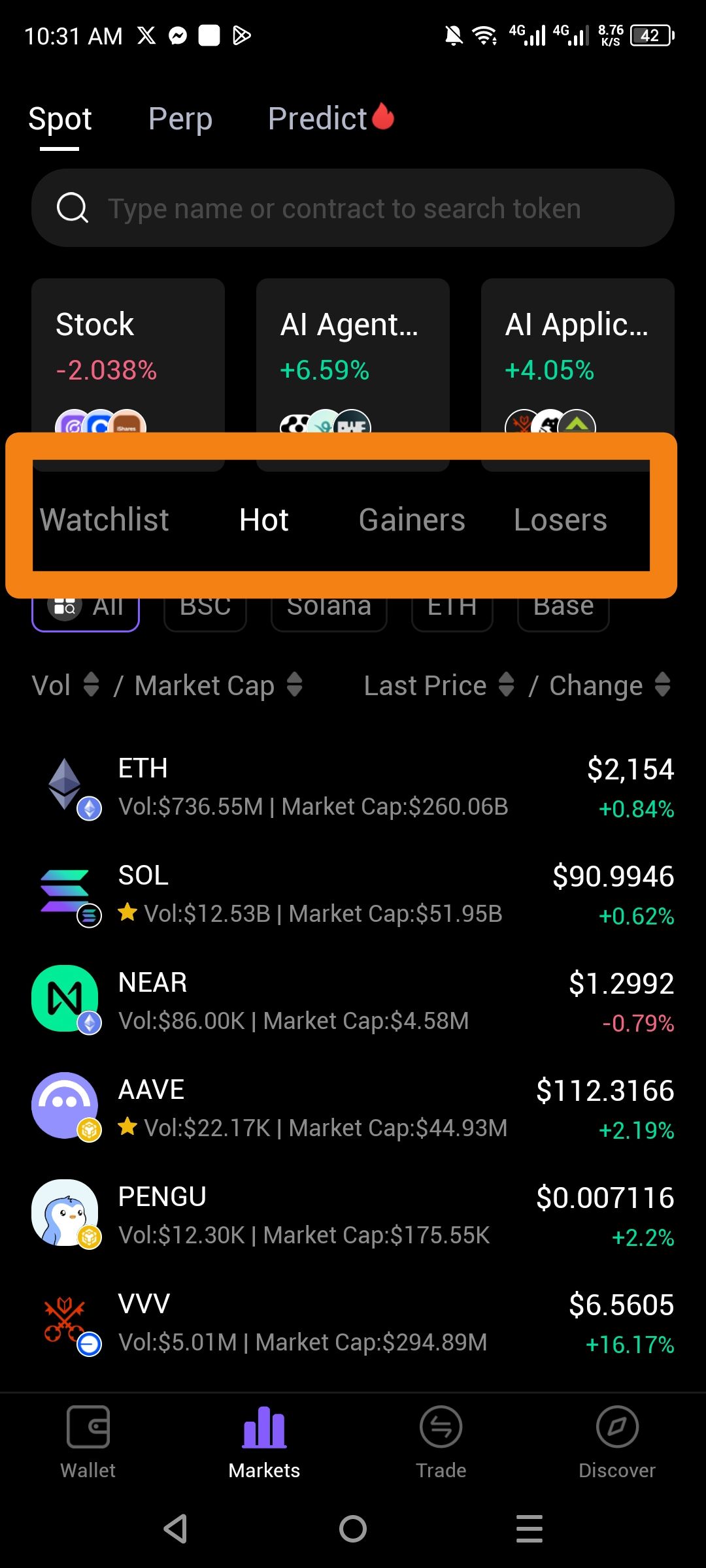
Description
The secondary navigation menu for market filters—specifically Watchlist, Hot, Gainers, and Losers—lacks descriptive icons and high-contrast visual state indicators. While the "Hot" tab is currently active (indicated by a white underline and brighter text), the inactive tabs (Watchlist, Gainers, and Losers) are rendered in a dim, low-contrast gray font that blends into the black background. Additionally, the interface relies solely on text labels without accompanying icons, which slows down user recognition of these core filtering features.
Steps to Reproduce
Open the ioPay app and navigate to the Markets tab.
Locate the filtering row below the "Spot/Perp/Predict" headers and featured asset cards.
Observe the visual presentation of the Watchlist, Hot, Gainers, and Losers labels.
Actual Result
Icon Absence: These categories are represented by text only, providing no symbolic cues for the user.
Low Visibility: Inactive tabs use a dark gray font that has poor legibility against the black theme, making the navigation options less prominent.
Expected Result
Iconic Representation: Each filter should feature a distinct icon (e.g., a star for Watchlist, a flame for Hot, an upward arrow for Gainers) to aid in rapid identification.
Improved Contrast: Inactive tab text should be brightened to ensure it is clearly readable while still being distinguishable from the active state.
Consistent Design: This row should match the quality of the "Network" filters below it (e.g., BSC, Solana, ETH), which are enclosed in clearer button-like containers.
Log in to comment and vote
No comments yet
Be the first to share your thoughts.