[ECO Bounty] iopay Lack of Visual Feedback and Icons in Trade Navigation
Wallet Address Reporter: io1tkw393kejmxwnd454twc6020sxcyvh5dxqmren
App Version: ioPay v5.3.1 (3973)
Device: Redmi Note 10 Pro (Android 13)
Description
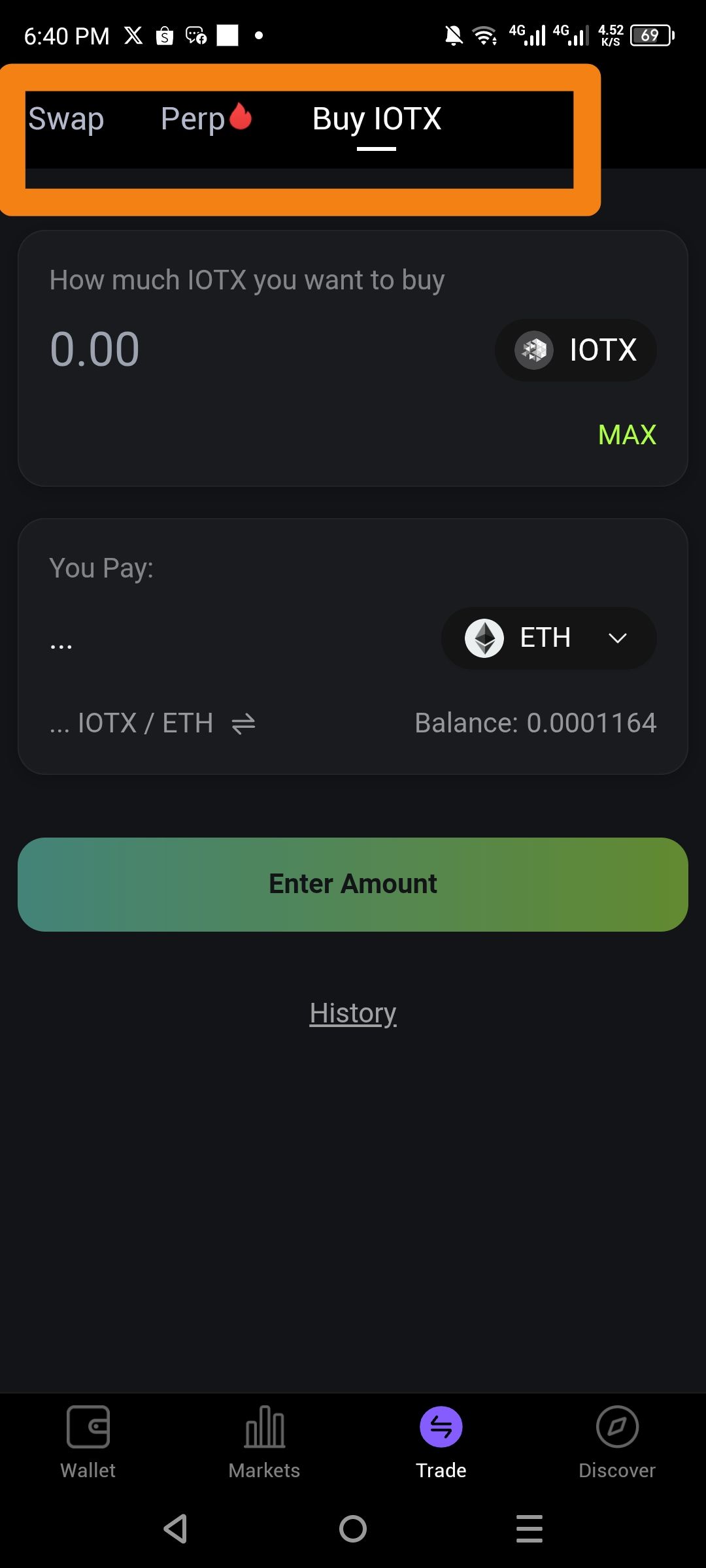
The top-level navigation menu within the Trade tab—specifically the Swap, Perp, and Buy IOTX headers—lacks descriptive icons and sufficient visual state feedback. Currently, the active state is only indicated by a thin white underline. The inactive tabs are rendered in a low-contrast gray font, making them difficult to distinguish from the background and reducing the overall "tappability" of the interface.
Steps to Reproduce
Open the ioPay application.
Navigate to the Trade tab in the bottom menu.
Observe the header navigation containing Swap, Perp, and Buy IOTX.
Compare the visual contrast between the active selection and the inactive options.
Actual Result
No Icons: The headers rely purely on text, which can slow down navigation compared to icon-assisted menus.
Low Contrast: Inactive text is dim and lacks a clear "interactive" look.
Expected Result
Iconic Support: Integrate relevant icons for each trade type (e.g., a "two-way arrow" for Swap, a "leverage" or "recurring" icon for Perp, and a "plus/credit card" icon for Buy IOTX).
Enhanced Visual State: Use a bolder font weight or a color change for the active tab to provide a more definitive "button-pressed" feel.
Log in to comment and vote
No comments yet
Be the first to share your thoughts.