[Eco Bounty] ioPay Lack of Visual Feedback and Missing Error Icon When Wallet Name is Already Occupied
Wallet Address Reporter: io1tkw393kejmxwnd454twc6020sxcyvh5dxqmren
App Version: ioPay v5.3.1 (3973)
Device: Redmi Note 10 Pro (Android 13)
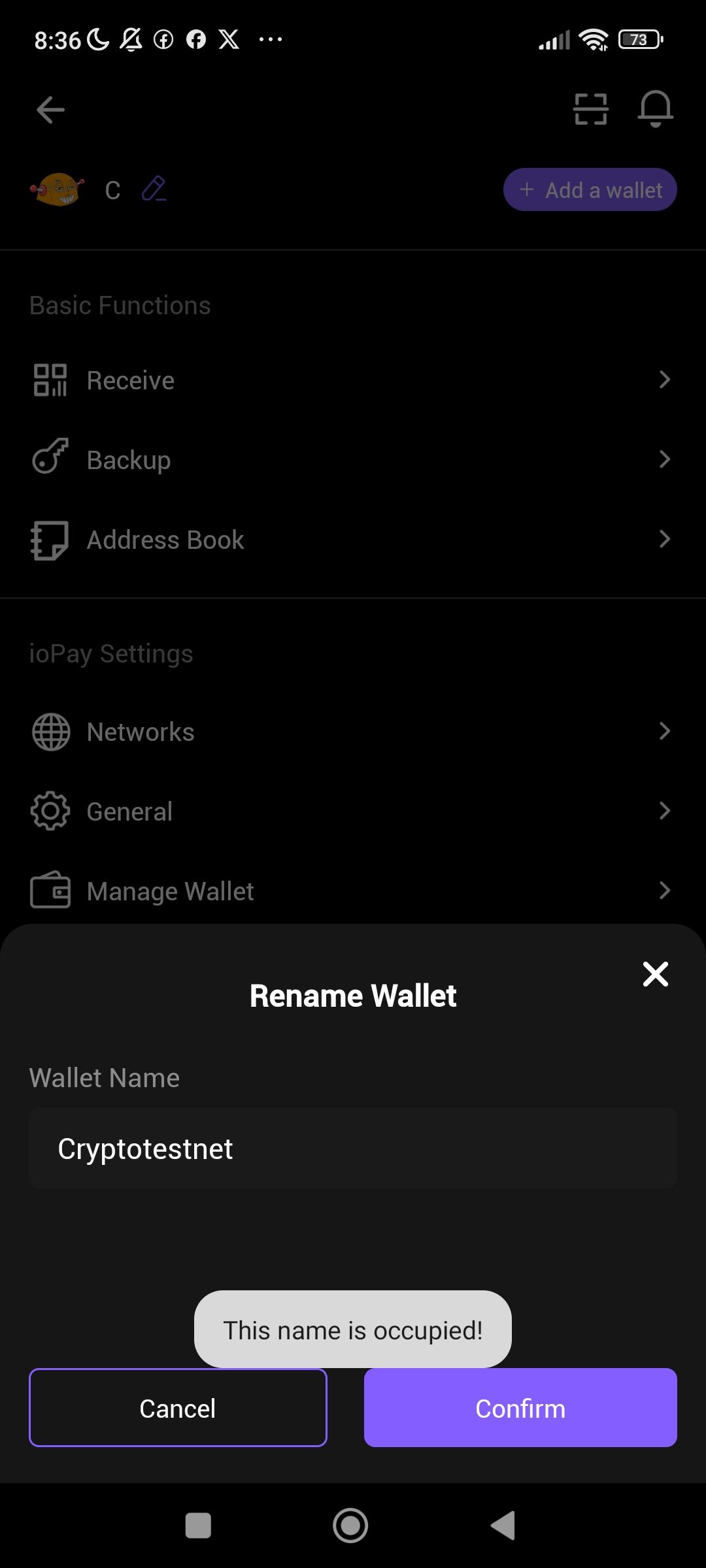
Summary: When a user attempts to rename a wallet using a name that is already taken, the app displays a tooltip-style message ("This name is occupied!") but provides no visual feedback on the input field itself and no warning/error icon. Additionally, the Confirm button remains enabled, allowing users to attempt submitting a duplicate name. This results in a poor and confusing user experience.
Steps to Reproduce:
Open the ioPay app.
Navigate to the Wallet settings page.
Tap the Edit/Rename icon (pencil icon) next to the wallet name.
In the "Rename Wallet" modal, type a wallet name that is already in use (e.g.,
Cryptotestnet).Observe the feedback provided by the app.
Expected Behavior:
Actual Behavior:
A floating tooltip ("This name is occupied!") appears near the bottom of the screen but:
❌ Has no warning or error icon.
❌ Input field shows no color change or border highlighting.
❌ No inline error message below the text field.
❌ Confirm button remains active/enabled (purple), misleading the user into thinking the action can be completed.
❌ Tooltip style is inconsistent with standard error feedback patterns.
Log in to comment and vote
No comments yet
Be the first to share your thoughts.