[ECO Bounty] iopay Lack of Visual Feedback for Wallet Address Copy Action
Wallet Address Reporter: io1tkw393kejmxwnd454twc6020sxcyvh5dxqmren
App Version: ioPay v5.3.1 (3973)
Device: Redmi Note 10 Pro (Android 13)
Description
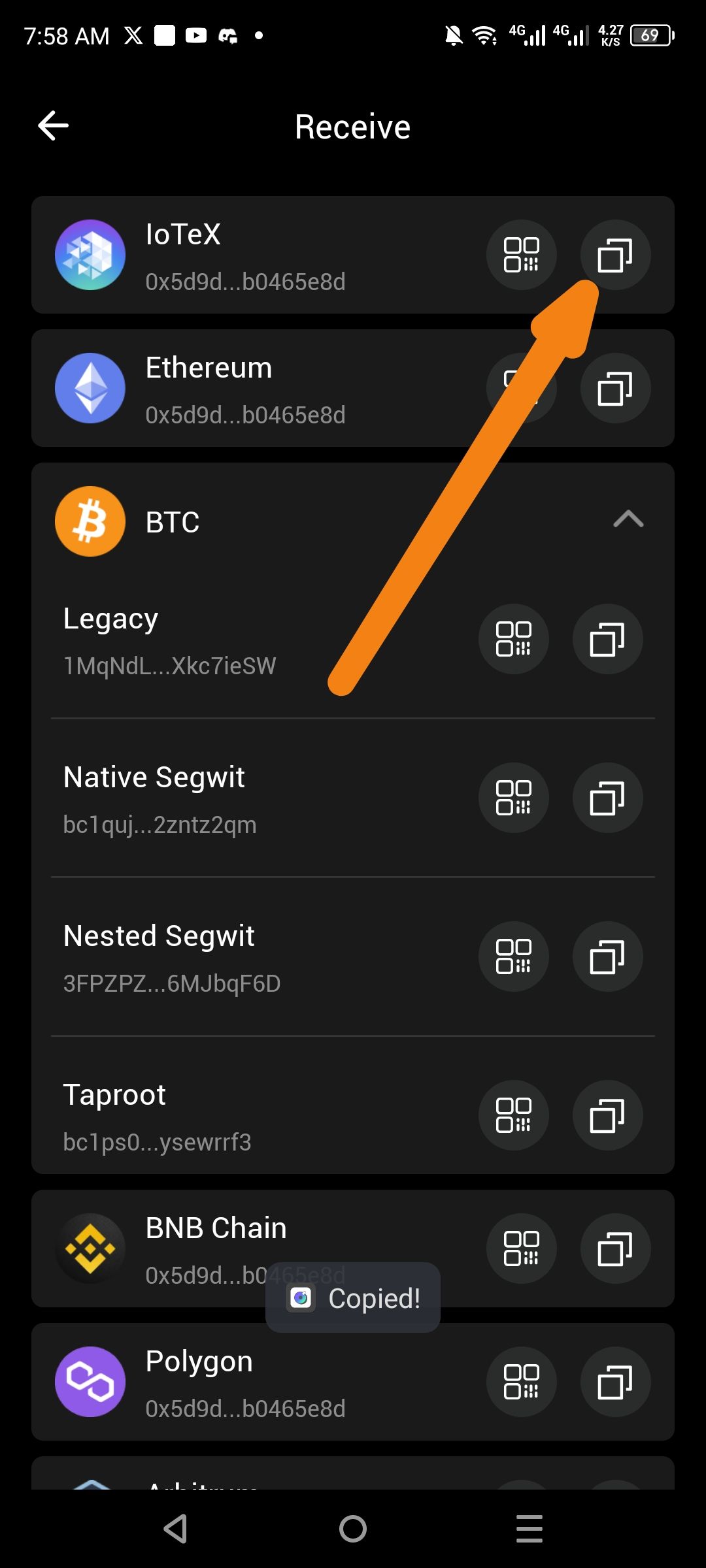
When a user attempts to copy a wallet address from the Receive screen, the interface provides inconsistent and insufficient visual feedback. While a "Copied!" toast message occasionally appears at the bottom of the screen, the copy icon itself does not change state (e.g., to a checkmark), and there is no persistent visual indicator to confirm which specific address was successfully copied. This can lead to user uncertainty, especially when managing multiple chain addresses (IoTeX, Ethereum, BTC, etc.) in a single view.
Steps to Reproduce
Open the ioPay app and navigate to the Receive screen.
Click the Copy icon next to any wallet address (e.g., IoTeX, Ethereum, or a specific BTC format like Legacy or Native Segwit).
Observe the behavior of the copy icon and the presence of any confirmation messages.
Actual Result
No Icon State Change: The copy icon remains static after interaction, providing no immediate "button-press" or "success" feedback.
Subtle Toast Message: A small "Copied!" toast message appears briefly at the bottom but may be overlooked by the user.
Expected Result
Dynamic Icon Feedback: The copy icon should instantly transform into a success icon (e.g., a green checkmark) for 1–2 seconds to confirm the specific action.
High-Visibility Confirmation: A more prominent "Wallet Address Successfully Copied" notification should be displayed to ensure the user is aware of the successful operation.
Log in to comment and vote
No comments yet
Be the first to share your thoughts.