Wallet Address:
io1tkw393kejmxwnd454twc6020sxcyvh5dxqmrenApp Version: ioPay v5.2.0 (1)
Device: iPhone XR
OS: iOS 18.7.3
Issue Summary
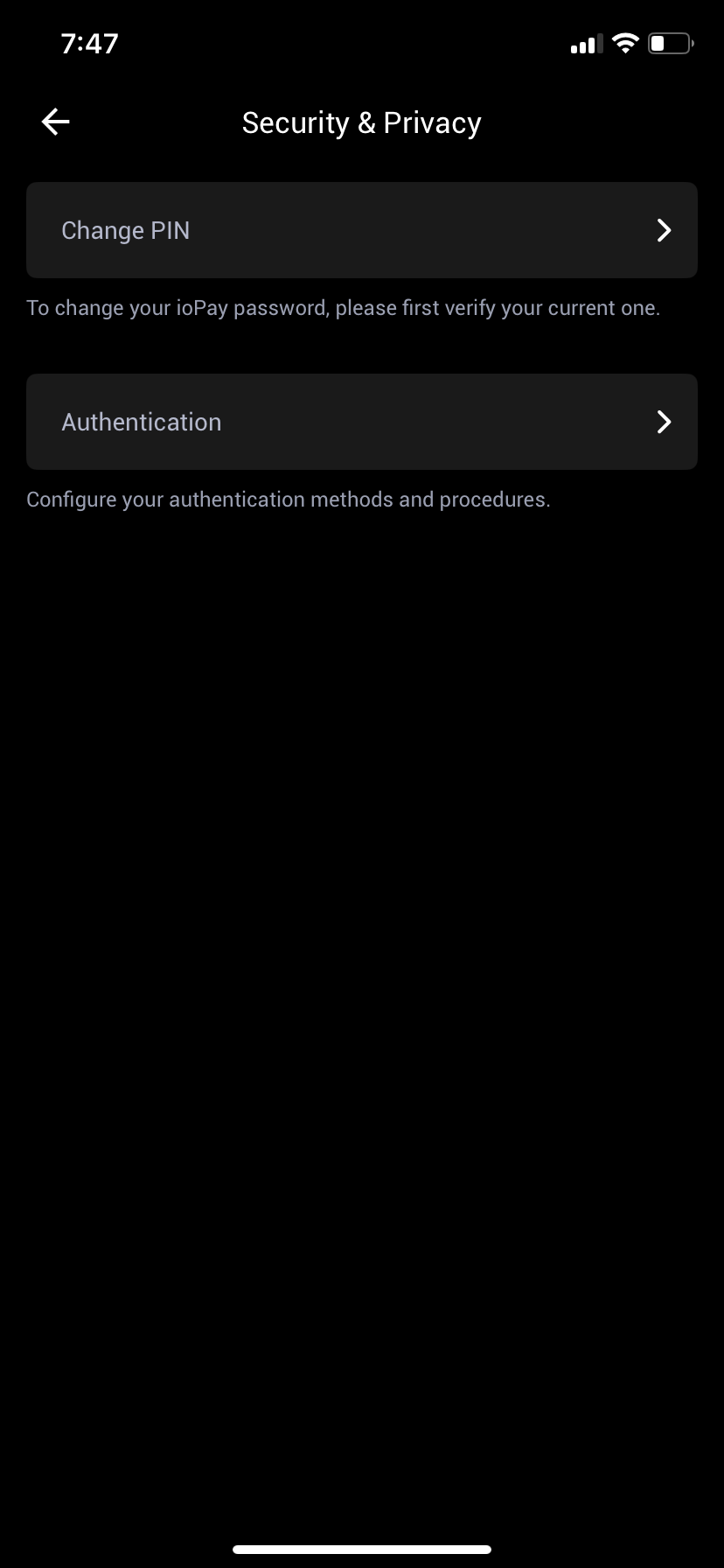
The Security & Privacy menu lacks supportive iconography for its primary action items. The current interface is text-heavy and does not provide visual cues to help users quickly identify security functions.
Detailed Description
Location:
Settings->Security & PrivacyObservation: As shown in IMG_0087.png, the "Change PIN" and "Authentication" menu items are presented as plain text blocks with standard chevron arrows. There are no leading icons (e.g., a lock icon for PIN or a fingerprint/shield icon for Authentication).
Impact (UX): The absence of icons makes the menu less intuitive to navigate at a glance. Visual indicators are standard in wallet security interfaces to help users differentiate between "Privacy" settings and "Security" actions, reducing cognitive load and improving the overall aesthetic of the app.
Steps to Reproduce:
Launch ioPay v5.2.0 (1).
Navigate to Settings > Security & Privacy.
Observe the menu structure for "Change PIN" and "Authentication."
Result: The menu items lack any descriptive or decorative icons, resulting in a generic and purely text-based interface.
Expected Result:
Each menu item should be accompanied by a relevant icon to improve scannability and UX design consistency:
Change PIN: Should have a "Lock" or "Keypad" icon.
Authentication: Should have a "Biometric," "Face ID," or "Shield" icon.
