[Eco Bounty] ioPay Misplaced "Get Template" Button in Mobile Navigation
Issue Summary
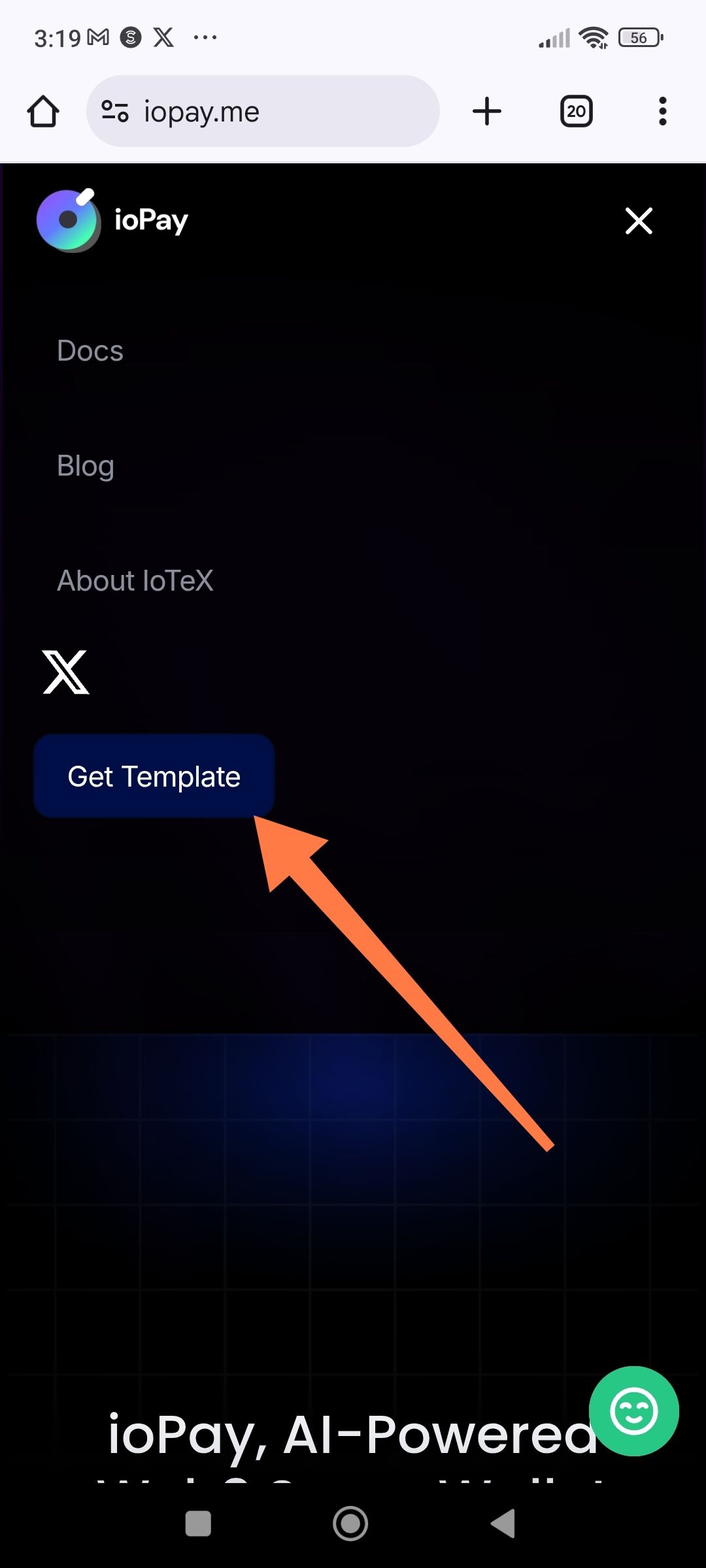
The "Get Template" button appears in the mobile navigation menu of the ioPay website, which is confusing and out of context for a Web3 wallet product page. This button likely links to Framer template resources (as indicated by the footer text) and should not be visible to end users visiting the ioPay wallet site.
Bug Details
Steps to Reproduce
Open a mobile browser (Chrome, Safari, etc.)
Navigate to
https://iopay.meTap the hamburger menu icon to open the navigation sidebar
Observe the "Get Template" button below the X (Twitter) icon
Expected Behavior
The mobile navigation menu should only contain:
Docs
Blog
About IoTeX
Social links (X/Twitter, Discord, etc.)
Download App CTA buttons
The "Get Template" button should NOT appear as it appears to be a Framer website builder artifact unrelated to the ioPay wallet product.
Actual Behavior
The mobile menu displays a blue "Get Template" button that likely links to Framer's template marketplace. This:
Confuses users expecting wallet-related actions
Appears unprofessional and unfinished
Suggests the website is a template rather than an official product page
Distracts from the primary CTA (Download the wallet)
Visual Evidence
![Mobile screenshot showing navigation menu with Docs, Blog, About IoTeX, X icon, and a blue "Get Template" button with an orange arrow pointing to it]
Root Cause Analysis
The website appears to be built with Framer (confirmed by footer: "Create a free website with Framer..."). The "Get Template" button is likely:
A default Framer template export artifact
Leftover from the design/development process
A "Clone this site" button intended for Framer users, not ioPay visitors
Suggested Fix
Remove or hide the "Get Template" button from the production site by:
css
/* Option 1: Hide the button */ nav .get-template-button, [class*="template"] { display: none !important; } /* Option 2: Remove from DOM before export */ /* In Framer: Check navigation component settings and remove the button layer */ In Framer specifically:
Open the Navigation component in Framer
Locate the "Get Template" button layer
Delete or hide the layer
Re-publish the site
Alternative Solutions
If the button serves a purpose (e.g., for developers):
Move it to the footer
Rename to "Site Template" or "Clone on Framer"
Add context: "Built with Framer - Clone this template"
Impact Assessment
User Confusion: Visitors may think ioPay is a template, not a real product
Brand Perception: Appears unprofessional/unfinished
Conversion Impact: Distracts from primary download CTAs
Trust: May reduce confidence in the wallet's legitimacy
Related Issues
Footer contains "Create a free website with Framer" text (also should be removed for production)
Wallet Address: io1tkw393kejmxwnd454twc6020sxcyvh5dxqmren
Device & Environment:
-Operating system: Android 13
-Device model: Redmi Note 10 Pro
Log in to comment and vote
No comments yet
Be the first to share your thoughts.