[ECO Bounty] iopay Missing APY Visibility in Wallet and Token Lists
Wallet Address Reporter: io1tkw393kejmxwnd454twc6020sxcyvh5dxqmren
App Version: ioPay v5.4.0 (3974)
Device: Redmi Note 10 Pro (Android 13)
Description
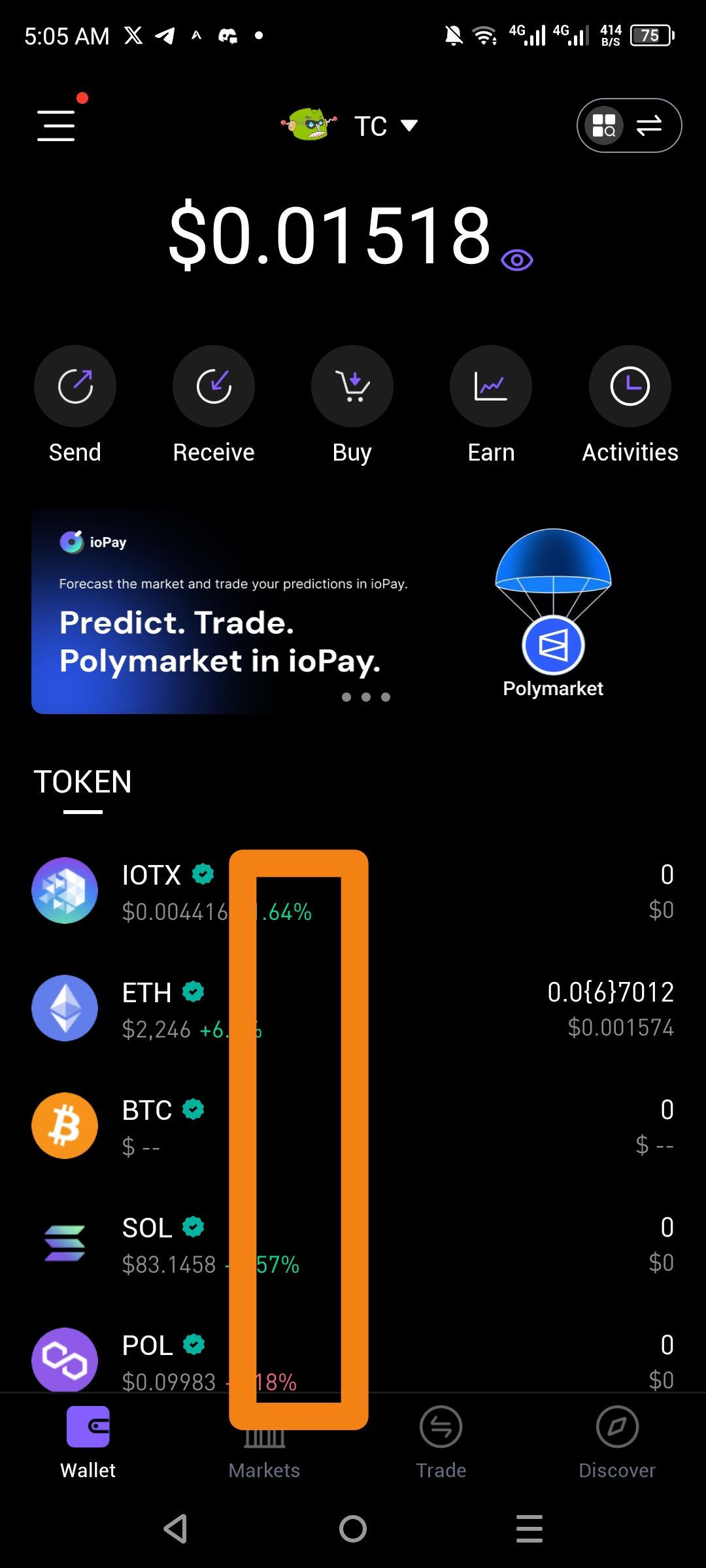
The primary Wallet dashboard fails to display APY or Staking Yield percentages next to supported tokens (such as IOTX, ETH, or SOL). While the UI includes an "Earn" quick-action button, the actual token list only shows price action and balances.
The area between the token price and the balance (highlighted in orange) is utilized solely for 24-hour price percentage changes, leaving no room for real-time yield data. For a DeFi-centric wallet, this forces users to manually navigate into separate "Earn" sub-menus to discover which assets are currently earning rewards, rather than providing an at-a-glance overview of their portfolio's productivity.
Steps to Reproduce
Open the ioPay app to the default Wallet tab.
Review the Token list for assets known to support staking or yield (e.g., IOTX, ETH, SOL).
Observe the data displayed: Name, Price, Price Change %, and Balance.
Note the total absence of an APY or Estimated Yield indicator.
Actual Result
The token list focuses exclusively on market price and balance, omitting critical yield-performance data for staked or earn-eligible assets.
Expected Result
A clear APY badge or percentage (e.g., "Stake for 5.2% APY") should be integrated into the token row to help users maximize their asset utility.
Log in to comment and vote
No comments yet
Be the first to share your thoughts.