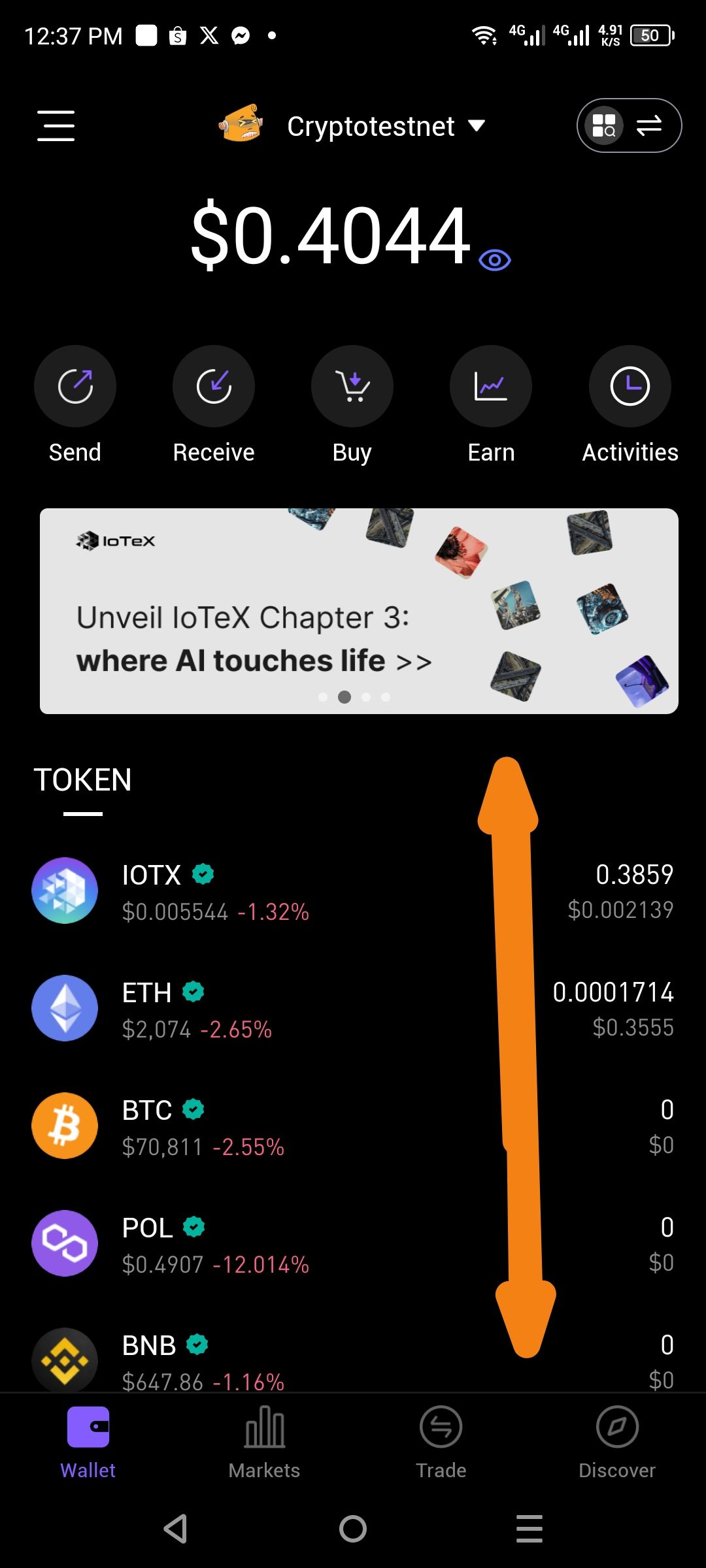
App Version: ioPay v5.2.0 (3970)
Screen: Main Wallet Dashboard Date Reported: March 6, 2026
Description
The wallet dashboard currently lacks the ability for users to sort their token list. Users with multiple assets cannot prioritize their view based on balance size (Highest to Lowest), token name, or percentage change. As seen in the provided screenshot, assets are listed in a fixed order regardless of their USD value or holding amount.
Steps to Reproduce / Current Behavior
Open the ioPay app to the main Wallet tab.
Observe the TOKEN list (showing IOTX, ETH, BTC, POL, BNB, etc.).
Look for a toggle, dropdown, or icon to change the sort order of these assets.
Note that no such option exists, forcing a default view that may not highlight the user's primary holdings.
Expected Result
The dashboard should include a sorting icon or settings toggle that allows users to:
Sort by Balance: Highest to Lowest (Value in USD).
Sort Alphabetically: A-Z or Z-A.
Hide Zero Balances: To declutter the dashboard and show only active holdings.
Actual Result
The token list appears to follow a hardcoded or network-based priority, making it difficult for users to quickly view their most valuable assets at a glance.
Wallet Address: io1tkw393kejmxwnd454twc6020sxcyvh5dxqmren
Device & Environment:
-Operating system: Android 13
-Device model: Redmi Note 10 Pro
