[ECO Bounty] iopay Missing CAPTCHA in User Feedback Submission
Wallet Address Reporter: io1tkw393kejmxwnd454twc6020sxcyvh5dxqmren
App Version: ioPay v5.3.1 (3973)
Device: Redmi Note 10 Pro (Android 13)
Description
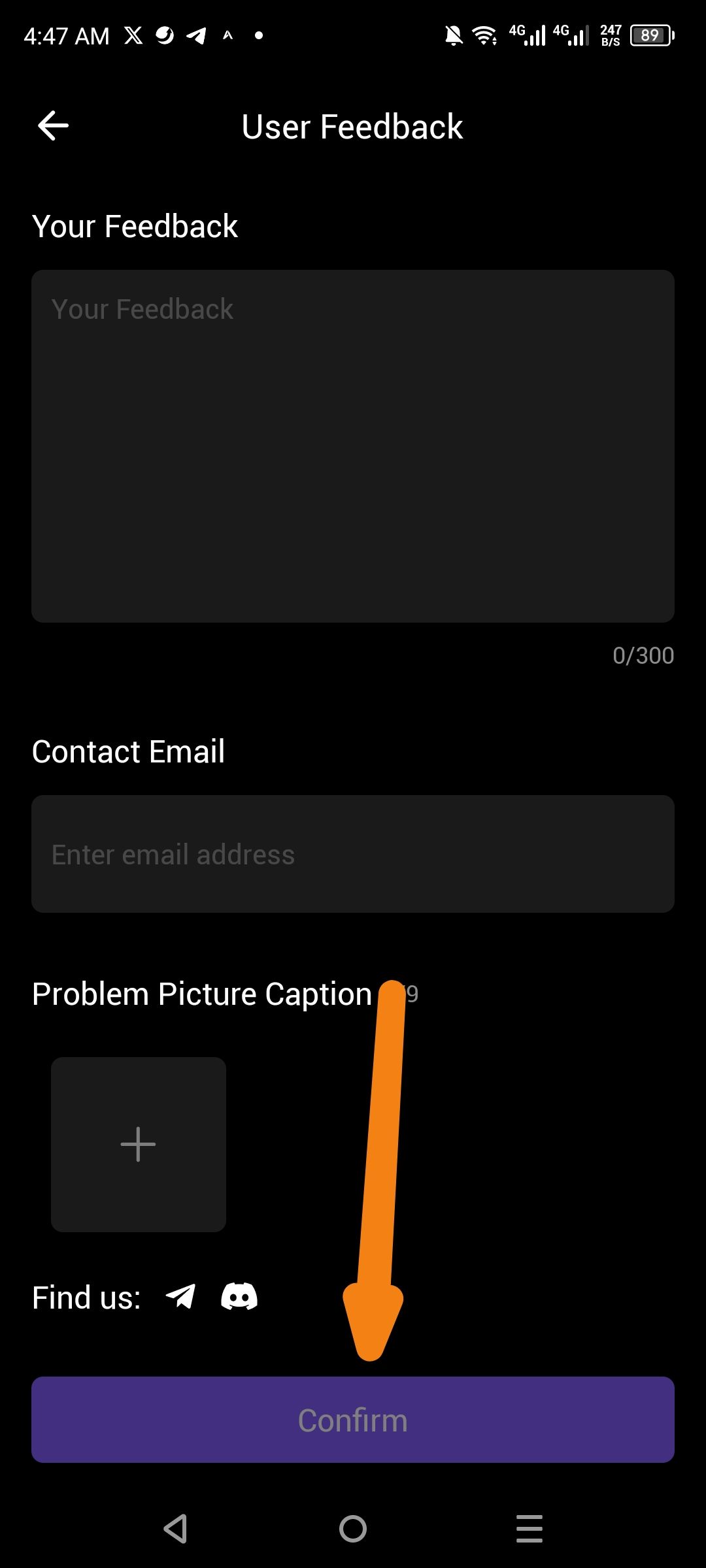
The User Feedback interface allows users to enter text, provide an email, and upload images before tapping Confirm to submit. However, there is no CAPTCHA (e.g., reCAPTCHA or hCaptcha) or similar human-verification step present during this flow.
The lack of bot protection means the feedback endpoint can be easily targeted by automated scripts, potentially leading to:
Spam Flooding: Overloading the support team with non-genuine feedback entries.
Server Strain: Unnecessary resource consumption from processing high volumes of automated requests.
Data Pollution: Compromising the quality of legitimate user data used for app improvements.
Steps to Reproduce
Open ioPay and navigate to About ioPay > Feedback.
Fill in the Your Feedback and Contact Email fields.
Observe the area above or adjacent to the Confirm button.
Note the total absence of any "I am not a robot" checkbox or visual verification puzzle.
Actual Result
The feedback is submitted immediately upon tapping Confirm without any verification that the sender is a human user.
Expected Result
A CAPTCHA verification step should be integrated into the feedback form to ensure system security and filter out automated submissions.
Log in to comment and vote
No comments yet
Be the first to share your thoughts.