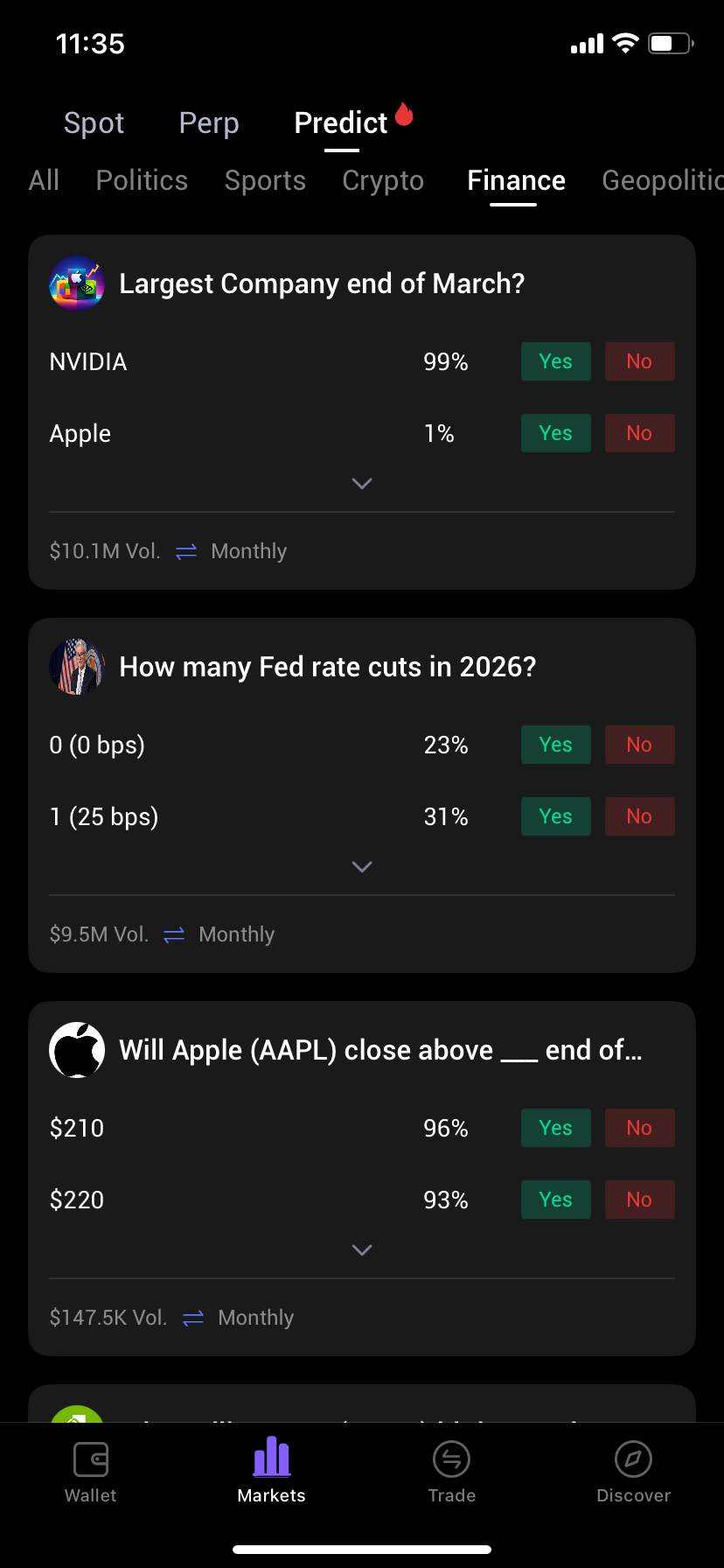
Wallet Address: io1tkw393kejmxwnd454twc6020sxcyvh5dxqmren
App Version: ioPay v5.3.0 (1)
Device: iPhone XR
OS: iOS 18.7.3
Issue Summary
The Predict section within the Markets tab lacks descriptive iconography for its category navigation, resulting in a text-only interface that lacks visual clarity.
Detailed Description
Location: Markets -> Predict
Observation: As seen in IMG_0309.png, the sub-categories (All, Politics, Sports, Crypto, Finance, Geopolitics) are displayed as plain text. There are no accompanying icons to help differentiate these sectors visually.
Impact (UX): This creates a high cognitive load for the user. In a data-heavy "Prediction Market" environment, icons (e.g., a "Bank" icon for Finance or a "Medal" for Sports) are essential for rapid navigation and to maintain the app's overall design language. The current layout feels unpolished and "under construction."
Steps to Reproduce:
Launch ioPay v5.3.0 (1).
Navigate to the Markets tab from the bottom menu.
Tap on the Predict sub-tab at the top.
Observe the category navigation bar (All, Politics, Sports, etc.).
Result: The categories are listed purely as text with no supporting visual icons.
Expected Result:
Each category should be paired with a unique, high-quality icon to allow for quick visual identification and a more professional user interface.
