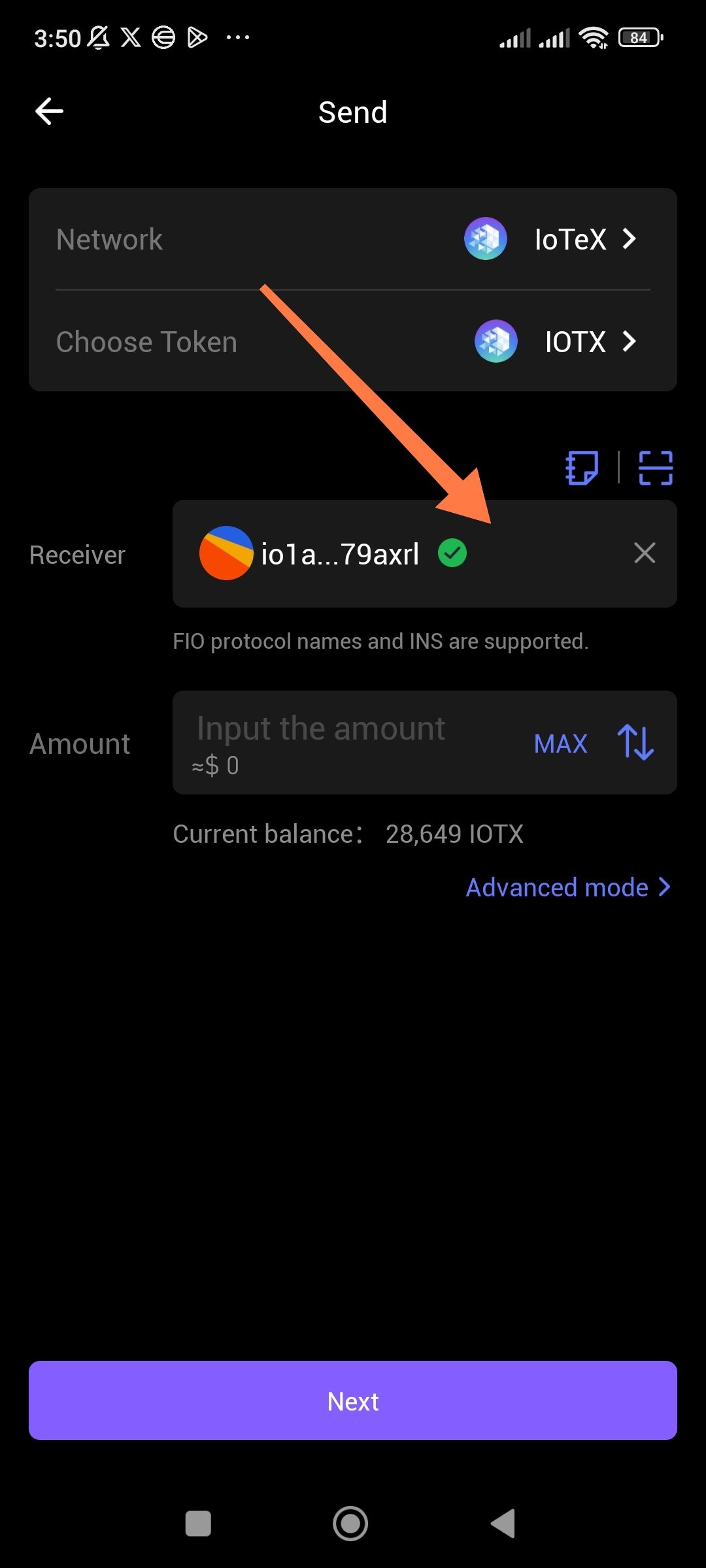
Description: When sending tokens from ioPay to a Centralized Exchange (CEX), the application does not identify the destination address with the exchange's official logo. In other wallets, pasting a known Binance or MEXC deposit address usually triggers a "Binance" label or icon. In ioPay, it only shows the alphanumeric string, which reduces user confidence and increases the risk of manual errors.
Steps to Reproduce:
Open the ioPay app.
Select a token (e.g., IOTX) and tap "Send".
Paste a valid deposit address from a CEX (e.g., Binance, MEXC, or Gate.io).
Observe the recipient field.
Expected Result: The wallet should recognize the address as belonging to a specific exchange and display the corresponding logo (e.g., the yellow Binance diamond) next to the address or in a "Verified Destination" tag.
Actual Result: The UI shows the raw address only, with no visual confirmation of the destination exchange.
Wallet Address: io1tkw393kejmxwnd454twc6020sxcyvh5dxqmren
Device & Environment:
-Operating system: Android 13
-Device model: Redmi Note 10 Pro
