[Eco Bounty] ioPay Missing Desktop Mode Toggle in ioPay DApp Browser
Summary
The ioPay DApp browser lacks a "Desktop Mode" or "Request Desktop Site" option in its browser menu, preventing users from switching to desktop view when interacting with DApps that require or work better with desktop layouts.
Description
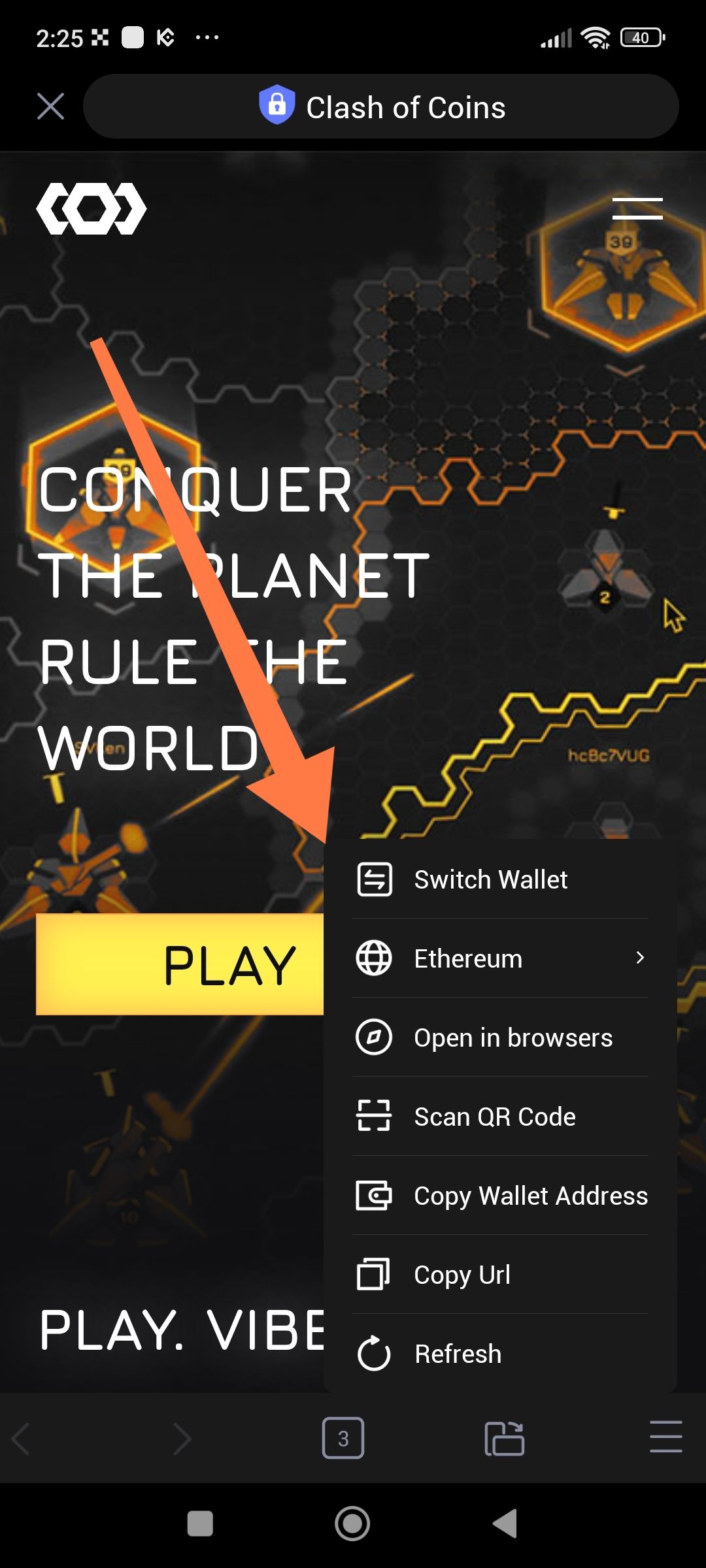
When using the built-in DApp browser to interact with decentralized applications (like the "Clash of Coins" game shown), users are forced into mobile view with no option to request the desktop version of the website. The browser menu (accessible via the hamburger icon in the bottom right or top menu) displays several options but omits the standard "Desktop Mode" or "Request Desktop Site" toggle that is available in most crypto wallet (MetaMask, etc.).
Steps to Reproduce
Open ioPay app
Navigate to DApp browser (e.g., through Discover tab or direct link)
Open any DApp (e.g., "Clash of Coins")
Tap the browser menu button (☰ bottom right or top right)
Review available options in the menu
Expected Result
The browser menu should include an option such as:
"Desktop Mode"
"Request Desktop Site"
"Switch to Desktop View"
Or similar toggle to change user agent/viewport
Actual Result
The browser menu only shows:
Switch Wallet
Ethereum (Network selection)
Open in browsers
Scan QR Code
Copy Wallet Address
Copy Url
Refresh
Missing: Desktop Mode toggle
Evidence
Screenshot shows:
DApp: "Clash of Coins" game loaded in ioPay browser
Browser menu is open with options listed
Orange arrow points to menu area showing available options
No "Desktop Mode" or "Request Desktop Site" option visible
Environment
App: ioPay Mobile
Feature: DApp Browser / Web3 Browser
Platform: Android
Time: 14:25 local time
Network: Ethereum (as shown in menu)
App Version: v5.1.0 (3963)
Severity
🟡 Medium - User experience limitation
Impact
Users cannot access desktop-only features of certain DApps
Limited functionality for DApps with poor mobile optimization
Forces users to use external browsers (losing wallet connection convenience)
Poor experience for games and complex DeFi interfaces designed for desktop
Use Cases Affected
Gaming DApps requiring desktop interface
DeFi protocols with desktop-optimized dashboards
NFT marketplaces with advanced features only in desktop view
Admin panels or creator tools within DApps
Suggested Fix
Add Desktop Mode toggle: Include "Request Desktop Site" option in the browser menu
User Agent switching: Implement user agent string modification to mimic desktop browsers
Viewport toggle: Allow viewport width adjustment to simulate desktop screens
Persistent setting: Remember user's preference per DApp or globally
Wallet Address: io1tkw393kejmxwnd454twc6020sxcyvh5dxqmren
Device & Environment:
-Operating system: Android 13
-Device model: Redmi Note 10 Pro
Log in to comment and vote
No comments yet
Be the first to share your thoughts.