[ECO Bounty] iopay Missing Desktop/Browser Extension Links in Mobile CTA Section
1. Issue Summary
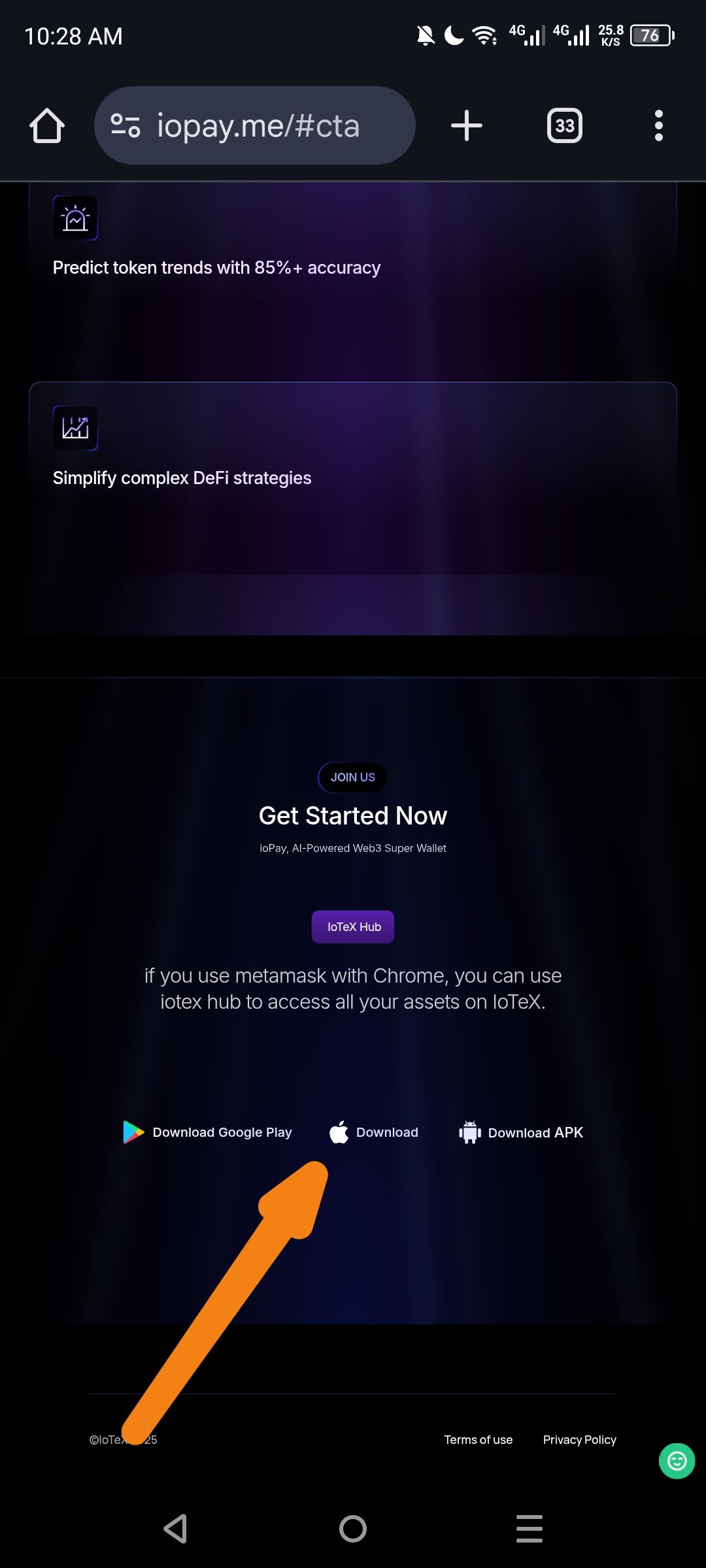
The "Get Started Now" Call-to-Action (CTA) section on the ioPay landing page (iopay.me/#cta) currently displays mobile-only download options on mobile viewports. The section lacks visible pathways to the Desktop Browser Extension (Chrome/Brave/Edge) and Web Wallet versions, which can lead to user confusion, support ticket inflation, and potential user drop-off.
2. Environment Details
3. Steps to Reproduce
Open Chrome on a mobile device (or use DevTools mobile viewport).
Navigate to
https://iopay.me/.Scroll to the "Get Started Now" section.
Observe the download options presented.
4. Actual Result
Only three download options are visible:
Google Play Store
Apple App Store
Direct APK Download
5. Expected Result
The CTA section should provide discoverable links to:
Chrome Web Store / Browser Extension
Web Wallet (wallet.iotex.io or equivalent)
Or a "Looking for Desktop? Click here" secondary link
6. Impact Analysis
7. Recommendation
Short-term Fix (Immediate): Add a secondary text link below the mobile store badges:
"Looking for the Desktop Browser Extension or Web Wallet? [Get Desktop Version →]"
Long-term Fix (Ideal UX): Implement a platform-detection toggle or segmented control:
Tab 1: Mobile (Show Play Store / App Store / APK)
Tab 2: Desktop (Show Chrome Web Store / Edge Add-ons / Firefox)
Tab 3: Web (Direct link to Web Wallet)
Alternative: If screen real estate is constrained, add a "View All Platforms" expandable accordion that reveals desktop links when tapped.
Acceptance Criteria for Fix:
Desktop users on mobile can easily locate the browser extension link.
Mobile users do not experience layout breaking with the addition of desktop options.
Both links are trackable via analytics (UTM parameters recommended).
8. Attachments
Screenshot: Mobile viewport showing missing desktop options (with orange arrow indicator).
Comparison screenshot (optional): Competitor landing page (e.g., Phantom.app) showing effective platform toggle.
Wallet Address: io1tkw393kejmxwnd454twc6020sxcyvh5dxqmren
Device & Environment:
-Operating system: Android 13
-Device model: Redmi Note 10 Pro
Log in to comment and vote
No comments yet
Be the first to share your thoughts.