[ECO Bounty] iopay Missing "Forgot Password/PIN" Recovery Option
Wallet Address Reporter: io1tkw393kejmxwnd454twc6020sxcyvh5dxqmren
App Version: ioPay v5.4.0 (3974)
Device: Redmi Note 10 Pro (Android 13)
Description
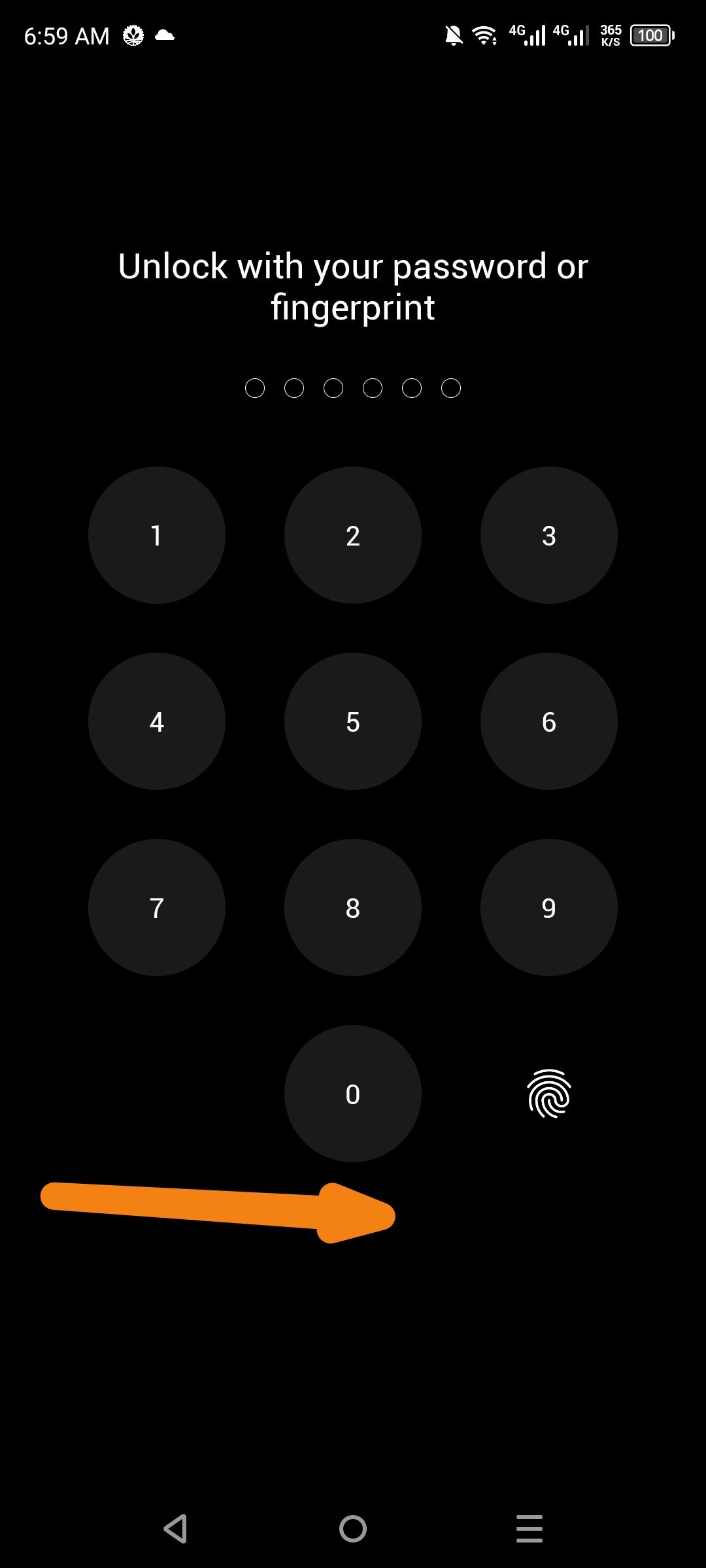
The current login/unlock interface for ioPay features a standard numeric keypad for PIN entry and a fingerprint authentication prompt. However, there is no "Forgot Password" or "Forgot PIN" link visible on the screen.
In standard wallet applications, this option is essential to guide users through the process of re-importing their wallet using their Recovery Phrase (Seed Phrase) if their local PIN is lost. Without this clear path, users may believe their funds are permanently inaccessible if they cannot remember their local credentials.
Steps to Reproduce
Launch the ioPay app or trigger a security lock (e.g., by timing out or navigating to security settings).
Observe the "Unlock with your password or fingerprint" screen.
Examine the area below the numeric keypad and the biometric icon.
Note the total absence of a recovery or "Forgot" link.
Actual Result
The unlock screen only provides input methods (PIN/Fingerprint) with no emergency recovery path for users who have forgotten their credentials.
Expected Result
The UI should include a "Forgot PIN?" or "Reset Wallet" button that redirects users to a secure recovery flow using their 12/24-word seed phrase.
Log in to comment and vote
No comments yet
Be the first to share your thoughts.