[Eco Bounty] ioPay Missing "Manage Tokens" / "Add Custom Token" Functionality
Summary
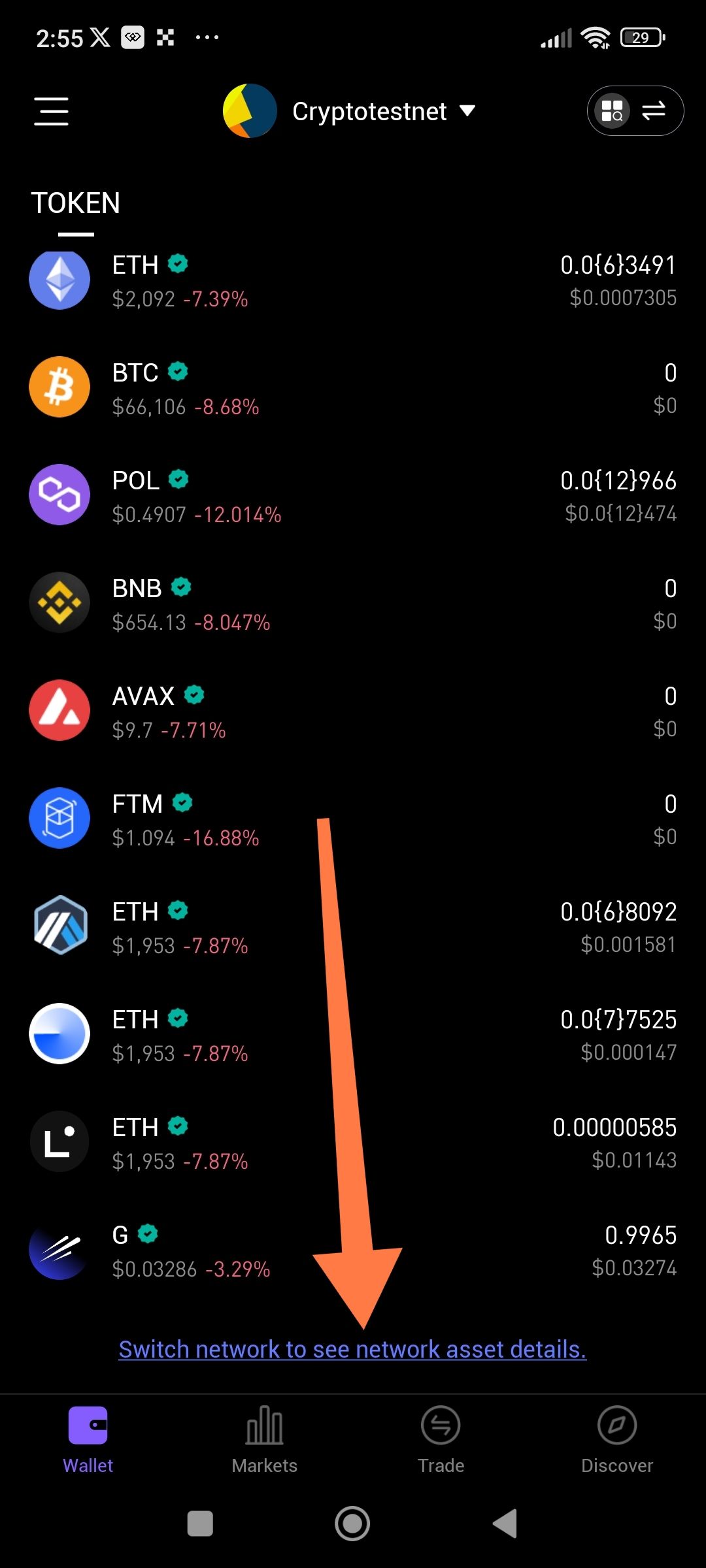
The ioPay wallet interface lacks a visible "Manage Tokens" button or "Add Token" (+) feature at the bottom of the token list, preventing users from customizing their asset view or manually adding custom contract addresses.
Description
In the standard wallet view, users should be able to manage which assets are displayed on their dashboard. Currently, there is no option to:
Hide tokens with zero balances.
Manually add a token via a contract address (Custom Token).
Rearrange the order of the token list. The bottom of the list only shows a network switch prompt, but no management utility.
Steps to Reproduce
Open the ioPay app and go to the "Wallet" tab.
Scroll to the bottom of the token list.
Attempt to find a "Manage," "Edit," or "+" icon to modify the token list.
Observe that the only available option is a link to "Switch network to see network asset details."
Expected Result
There should be a "Manage Tokens" button or a "+" icon, usually located at the very bottom of the asset list or at the top near the "TOKEN" header, allowing users to toggle token visibility or add new ones.
Actual Result
The list ends abruptly with a network switching prompt. There is no user-facing way to manage the token list or add unlisted assets.
Evidence
Screenshot analysis:
The list shows multiple assets (ETH, BTC, POL, etc.) on the Cryptotestnet.
The orange arrow points to the bottom of the screen where a "Manage" button is traditionally located in crypto wallets.
Found instead: Only a text link: "Switch network to see network asset details."
Environment
App: ioPay Mobile
Feature: Wallet / Asset Management
Platform: Android
Time of Observation: 14:55 (from screenshot)
Severity
🟡 Medium This is a significant usability issue. If a user receives a token that the wallet doesn't recognize by default, they have no way to make it appear in their balance.
Suggested Fix
Add "Manage Tokens" Button: Place a clear button at the bottom of the token list.
Add "+" Icon: Place a plus icon next to the "TOKEN" heading to allow quick addition of custom contract addresses.
Filter Options: Include a "Hide 0 balance tokens" toggle within the management screen.
Wallet Address: io1tkw393kejmxwnd454twc6020sxcyvh5dxqmren
Device & Environment:
-Operating system: Android 13
-Device model: Redmi Note 10 Pro
Log in to comment and vote
No comments yet
Be the first to share your thoughts.