[ECO Bounty] iopay Missing Native Emoji Selector in Feedback UI
Wallet Address Reporter: io1tkw393kejmxwnd454twc6020sxcyvh5dxqmren
App Version: ioPay v5.3.1 (3973)
Device: Redmi Note 10 Pro (Android 13)
Description
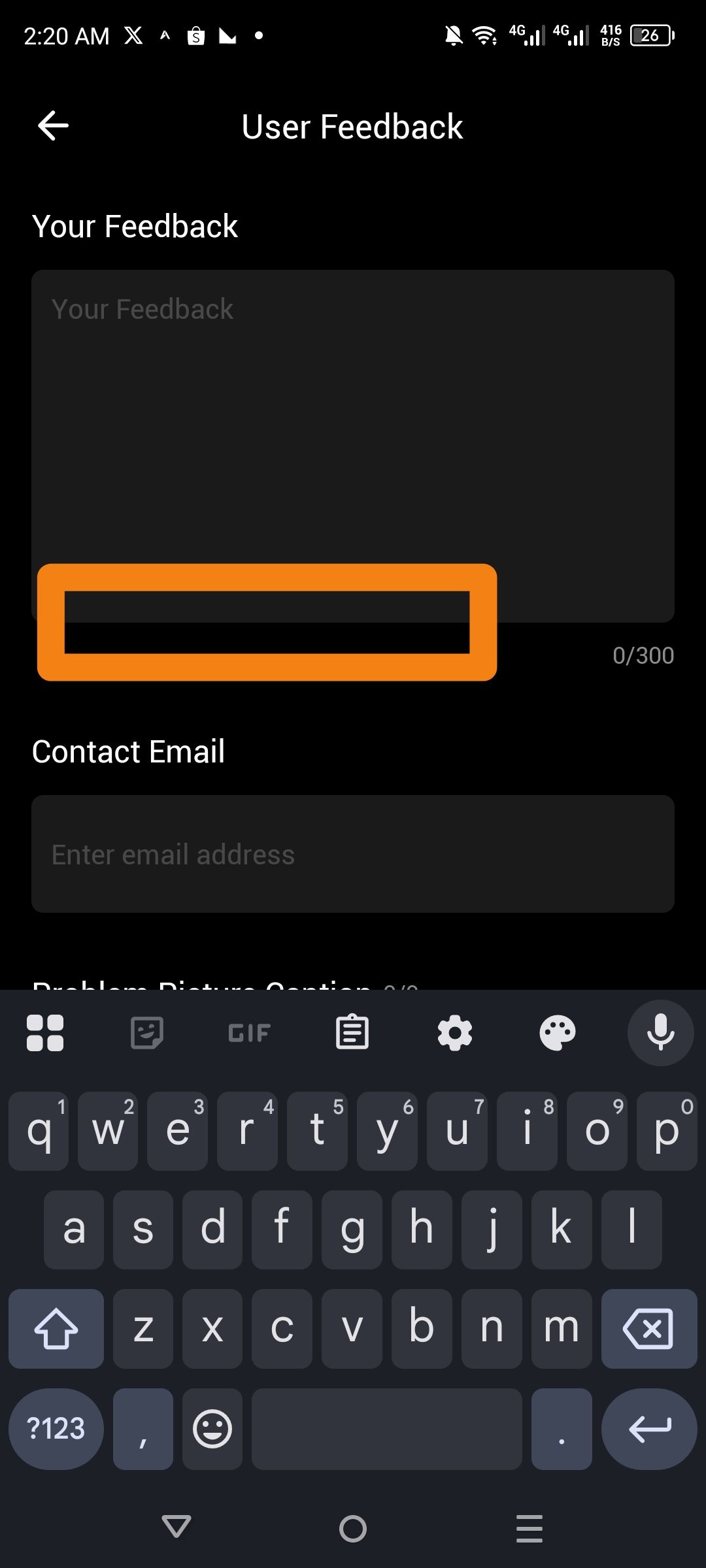
The User Feedback screen lacks a native emoji shortcut bar or dedicated "Emoji" button below the text input area. While users can manually trigger their system keyboard’s emoji picker, the application does not provide a streamlined way to insert common sentiment icons (e.g., 🚀, 🔧, 🚨, 😊) directly within the app interface.
In a community-driven Web3 environment, the absence of integrated emojis makes the feedback process feel "cold" and technically rigid, potentially discouraging users from providing nuanced, sentiment-driven reports about their experience.
Steps to Reproduce
Open the ioPay app and navigate to About ioPay > Feedback.
Focus on the Your Feedback text box to trigger the keyboard.
Inspect the area highlighted below the text box (indicated by the orange frame in).
Observe the lack of any native emoji shortcuts or a "Quick Emoji" bar.
Actual Result
The interface provides a blank space below the text box with no native emoji integration or quick-response icons.
Expected Result
A Quick Emoji Bar should be implemented below the feedback box, featuring common icons to help users quickly categorize their sentiment or the nature of their report (e.g., a bug 🐛, a feature request ✨, or a general question ❓).
Log in to comment and vote
No comments yet
Be the first to share your thoughts.