Wallet Address Reporter: io1tkw393kejmxwnd454twc6020sxcyvh5dxqmren
App Version: ioPay v5.3.1 (3973)
Device: Redmi Note 10 Pro (Android 13)
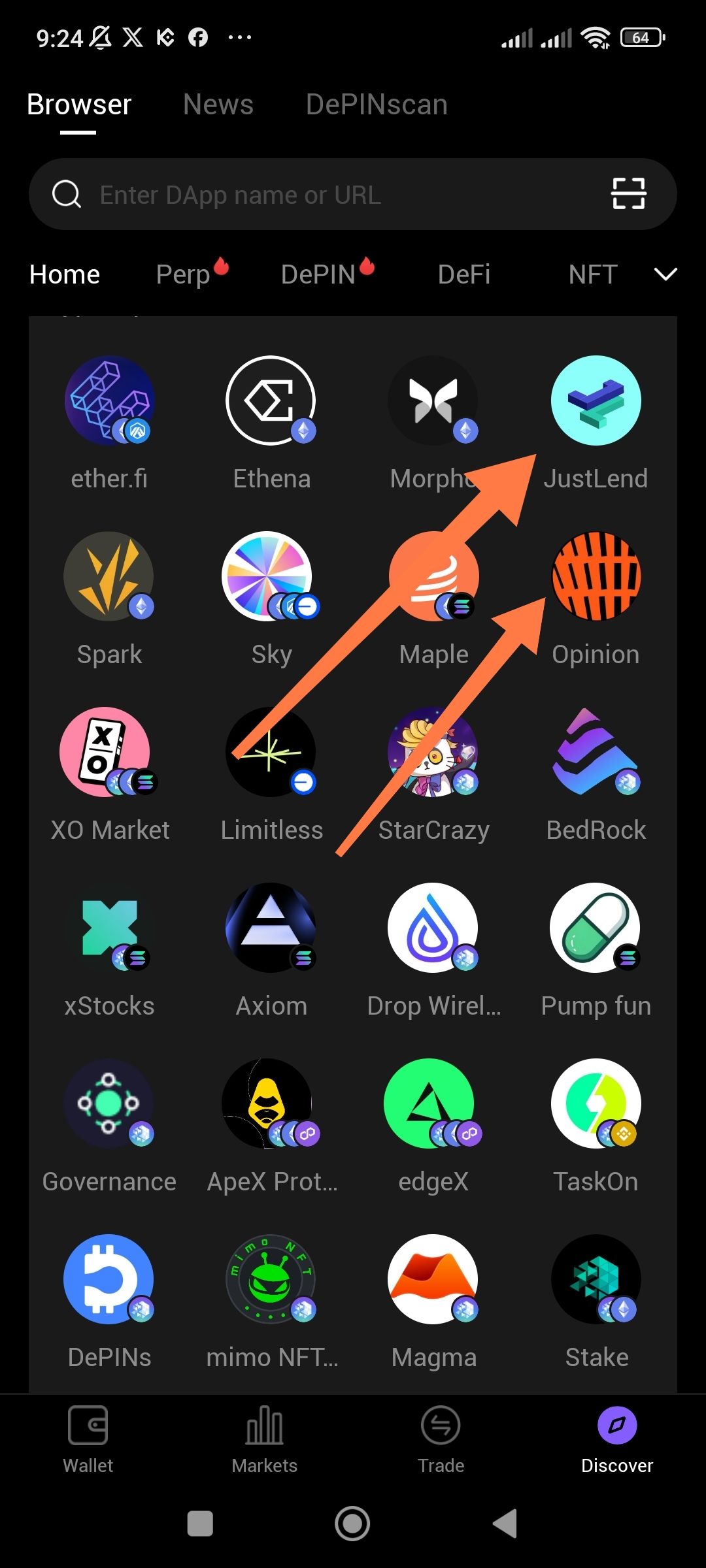
Description
In the DApp Browser/Discover section, some DApp icons are missing their network logo badges in the bottom-right corner. The orange arrows in the screenshot point to examples where network logos should appear but are either missing or inconsistently rendered across different DApp tiles.
Steps to Reproduce
Open the app
Navigate to Discover tab (bottom navigation)
Browse the DApp grid in the Browser section
Observe that some DApp icons have network badges while others don't
Expected Behavior
Each DApp icon should consistently display its associated network logo badge in the bottom-right corner for easy network identification.
Actual Behavior
Some DApp icons show network badges (blue/purple circular icons)
Other DApp icons are missing these badges entirely
Inconsistent visual presentation across the grid
