Description
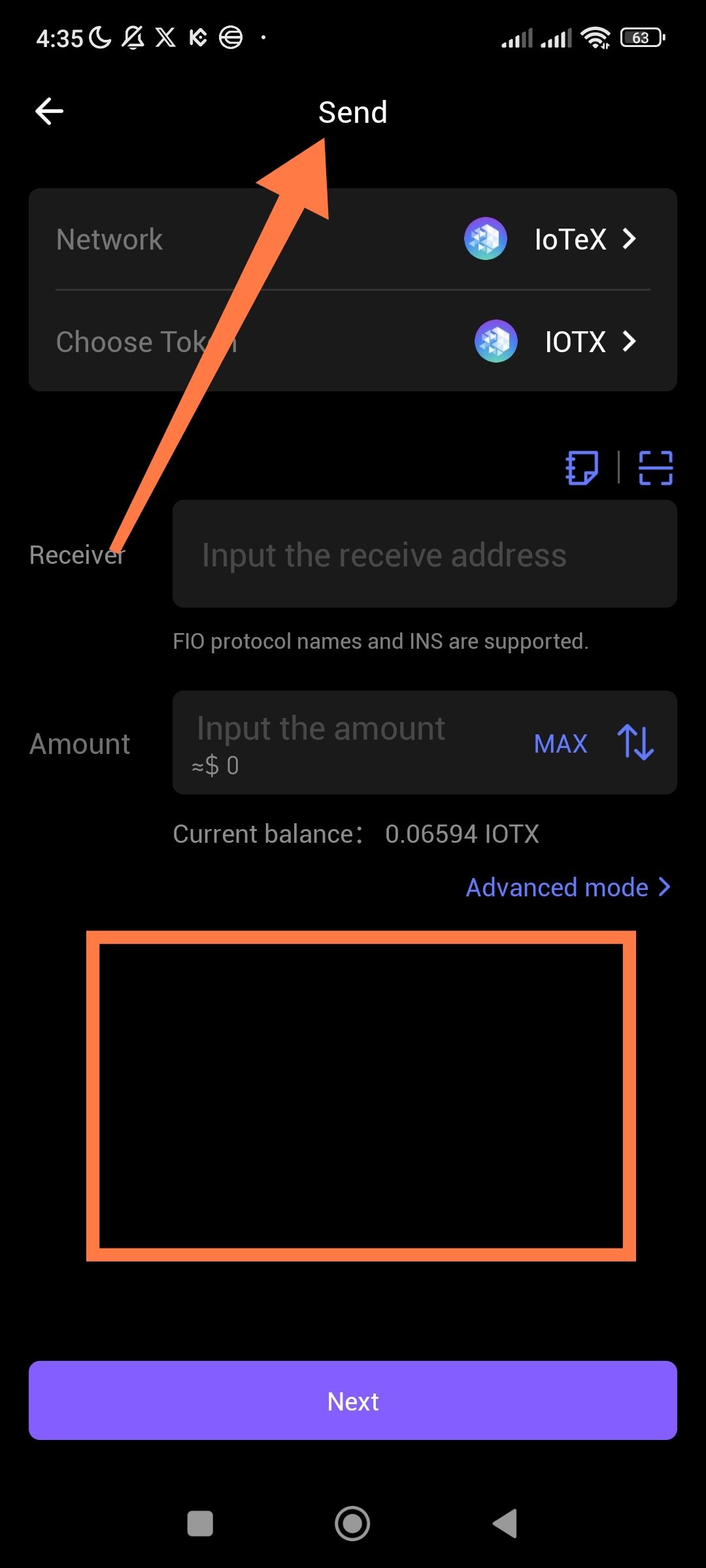
The "Send" interface does not display any recommended or recently used addresses, despite the user having a significant history of transactions. The area below the "Amount" input (highlighted in the provided screenshot) remains empty.
Steps to Reproduce
Open the ioPay app.
Ensure the account has a history of multiple outgoing transactions.
Navigate to the Send screen.
Observe the section below the "Amount" field.
Actual Result
The space remains blank. No historical data is surfaced.
### Suggested Fixes
To resolve this and improve the user experience, I suggest the following implementation:
Local History Caching: Implement a local cache that stores the last 5–10 unique recipient addresses. This ensures that even if the blockchain indexer is slow, the UI can instantly populate "Recent" addresses from local storage.
Toggle/Tab Interface: Add a small tabbed section in that empty space labeled "Recents" and "Address Book."
Frequency Algorithm: Instead of just "last sent," rank addresses by frequency. If a user sends to the same exchange or friend 10 times, that address should be pinned to the top as a "Recommended" shortcut.
UI Placeholder: If there truly are no transactions, display a "No recent contacts found" message or a button to "Add from Address Book" to confirm the feature is working but empty.
Wallet Address: io1tkw393kejmxwnd454twc6020sxcyvh5dxqmren
Device & Environment:
-Operating system: Android 13
-Device model: Redmi Note 10 Pro
