Wallet Address: io1tkw393kejmxwnd454twc6020sxcyvh5dxqmren
App Version: ioPay v5.2.0 (1)
Device: iPhone XR
OS: iOS 18.7.3
Issue Summary
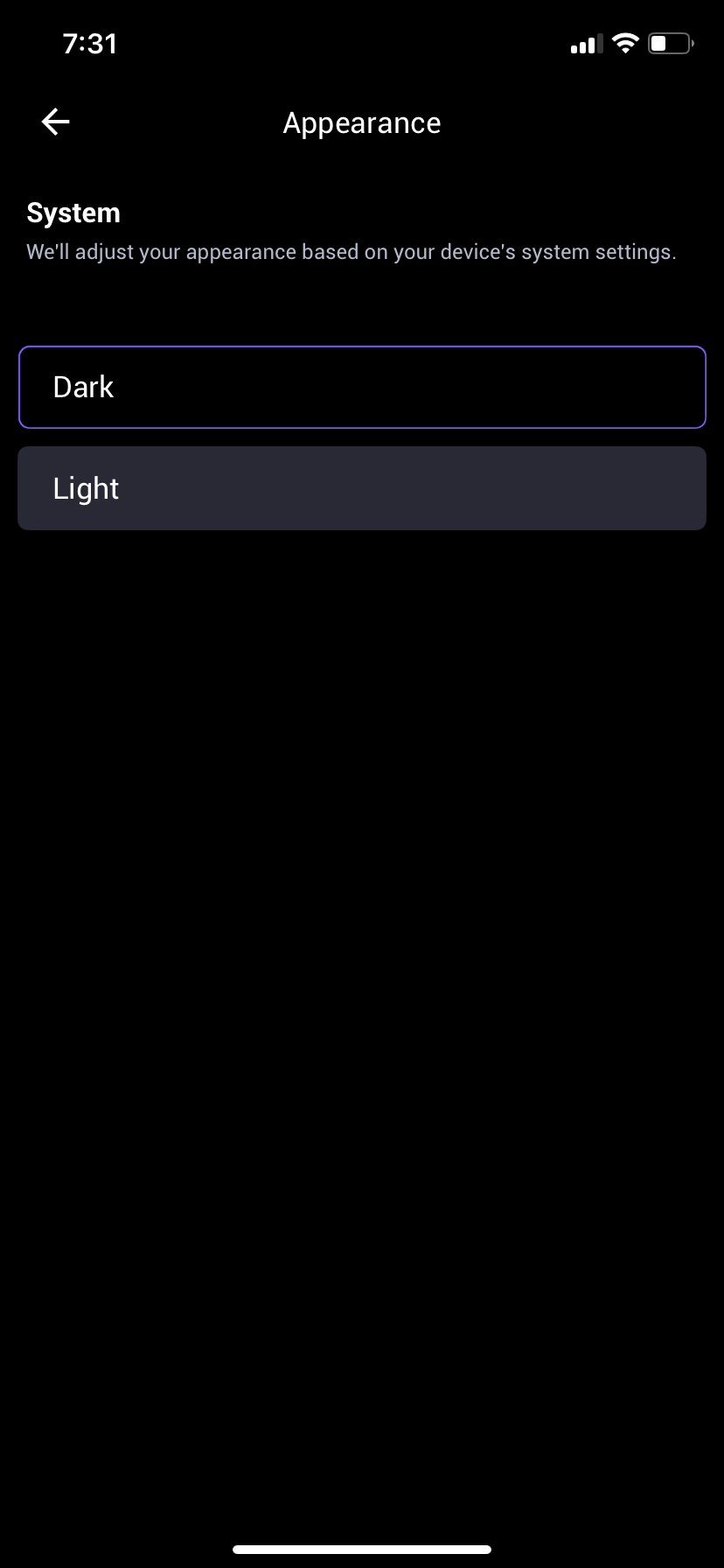
The "Appearance" settings menu contains a logical inconsistency where the description promises system-based adjustment, but the actual selectable "System" toggle/option is missing from the interface.
Detailed Description
Location: Settings -> Appearance
Observation: As seen in IMG_0086.png, the header text states: "System: We'll adjust your appearance based on your device's system settings." However, below this text, only "Dark" and "Light" buttons are available for selection.
Impact (UX): There is no third option (usually labeled "System" or "Automatic") that allows the app to dynamically switch themes based on the iOS system-wide Dark Mode schedule. This forces users to manually toggle the theme within ioPay, contradicting the app's own instructional text.
Steps to Reproduce:
Launch ioPay v5.2.0 (1) on iPhone XR.
Navigate to Settings > Appearance.
Read the "System" description regarding automatic adjustment.
Attempt to find a "System" or "Auto" selection button.
Result: Only "Dark" and "Light" are selectable; the "System" option described in the header is missing from the UI.
Expected Result:
The interface should include a third selectable button labeled "System" or "Follow System" so that the app's behavior matches its description.
