[ECO Bounty] iopay Missing "Unlimited" Approval Option in Token Approval Dialog
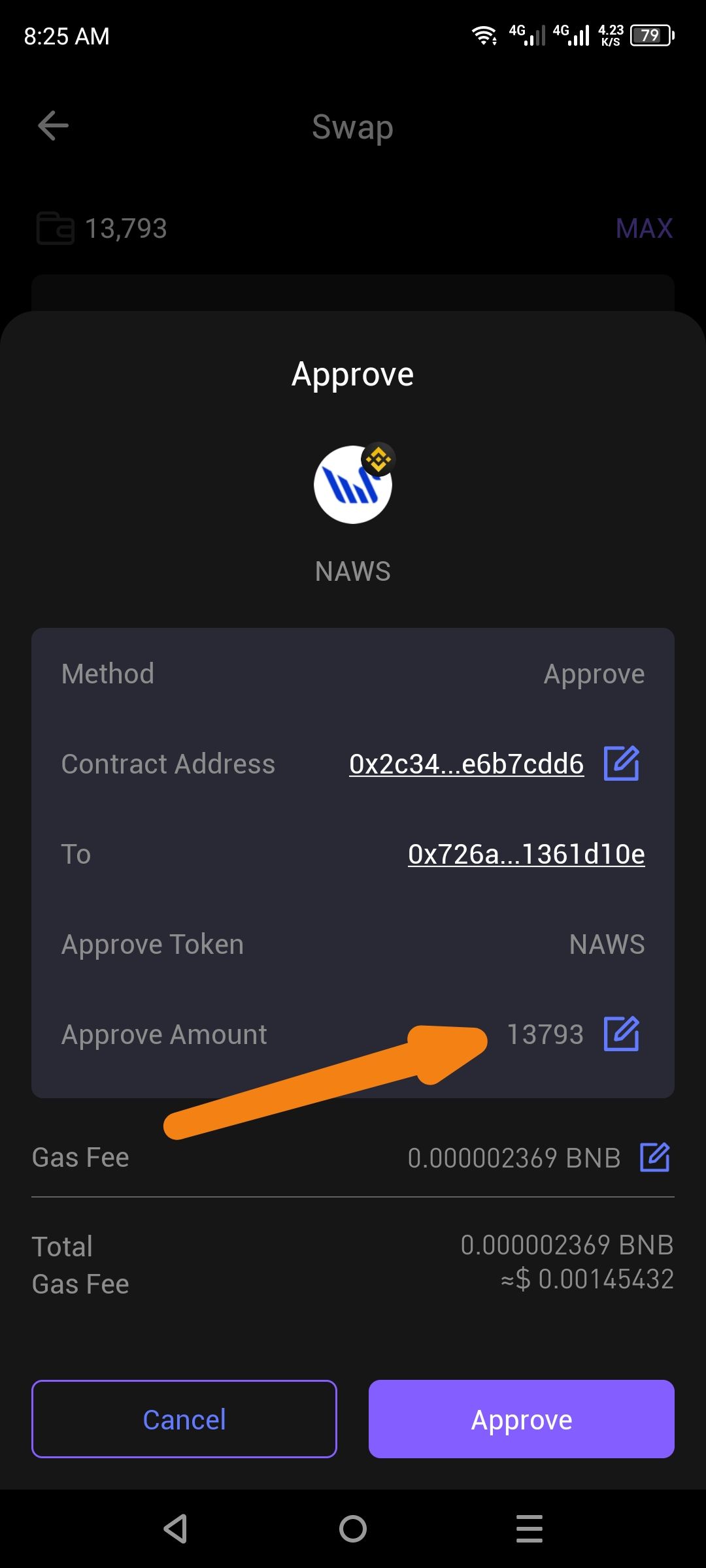
Description: When initiating a token swap that requires a smart contract approval, the Approve dialog in ioPay only shows the exact token amount (13793) as the approvable amount, with no option to set an unlimited (max) approval. Most leading wallets (MetaMask, Trust Wallet, etc.) provide users with the choice between approving the exact amount or granting unlimited approval to save on future gas fees.
Steps to Reproduce:
Open the ioPay mobile wallet.
Navigate to the Swap feature.
Select a token to swap (e.g., NAWS).
Initiate the swap and wait for the Approve confirmation dialog to appear.
Observe the Approve Amount field.
Expected Result: The approval dialog should offer the user at least two options:
✅ Exact Amount — Approve only the specific number of tokens needed for this transaction (
13793).✅ Unlimited — Approve an unlimited spending allowance for the contract, avoiding repeated approval transactions in the future.
Actual Result: Only the exact token amount (13793) is displayed in the Approve Amount field, with no toggle, dropdown, or option to switch to an unlimited approval. The edit icon (✏️) next to the amount field only allows manual numeric input and does not offer an "Unlimited" preset.
Impact:
Medium — Users who frequently swap the same token must repeatedly approve the contract each time, paying unnecessary gas fees. This is a UX regression compared to industry-standard wallet behavior.
Suggested Fix: Add a toggle or dropdown in the Approve Amount field with two preset options:
Exact Amount (current behavior)
Unlimited (
type(uint256).max— standard ERC-20 unlimited approval value)
Wallet Address: io1tkw393kejmxwnd454twc6020sxcyvh5dxqmren
Device & Environment:
-Operating system: Android 13
-Device model: Redmi Note 10 Pro
Log in to comment and vote
No comments yet
Be the first to share your thoughts.