[ECO Bounty] ioPay "More" (...) Button Unresponsive in Connected DApps List
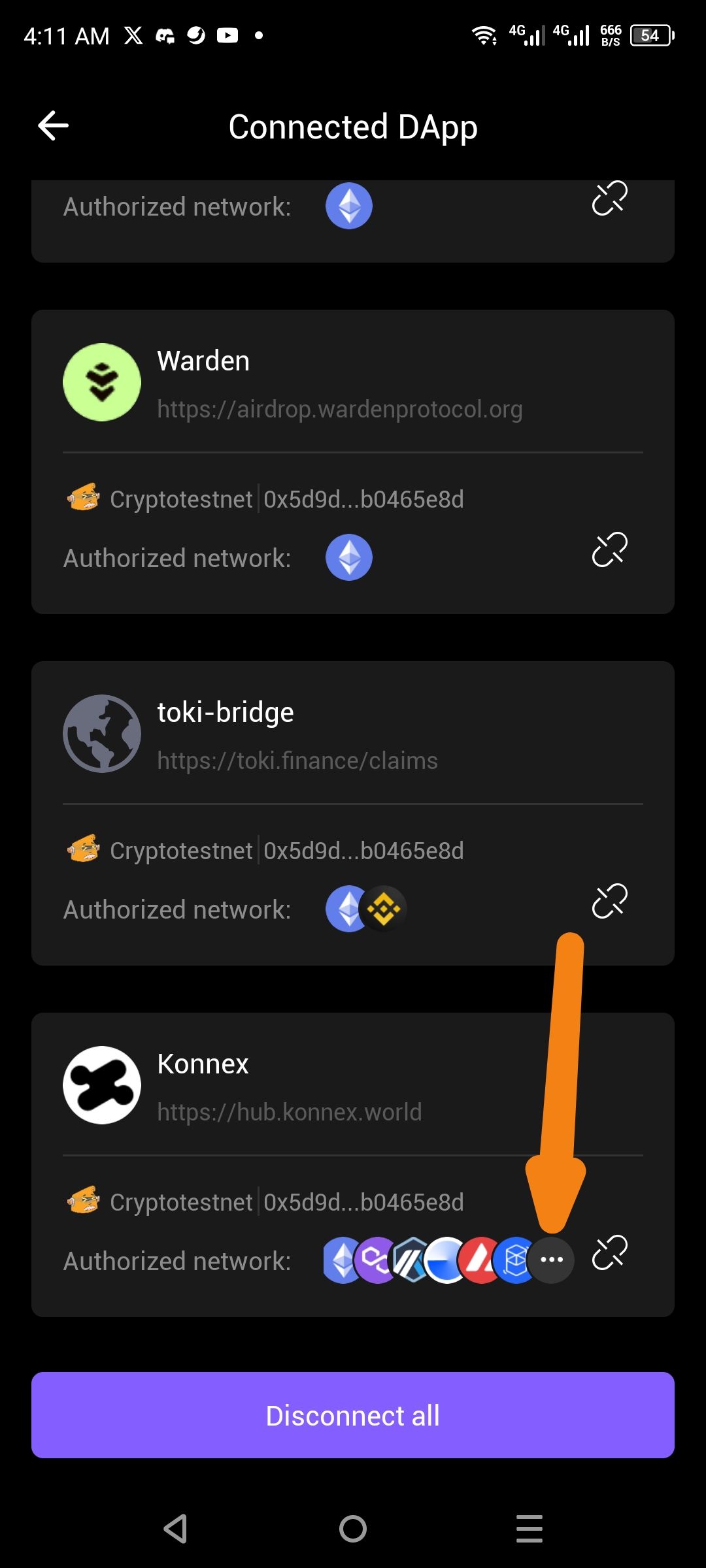
Description: In the Connected DApp settings page, clicking the "more" ellipsis menu (...) next to the authorized networks list does not trigger any action. Users expect this button to expand the list to show all authorized networks or open a detailed menu, but currently, nothing happens upon interaction.
Steps to Reproduce:
Open the ioPay wallet.
Navigate to Settings > Connected DApp (or the respective management screen for active connections).
Find a DApp with multiple authorized networks (e.g., Konnex).
Tap the three dots (...) located at the end of the chain icon list.
Expected Result: A pop-up, tooltip, or expanded view should appear, showing the full list of blockchains the DApp is authorized to interact with.
Actual Result: The button is unresponsive. No UI change or additional information is displayed.
Environment Details:
Wallet: ioPay Mobile
Page: Connected DApp management
Affected Entry: DApps with more network authorizations than the UI can display in the primary row (indicated by the "..." icon).
Suggested Fix: Ensure the click listener is correctly attached to the ellipsis icon and that the resulting modal or expansion logic is not being blocked by other UI layers.
Wallet Address: io1tkw393kejmxwnd454twc6020sxcyvh5dxqmren
Device & Environment:
-Operating system: Android 13
-Device model: Redmi Note 10 Pro
Log in to comment and vote
No comments yet
Be the first to share your thoughts.