[ECO Bounty] iopay Non-Standard Formatting in Biometric Authentication Modal
Wallet Address Reporter: io1tkw393kejmxwnd454twc6020sxcyvh5dxqmren
App Version: ioPay v5.4.0 (3974)
Device: Redmi Note 10 Pro (Android 13)
Description
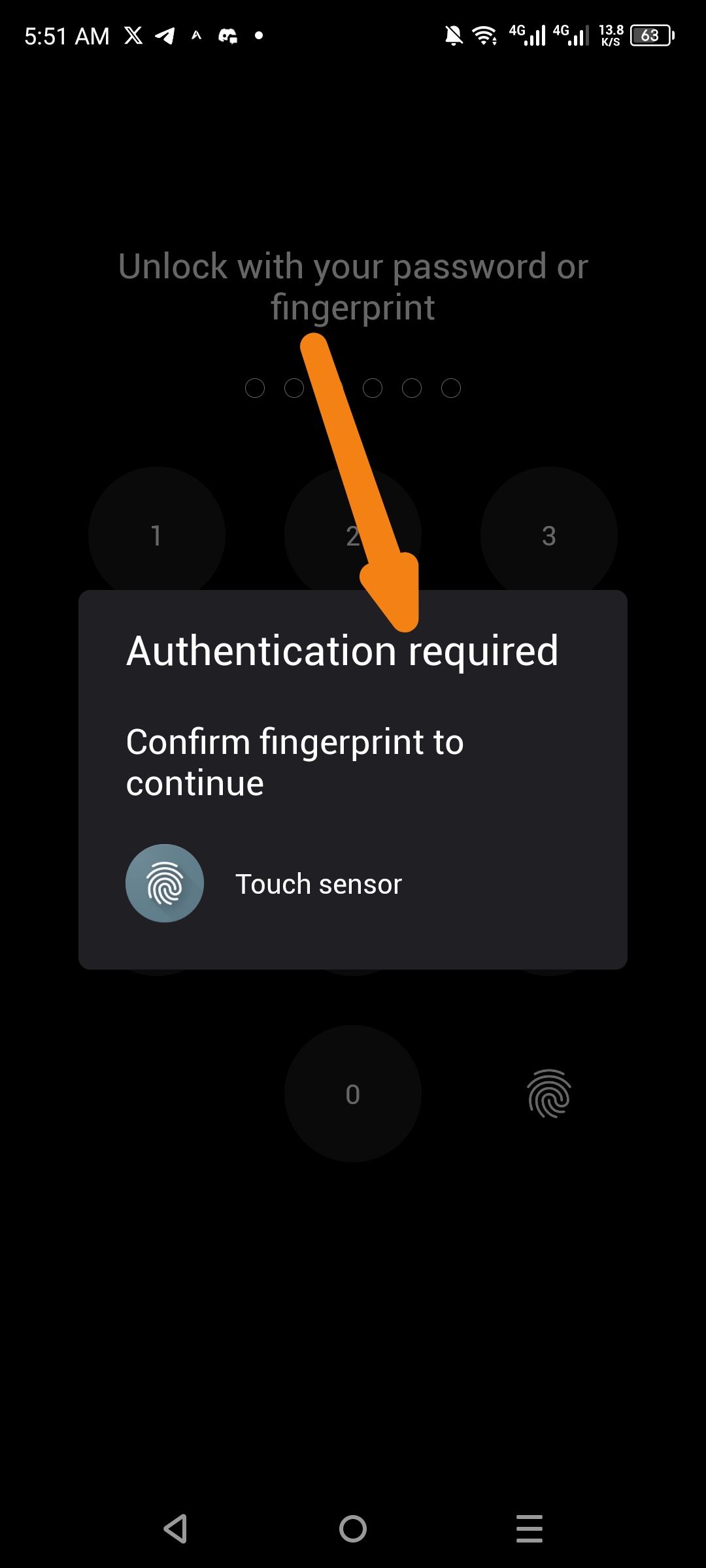
When the application triggers a biometric security check (e.g., during app launch or transaction signing), the "Authentication required" modal displays inconsistent capitalization and formatting. The secondary instruction text, "Confirm fingerprint to continue", utilizes lowercase for the initial letter, which deviates from standard mobile UI conventions for critical security prompts.
This lack of formal sentence casing can make the system-level interaction feel "unpolished" or informal, which may reduce user trust during sensitive security operations.
Steps to Reproduce
Open the ioPay app (assuming biometric lock is enabled) or initiate a task requiring signature.
Observe the "Authentication required" pop-up.
Examine the casing used for the sub-header: "Confirm fingerprint to continue".
Actual Result
The modal utilizes a lowercase starting letter for the instruction text, creating a visual mismatch with the title-cased header.
Expected Result
The prompt should utilize standard Sentence Case (e.g., "Confirm fingerprint to continue.") to maintain a professional and consistent visual identity across all security modules.
Log in to comment and vote
No comments yet
Be the first to share your thoughts.