[ECO Bounty] iopay Non-Standard Scientific/Abbreviated Notation for Small Balances
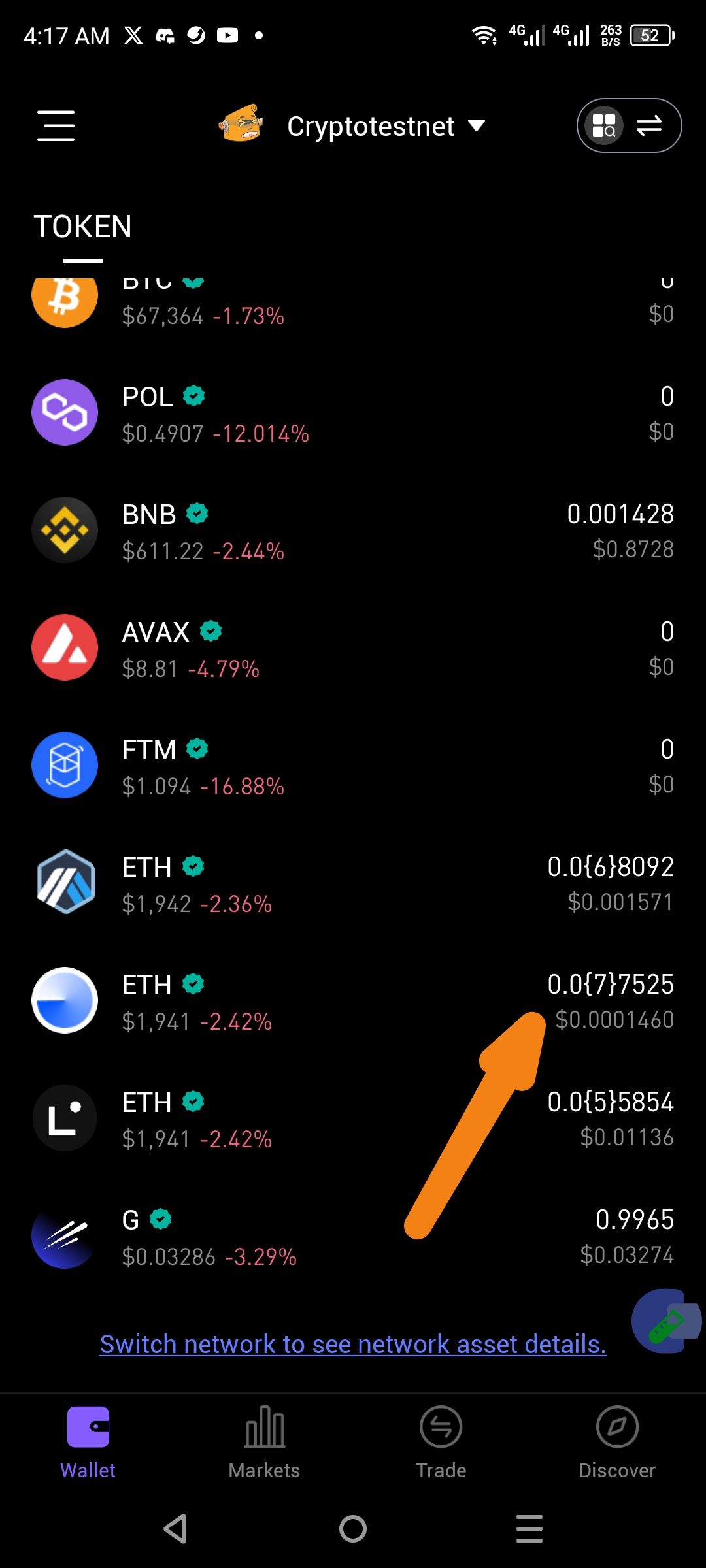
Description: In the Wallet asset list, small token balances are being displayed using a non-standard abbreviated notation (e.g., 0.0{7}7525) instead of a traditional decimal format or standard scientific notation (e.g., 0.00000007525). This formatting is confusing for users and inconsistent with standard financial app displays.
Steps to Reproduce:
Open the ioPay mobile application.
Ensure you are on the Wallet (Token) tab.
Observe assets with very small balances (less than 0.0001), such as the ETH entries shown in the screenshot.
Expected Result: Balances should be displayed in a human-readable decimal format (e.g., 0.00000752) or, if space is an issue, rounded appropriately with an option to tap to see the full precision.
Actual Result: The app uses a curly-brace notation to represent leading zeros, such as 0.0{7}7525 and 0.0{6}8092. This is not a standard way to display currency or token balances and can be difficult for users to interpret at a glance.
Environment Details:
Wallet: ioPay Mobile
Version: Latest (as of Feb 22, 2026)
View: Main Wallet Token List
Suggested Fix: Update the balance string formatting logic to use standard decimal expansion for up to 8–18 decimal places (depending on the token), or utilize standard scientific notation if necessary, rather than the {x} zero-count shorthand.
Wallet Address: io1tkw393kejmxwnd454twc6020sxcyvh5dxqmren
Device & Environment:
-Operating system: Android 13
-Device model: Redmi Note 10 Pro
Log in to comment and vote
No comments yet
Be the first to share your thoughts.