[ECO Bounty] iopay Outdated Medium Logo in Community Section
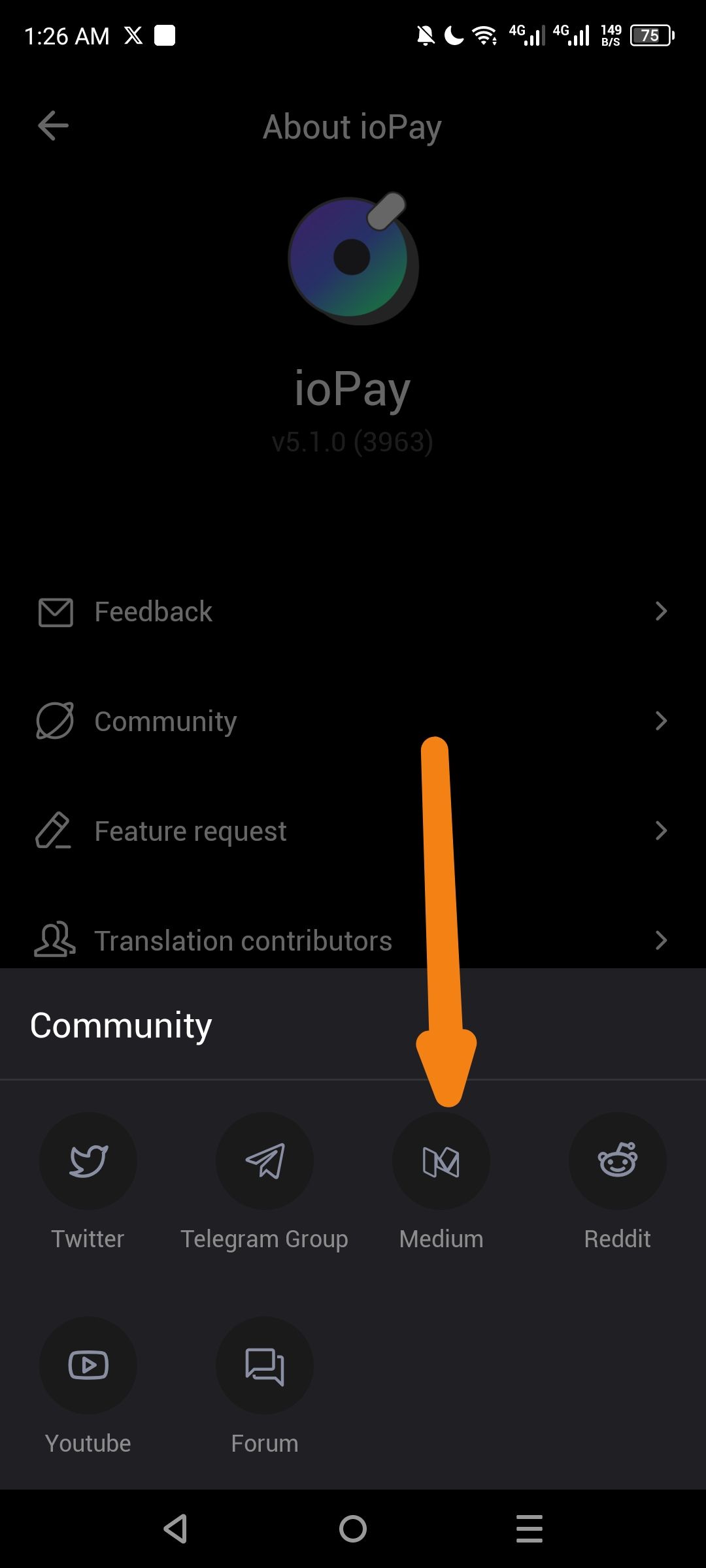
Severity: Low / UI Polish
Description:
The Medium logo displayed in the Community section is using the old brand identity. Medium updated their logo design in 2023, replacing the stylized "M" icon with a new design featuring overlapping circles/ovals.
Steps to Reproduce:
Open ioPay app
Navigate to Settings → About ioPay
Tap on "Community"
Observe the Medium icon in the social links row
Expected Behavior:
The Medium icon should display the current Medium brand logo (overlapping ellipses/circles design).
Actual Behavior:
The Medium icon displays the old "angled M" logo, which no longer represents Medium's current brand identity.
Suggested Fix:
Update the icon asset to use Medium's current logo design.
Wallet Address: io1tkw393kejmxwnd454twc6020sxcyvh5dxqmren
Device & Environment:
-Operating system: Android 13
-Device model: Redmi Note 10 Pro
Log in to comment and vote
No comments yet
Be the first to share your thoughts.