[ECO Bounty] iopay Pagination UI Glitch – Empty/Clipped "Previous" Button on Page 1
📍 Description
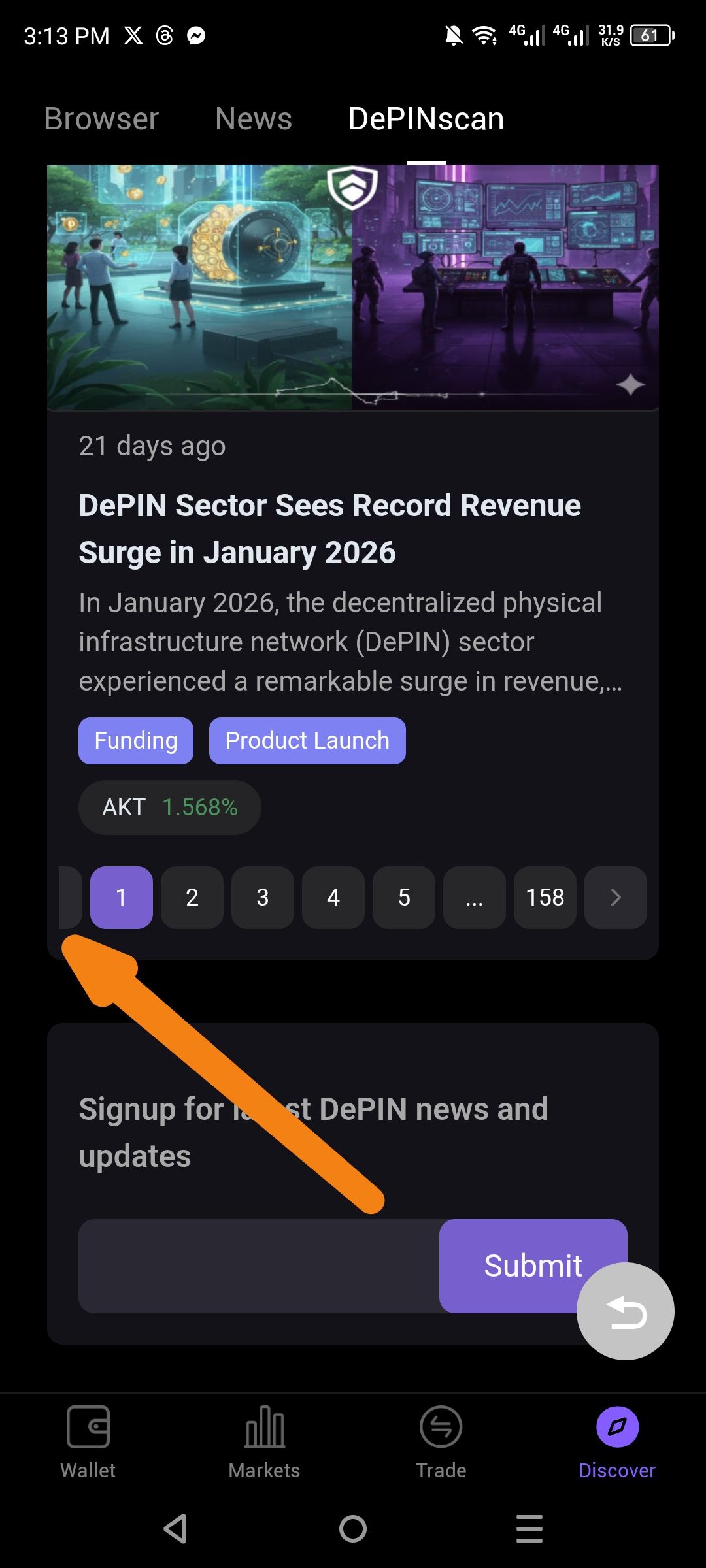
In the Discover → DePINscan news feed, the pagination component at the bottom of the article list displays a UI anomaly when on the first page.
As indicated by the orange arrow in the screenshot:
There is a partially visible, dark grey button fragment to the left of the active page "1" button.
This appears to be a "Previous" (
<) arrow button that is incorrectly rendered, clipped, or not properly hidden despite being on the first page of results.
🔁 Steps to Reproduce
Open the ioPay mobile app.
Navigate to Discover → DePINscan.
Scroll to the bottom of the first page of news articles.
Observe the pagination bar (numbers 1, 2, 3, etc.).
Result: An empty or clipped button box appears to the left of the number "1".
✅ Expected Behavior
When on Page 1, the "Previous" (
<) button should either be completely hidden or clearly disabled (visible but inactive/greyed out).The pagination bar should be centered or properly aligned without orphaned UI fragments on the edges.
❌ Actual Behavior
A glitched UI sliver/box appears at the start of the pagination row.
It creates an asymmetrical and broken look for the navigation component.
💡 Suggested Fix
Total Removal: Use a strict conditional statement to ensure the "Previous" button element is not rendered at all when
currentPage === 1.UI Consistency: Ensure the "Previous" and "Next" buttons have fixed dimensions and proper spacing that accounts for the screen edge.
Wallet Address: io1tkw393kejmxwnd454twc6020sxcyvh5dxqmren
Device & Environment:
-Operating system: Android 13
-Device model: Redmi Note 10 Pro
Log in to comment and vote
No comments yet
Be the first to share your thoughts.