[ECO Bounty] iopay Redundant/Double "Swap" Buttons on Asset Page
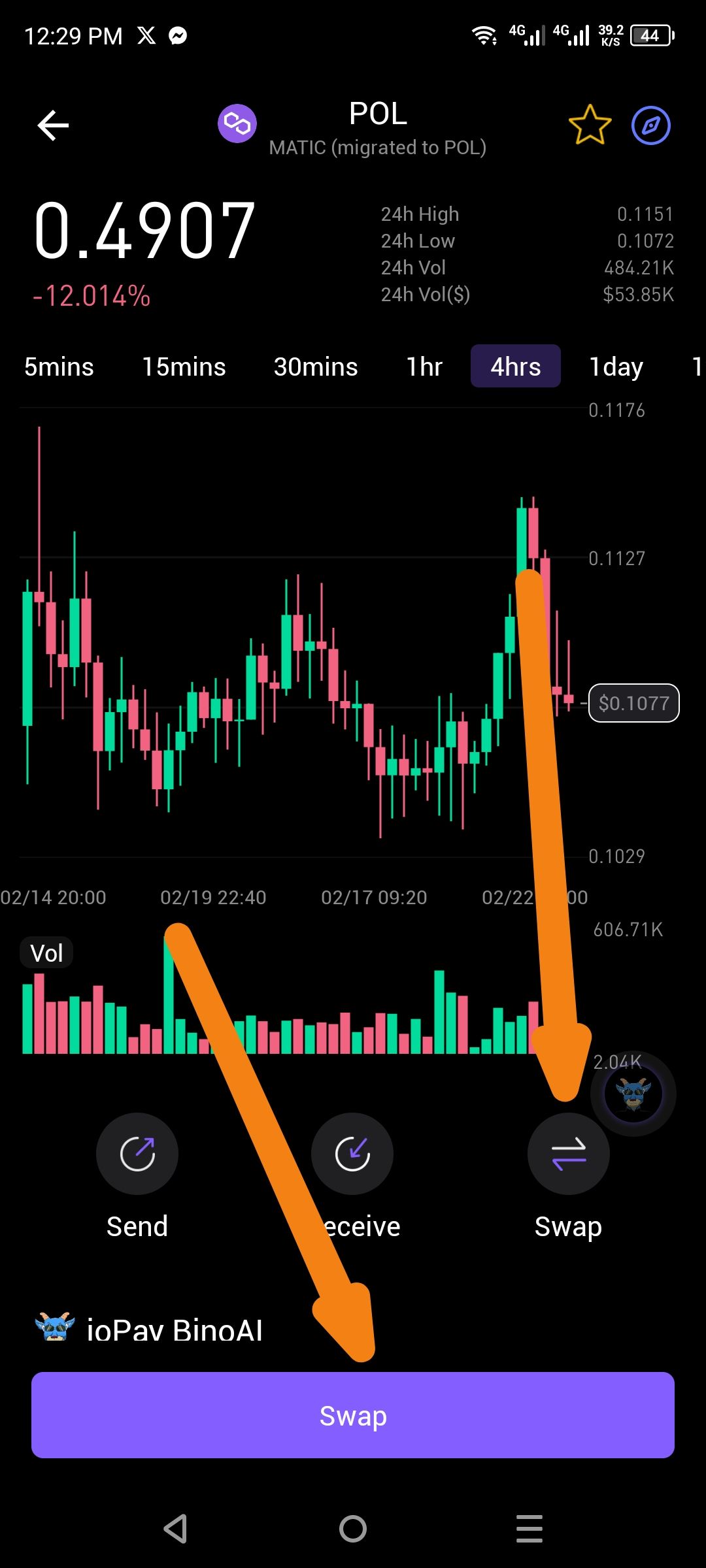
Description: The asset detail view for POL displays two "Swap" buttons at the same time. One is located in the standard action icon row below the price chart, and another is a large, full-width button at the bottom of the screen. This redundancy impact the UI/UX and may lead to user confusion.
Steps to Reproduce:
Open the ioPay mobile application.
Select an asset (e.g., POL) to view its price chart and details.
Observe the action area and the bottom of the screen.
Expected Result: The UI should show a single, consistent entry point for the swap feature to maintain a clean interface. Usually, either the icon row or the persistent bottom button should be used, but not both.
Actual Result: Two "Swap" buttons are visible simultaneously, causing a redundant UI element.
Suggested Resolution: Consolidate the buttons. If the "ioPay BinoAI" swap is the preferred method, the developer should consider hiding the standard icon-row "Swap" button when the BinoAI button is active to avoid visual clutter.
Wallet Address: io1tkw393kejmxwnd454twc6020sxcyvh5dxqmren
Device & Environment:
-Operating system: Android 13
-Device model: Redmi Note 10 Pro
Log in to comment and vote
No comments yet
Be the first to share your thoughts.